Cesar WordPress Theme
by ThemeGoods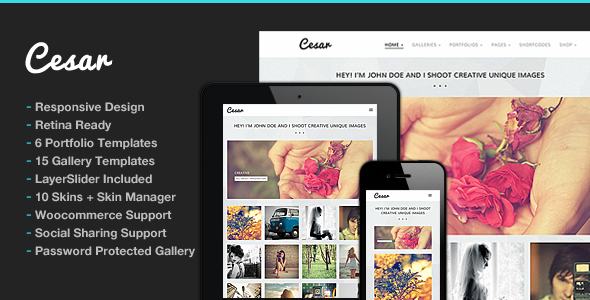
Stuck on your Cesar WordPress theme? Let's fix it.
No endless back-and-forth. Just send us the details and we'll get it done.
No obligation · Replies within 1 hour · Quote within 1 day
Setup · Customization · Bug fixes · WooCommerce integration
About Cesar WP Theme
Cesar is a premium WordPress theme by ThemeGoods, built for creative agencies, freelancers, and portfolio-focused businesses. It ships with a clean, minimal aesthetic and a strong emphasis on visual storytelling through large imagery and whitespace.
The theme includes multiple homepage layouts, portfolio post types, and support for Elementor and WPBakery page builders. It also bundles the Revolution Slider plugin, giving you control over hero sections without extra cost.
Cesar is responsive across all screen sizes and includes WPML support for multilingual sites. ThemeGoods keeps the theme updated regularly, and documentation covers most standard setup scenarios. It suits anyone who wants a polished, image-driven site without writing code from scratch.
Get matched with a Cesar developer in under one day
Tell us about your Cesar project. Small fixes, Cesar theme customization, or a full website build, whatever you need, we've got it covered.
We'll connect you to the right Cesar developers, define the scope, and get everything 100% clear.
You'll get one estimate, hire your preferred developer, and start collaborating.
ThemeGoods themes like Cesar are well-built, but every site has unique requirements. When demo imports don’t match your vision or a plugin creates an unexpected conflict, you need someone who knows the codebase.
FoxyConcept connects you with vetted Cesar developers through Codeable, the professional WordPress freelancer network. Every developer is screened, rated, and experienced with premium themes. You get a free estimate before any work starts, and you only pay when you’re ready to move forward.
Pros
- Multiple pre-built homepage demos speed up initial setup significantly
- Revolution Slider is bundled, saving the $29 standalone license cost
- Built-in portfolio post type with category filtering works without plugins
- WPML compatibility makes multilingual builds straightforward
- Both Elementor and WPBakery are supported, giving layout flexibility
Cons
- Demo import can leave behind unused shortcodes that clutter the editor
- WPBakery dependency means migrating to block editor later is painful
- ThemeGoods support response times vary and can be slow during busy periods
- Limited typography options in the Customizer require CSS for advanced font control
- Some portfolio layout options only work correctly with specific demo content structures
Who is Cesar for?
Creative Agency Portfolio
Cesar’s multi-column portfolio grids and fullscreen project pages make it a strong fit for agencies presenting case studies. The built-in filtering lets visitors sort by service type or industry. Combined with a team page and services section, an agency can have a complete online presence without custom post type plugins.
Freelance Designer Site
Freelancers benefit from Cesar’s minimal layout options and the ability to highlight selected projects prominently. The single-page demo works well for solo operators who want everything above the fold. Contact form integration is clean, and the theme handles client testimonials natively without extra plugins.
Photography Studio
Cesar’s fullscreen image support and masonry grid layouts suit photographers who need work to speak for itself. Image-heavy pages load cleanly when performance is tuned correctly. Gallery post types and lightbox support come built in, reducing reliance on third-party gallery plugins that often conflict with themes.
Architecture or Interior Design Firm
Architecture and interior design firms need large imagery, project categorization, and a professional tone. Cesar handles all three. Project detail pages support multiple images and text layouts, making it easy to present a before-and-after narrative or document a completed build with context and visuals side by side.
Small Product or Lifestyle Brand
Lifestyle and product brands with a small catalog can use Cesar alongside WooCommerce for a site that balances editorial content with shopping. The blog layouts pair well with a shop, and the visual style keeps branded photography front and center rather than letting product grids dominate every page.

Customizing Cesar
Out of the box, Cesar gives you solid control through the WordPress Customizer. You can adjust fonts, colors, header styles, and layout options without touching a stylesheet. But most serious customizations go beyond those panels quickly.
If you need custom portfolio filtering, unique section layouts, bespoke animations, or anything outside the built-in demos, you need someone who knows the theme’s structure. A Cesar expert understands how ThemeGoods builds its child theme support, how WPBakery shortcodes interact with Cesar’s custom post types, and where CSS overrides are cleanest.
Custom header builds, sticky navigation tweaks, and third-party plugin integrations are all common requests. Getting them right the first time saves hours of trial and error.
Recommended plugins for Cesar
Cesar works well with several plugins that extend its core functionality. WooCommerce integration is possible for small shops alongside a portfolio. Contact Form 7 and Gravity Forms both drop into Cesar’s layouts without conflicts.
For speed, pairing Cesar with a caching plugin and optimized image delivery makes a real difference. See our WordPress performance service for specifics. If you’re running an SEO-focused site, Yoast and Rank Math both work cleanly with Cesar’s schema structure. Our WordPress SEO service covers full on-page setup. WPML and Polylang both handle multilingual builds on Cesar without major conflicts.
Not sure which plugins to use? This WordPress plugins directory covers the most popular options with reviews and setup guides.
Cesar common issues
Cesar theme demo import not working
Demo import failures in Cesar usually come from PHP memory limits, upload size restrictions, or a timeout during the XML import process. Start by increasing max_execution_time and upload_max_filesize in your php.ini or wp-config.php. If the import stalls, try importing content in parts using the native WordPress importer. If problems persist, a developer can import the demo manually via FTP and database tools. Our bug fixing service covers these setup issues.
Cesar portfolio filtering broken after update
Portfolio filtering in Cesar relies on isotope.js and correctly assigned taxonomy terms. After an update, check that portfolio categories are still assigned to each project. Also verify that no JavaScript errors appear in the browser console, as a plugin conflict can break the isotope initialization. Deactivating plugins one by one helps isolate the cause. If the issue appeared after a theme update specifically, check the ThemeGoods changelog for script changes.
Cesar theme header not displaying correctly on mobile
Mobile header issues in Cesar typically involve the hamburger menu not triggering, logo scaling incorrectly, or sticky header behavior conflicting with mobile breakpoints. Check your Customizer header settings first and confirm you haven’t added custom CSS that overrides responsive rules. If a page builder row is set to full-width without proper mobile padding, it can push the header out of alignment. Clearing cache after any CSS change is essential before testing.
Revolution Slider not loading on Cesar theme
Revolution Slider failing to load on Cesar usually means the bundled plugin version is outdated or wasn’t activated after import. Go to Plugins and check for a pending Revolution Slider activation or update notification. If sliders show a blank area, check the slider’s published status inside the Revolution Slider editor. Conflicts with lazy loading plugins can also prevent slides from rendering. Temporarily disable lazy loading to confirm before investigating further.
Cesar FAQ
Yes, Cesar supports Elementor alongside its default WPBakery integration. You can build pages using Elementor’s drag-and-drop interface, though Cesar’s custom shortcodes and portfolio features are tied to WPBakery. If you plan to build primarily with Elementor, some theme-specific elements may not translate cleanly and may need custom styling to match.
Cesar is compatible with WooCommerce. Basic shop, product, and cart pages render correctly with the theme’s styles applied. For heavily customized shop layouts or complex catalog needs, additional CSS or a developer’s input helps. Cesar isn’t built as a dedicated WooCommerce theme, so deep ecommerce customization takes more effort than on a shop-first theme.
Technically yes, but Cesar’s demo content and many layout features are built around WPBakery shortcodes. If you remove WPBakery after importing a demo, those shortcodes will display as plain text. Starting fresh with Elementor or the block editor is cleaner than trying to strip WPBakery out mid-project. Plan your page builder choice before importing content.
Always use a child theme for any code customizations before updating. Changes made to the parent theme files are overwritten on update. Customizer settings and page builder content are stored in the database and survive updates safely. Before updating, back up your site and check the ThemeGoods changelog for breaking changes. Our WordPress maintenance service handles updates with pre- and post-checks.
Cesar uses clean HTML output and supports SEO plugins like Yoast and Rank Math without conflicts. It generates valid schema markup for basic site structure. Page speed, which directly affects SEO rankings, depends on your hosting and configuration rather than the theme alone. Image-heavy portfolio pages need compression and lazy loading set up properly to score well in Core Web Vitals audits.
Hire a Cesar WordPress Expert
Need a custom build, a layout that matches your brand, or a fix that’s been blocking your launch? Our Cesar developers handle everything from full site builds to targeted tweaks. Work is done through Codeable’s vetted network, so quality and accountability are built in. Get a free estimate and describe what you need. No obligation, no upfront payment, and you’ll hear back within 24 hours.
You'll need a free Codeable account so developers can ask questions and send their quotes.