Literatum WordPress Theme
by RafaelMartin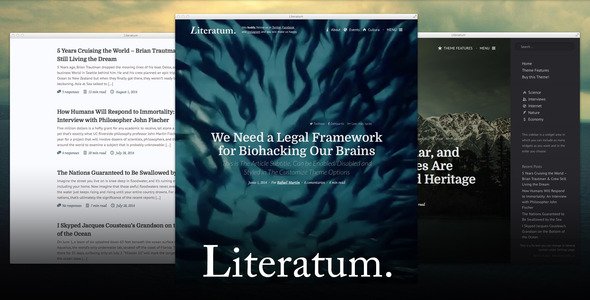
Stuck on your Literatum WordPress theme? Let's fix it.
No endless back-and-forth. Just send us the details and we'll get it done.
No obligation · Replies within 1 hour · Quote within 1 day
Setup · Customization · Bug fixes · WooCommerce integration
About Literatum WP Theme
Literatum is a WordPress theme built by RafaelMartin with a clear focus on editorial and literary websites. It suits blogs, online magazines, book review sites, and independent publishers who want a clean reading experience without unnecessary clutter.
The theme puts typography first. Font sizing, line height, and spacing are all tuned for long-form reading. The layout is minimal but structured, giving content room to breathe while keeping navigation logical and straightforward.
Literatum is built on standard WordPress hooks and filters, which means it plays well with most plugins and does not lock you into a proprietary page builder. If you value readable code and a sensible theme structure, it is worth a closer look for any content-heavy project.
Get matched with a Literatum developer in under one day
Tell us about your Literatum project. Small fixes, Literatum theme customization, or a full website build, whatever you need, we've got it covered.
We'll connect you to the right Literatum developers, define the scope, and get everything 100% clear.
You'll get one estimate, hire your preferred developer, and start collaborating.
Literatum is a focused theme, and that focus is also its limitation. It does exactly what it is designed for, but customizing it outside those boundaries takes real WordPress development knowledge.
Our developers on Codeable have worked with editorial and publishing themes extensively. They know how to extend Literatum without creating technical debt, and they can adapt it to match your exact content structure. If your site needs something the default theme cannot deliver cleanly, that is the right time to bring in a specialist.
Pros
- Typography-first design that improves readability for long-form and literary content
- Clean, minimal codebase with no dependency on a proprietary page builder
- Customizer options cover core branding without requiring code edits
- Works well with standard SEO and forms plugins without conflicts
- Suitable for WooCommerce integration for digital product or book sales
Cons
- Limited layout flexibility outside its editorial focus without custom development
- No built-in mega menu or complex navigation options for large site structures
- Archive and category templates are basic and often need customization for larger publications
- Smaller developer community compared to major commercial themes, so fewer ready-made tutorials
- No bundled demo content or one-click setup, which adds initial configuration time
Who is Literatum for?
Book Review Blogs
Literatum’s reading-focused layout handles long review posts without visual clutter. Clear post meta, author info, and category tagging make it easy for readers to find reviews by genre or rating. The theme holds up well when post volume grows into the hundreds.
Independent Literary Magazines
For small literary magazines publishing fiction, poetry, and essays, Literatum’s structured editorial layout works well. You can organize content by issue or genre using categories and custom taxonomy, keeping the reading experience consistent across different content types.
Author Portfolio Sites
Authors who want a clean site to showcase their books, essays, and press coverage will find Literatum straightforward to manage. The minimal design keeps focus on the writing rather than visual effects, which suits most author branding goals.
Online Publishing Houses
Small publishing houses that manage multiple titles and authors can use Literatum as a content hub. Combined with WooCommerce, it handles book listings and digital sales. Custom post types for authors and titles can be added by a developer to extend the default setup.
Academic or Essay Journals
Academic blogs and essay journals benefit from Literatum’s tight typographic control and distraction-free reading layout. Citation-heavy posts, long-form essays, and contributor bios all sit naturally within the theme’s structure without requiring major template changes.

Customizing Literatum
Out of the box, Literatum gives you control over fonts, colors, header layout, and sidebar positioning through the WordPress Customizer. That covers most basic branding needs without touching code.
Beyond that, meaningful customization requires PHP and CSS knowledge. Changing the post grid layout, adding custom post types, or modifying the archive templates means editing template files directly. Without that experience, you will hit walls quickly.
A Literatum expert can handle those changes properly, keeping the theme update-safe by working through a child theme. Whether you need a bespoke front page layout, custom category pages, or a tailored reading mode, working with someone who knows the theme saves time and avoids breaking things mid-project.
Recommended plugins for Literatum
Literatum works cleanly with WooCommerce if you want to sell books, subscriptions, or digital downloads alongside your editorial content. WPForms and Gravity Forms integrate without conflicts for newsletter signups and reader submissions.
For performance, pairing Literatum with a caching plugin and a CDN makes a noticeable difference on image-heavy post archives. See our WordPress performance service for more on that.
On the SEO side, Yoast and Rank Math both work well with the theme’s clean markup. If you want to go further, our WordPress SEO service covers structured data, schema for articles, and technical audits specific to content-heavy sites.
Not sure which plugins to use? This WordPress plugins directory covers the most popular options with reviews and setup guides.
Literatum common issues
Literatum theme not showing featured images on archive pages
This usually happens when the featured image size registered by Literatum does not match the images uploaded before the theme was activated. Go to Settings, then Media, and check your image size settings. Running a thumbnail regeneration plugin like Regenerate Thumbnails fixes the mismatch in most cases. If the issue persists after regeneration, the template file for archive pages may need a direct code fix. Our bug fixing service can identify the exact cause.
Literatum sidebar not displaying on mobile devices
Literatum hides the sidebar on smaller screens by default through its stylesheet. If you need the sidebar visible on mobile, you will need to override the relevant CSS media queries in a child theme. Avoid editing the parent theme files directly, as updates will overwrite your changes. If you are not comfortable with CSS, this is a straightforward task for a WordPress developer and typically takes less than an hour to resolve correctly.
Literatum custom fonts not loading after theme update
Theme updates sometimes reset Customizer font selections if the update changes how font options are stored. After updating, go back into the Customizer and reapply your font choices. If the fonts still do not load, check whether the Google Fonts API call is being blocked by a caching plugin or CSP header on your server. Clearing all caches and checking your browser console for blocked requests usually pinpoints the cause quickly.
Literatum WooCommerce shop page layout broken
Literatum does not ship with dedicated WooCommerce template files, so WooCommerce falls back to its own default templates when the theme lacks them. This often causes layout inconsistencies on the shop, product, and cart pages. The fix is to copy the relevant WooCommerce templates into your child theme’s WooCommerce folder and adjust the markup to match Literatum’s layout. This requires PHP knowledge to do cleanly without creating display conflicts.
Literatum FAQ
Literatum is available through RafaelMartin’s distribution. Check the theme’s official listing for current pricing and licensing details, as availability and cost can change. Always download WordPress themes from the official source or WordPress.org to avoid modified or malicious versions.
Literatum works with the WordPress block editor, Gutenberg, without major conflicts. Full-site editing is not supported. Elementor can be used alongside it, but some layout elements may need CSS adjustments to match the theme’s native styling. Testing in a staging environment before going live is strongly recommended.
Yes, WooCommerce works with Literatum, but the integration is not plug-and-play. Without dedicated WooCommerce templates in the theme, shop pages use WooCommerce’s default styling, which often clashes with Literatum’s design. A developer can build proper WooCommerce templates into a child theme to make it look consistent.
Create a new folder in your themes directory named something like literatum-child. Inside it, add a style.css file with the correct child theme header referencing Literatum as the parent, and a functions.php file to enqueue the parent stylesheet. Activate the child theme from the WordPress dashboard. All custom code and template overrides go into the child theme folder.
Literatum’s clean markup and minimal code output give it a reasonable SEO foundation. It does not bloat pages with unnecessary scripts. Pairing it with a plugin like Rank Math or Yoast adds meta control and schema support. For a full technical SEO audit on a Literatum site, see our WordPress SEO service.
Hire a Literatum WordPress Developer
If you need layout changes, plugin integration, performance work, or a full Literatum build from scratch, our WordPress developers can help. Projects are scoped and estimated before any work begins, so you know exactly what you are getting.
Get a free estimate and hear back within 24 hours. No obligation, no upfront cost. Work is delivered through Codeable, so quality is backed by the platform’s vetting process and dispute resolution.
You'll need a free Codeable account so developers can ask questions and send their quotes.