Greenova WordPress Theme
by RadiusTheme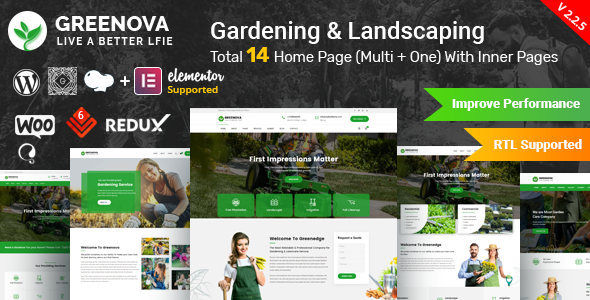
Stuck on your Greenova WordPress theme? Let's fix it.
No endless back-and-forth. Just send us the details and we'll get it done.
No obligation · Replies within 1 hour · Quote within 1 day
Setup · Customization · Bug fixes · WooCommerce integration
About Greenova WP Theme
Greenova is a WordPress theme built by RadiusTheme, designed specifically for environmental and eco-friendly businesses. It targets NGOs, sustainability consultancies, organic product brands, and green energy companies. The theme ships with Elementor page builder support, multiple homepage layouts, and a set of pre-built inner pages that cover the most common needs for this niche.
Out of the box you get a clean, nature-inspired design with earthy tones, leaf iconography, and well-structured sections for causes, projects, donation integration, and team profiles. WooCommerce compatibility is included, so selling eco products works without additional plugins. Performance is reasonable on default settings, and the theme follows standard WordPress coding practices from RadiusTheme, who maintain an active update schedule.
Get matched with a Greenova developer in under one day
Tell us about your Greenova project. Small fixes, Greenova theme customization, or a full website build, whatever you need, we've got it covered.
We'll connect you to the right Greenova developers, define the scope, and get everything 100% clear.
You'll get one estimate, hire your preferred developer, and start collaborating.
Greenova looks straightforward until you need something specific. Custom post type queries, donation plugin conflicts, or Elementor widget overrides can eat hours if you’re figuring it out alone. FoxyConcept works through Codeable, a vetted network of WordPress developers. Every developer on the platform is screened, so you get someone who knows what they’re doing. Post your project, get an estimate within 24 hours, and decide from there. No obligation.
Pros
- Purpose-built for environmental and eco niche sites with relevant page sections already included
- Ships with multiple pre-built homepage demos, reducing initial setup time
- WooCommerce compatible out of the box for selling eco and organic products
- Elementor support means non-developers can manage content without touching code
- RadiusTheme maintains active updates and provides dedicated support documentation
Cons
- Heavy reliance on Elementor means migrating to a different builder later is painful
- Default mobile spacing is loose in several sections and needs manual adjustment
- Some pre-built sections feel redundant across demos with limited visual variation
- No built-in donation system, requires a third-party plugin like GiveWP to handle fundraising
- Page load time increases noticeably when multiple Elementor sections stack on one page
Who is Greenova for?
Environmental NGO
Greenova includes causes and projects custom post types that work well for NGO campaign pages. You can list active environmental initiatives, show progress toward funding goals with GiveWP, and publish team profiles. The layout structure handles both local community groups and larger international organizations without needing heavy customization.
Organic Food Brand
The WooCommerce integration makes Greenova a workable base for organic food and natural product stores. Product pages carry the earthy aesthetic well. You can set up category pages for food, supplements, or household items with minimal styling adjustments. A developer can extend the templates for custom product labels or ingredient lists if needed.
Sustainability Consultancy
Consultancies need credibility-focused layouts with clear service descriptions, case studies, and contact forms. Greenova’s inner page templates cover these without much rework. The projects post type doubles as a case study section. A Greenova developer can modify the layout to remove donation-focused elements and shift the tone toward B2B services.
Green Energy Company
Solar, wind, and energy efficiency companies fit the Greenova aesthetic naturally. The theme handles service listings, project showcases, and stat counters for installed capacity or carbon offset figures. The homepage demos include icon-based feature sections that work for explaining technical services to non-technical audiences.
Eco Tourism Business
Eco tourism operators need strong visual sections for destinations, trip packages, and booking calls to action. Greenova’s hero sections and gallery layouts support this well. Pairing it with a booking plugin like WP Travel Engine gives you a full trip management system. Custom post types for tours can be added by a developer familiar with the theme structure.

Customizing Greenova
Greenova gives you a solid starting point, but most projects need changes beyond what the Theme Customizer and Elementor widgets allow. Custom color schemes, unique section layouts, modified header structures, or integration with third-party donation platforms often require direct code work.
A Greenova expert can handle these without breaking existing functionality. That includes building custom Elementor widgets, extending WooCommerce templates for eco product shops, adjusting the causes and projects post types, and tightening up the mobile layout where the default spacing can feel loose.
If you need specific features added, like a carbon offset calculator or a recurring donation flow, a developer familiar with both Greenova and RadiusTheme’s code structure will get it done faster and cleaner than a generalist. Working with a Greenova expert means you skip the trial-and-error phase entirely.
Recommended plugins for Greenova
Greenova works well with a focused plugin stack. WooCommerce handles eco product sales. Give WP or GiveWP manages one-time and recurring donations. For forms, WPForms or Gravity Forms covers contact, volunteer signup, and event registration.
On the performance side, caching with WP Rocket and image optimization with ShortPixel make a measurable difference, especially if you load multiple Elementor sections. Check our WordPress performance service if speed is a priority. For organic search traffic, structured data and on-page optimization matter in this niche. See our WordPress SEO service for details.
Not sure which plugins to use? This WordPress plugins directory covers the most popular options with reviews and setup guides.
Greenova common issues
Greenova homepage slider not showing on mobile
This usually comes down to a CSS conflict between the slider plugin and Greenova’s mobile stylesheet, or a slider setting with a fixed pixel height that doesn’t scale on smaller screens. Open the slider settings and switch from fixed height to percentage-based or auto height. If the issue persists after a theme update, check whether RadiusTheme pushed a CSS change affecting mobile breakpoints. A quick inspection in browser dev tools on a mobile viewport will pinpoint the conflicting rule. Our bug fixing service can resolve this quickly.
Greenova WooCommerce product page layout broken
Broken WooCommerce product pages in Greenova are often caused by a plugin update that changed WooCommerce template hooks, or a child theme override that’s now out of sync with the current WooCommerce version. Check the WooCommerce system status page for outdated templates. If Greenova’s WooCommerce templates haven’t been updated to match the current WooCommerce version, you’ll see layout problems. Updating or replacing the outdated template files through a child theme usually fixes it.
Greenova Elementor sections not loading after update
After a Greenova or Elementor update, widget conflicts can cause sections to display incorrectly or show error notices instead of content. Clear all caches first. If the problem persists, deactivate plugins one at a time to isolate the conflict. RadiusTheme themes use custom Elementor widgets that sometimes need their own update cycle to stay compatible. Check the RadiusTheme changelog and their dedicated Elementor addon plugin version against your current Elementor install.
Greenova contact form not sending emails
Contact form delivery failures on Greenova sites are almost always a server-side email issue, not a theme problem. WordPress’s default wp_mail function relies on the server’s sendmail, which most hosting providers block. Install an SMTP plugin like WP Mail SMTP and connect it to a transactional email service such as SendGrid or Mailgun. That fixes delivery for contact forms, WooCommerce order emails, and donation receipts in one step. See our WordPress maintenance service for ongoing site health monitoring.
Greenova FAQ
Yes, Greenova suits nonprofits well. It includes causes and projects post types, donation-ready layouts, and sections for volunteer calls to action and impact statistics. You’ll still need a donation plugin like GiveWP for actual payment processing. The theme provides the structure; the plugin handles the transactions. For nonprofits with specific requirements, a developer can extend the default setup.
Greenova and GiveWP work together without major conflicts. GiveWP handles the donation forms and payment gateways while Greenova provides the surrounding page layout. You can embed donation forms in any page using GiveWP shortcodes or blocks. Styling the form to match Greenova’s design exactly may need minor CSS adjustments, but the functional integration works out of the box.
Greenova is built around Elementor. The demo content, pre-built pages, and custom widgets all depend on it. You can technically use the block editor for basic posts and pages, but you’ll lose access to most of the theme’s designed sections. Removing Elementor and rebuilding in the block editor would require significant development work. If you prefer a block-based workflow, a different theme is a better starting point.
After installing and activating Greenova, the theme will prompt you to install required plugins including the RadiusTheme core plugin and Elementor. Once those are active, go to Appearance, then Import Demo Data. Select your preferred demo and run the import. The process takes a few minutes. Make sure your hosting environment allows file imports of the demo size, as some shared hosts have low limits that interrupt the process.
RadiusTheme maintains an active update schedule for Greenova. Updates address WooCommerce compatibility, Elementor version changes, and WordPress core releases. You can check the changelog on ThemeForest where the theme is sold. That said, staying current with updates on a live site requires care. Always test updates on a staging environment first to catch any conflicts before they affect your visitors.
Hire a Greenova Developer
Need changes to your Greenova site that go beyond the default settings? Whether it’s a custom layout, WooCommerce integration, donation plugin setup, or a performance fix, a specialist gets it done right. FoxyConcept delivers WordPress work through Codeable’s vetted developer network. You get a free estimate first with no pressure to proceed. Request your free estimate and describe what you need. Most projects get matched within 24 hours.
You'll need a free Codeable account so developers can ask questions and send their quotes.