Castilo WordPress Theme
by liviu_cerchez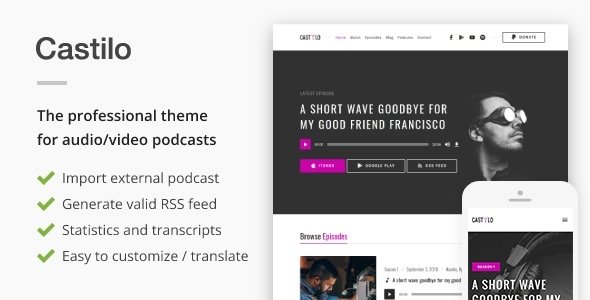
Stuck on your Castilo WordPress theme? Let's fix it.
No endless back-and-forth. Just send us the details and we'll get it done.
No obligation · Replies within 1 hour · Quote within 1 day
Setup · Customization · Bug fixes · WooCommerce integration
About Castilo WP Theme
Castilo is a WordPress theme developed by liviu_cerchez, built for creative agencies, portfolio sites, and small business brands that want a clean, visual-first layout without a heavy page builder dependency.
The theme ships with a block-based structure, making it compatible with the WordPress Full Site Editor. Typography is well-considered, spacing is consistent, and the default color palette suits premium service brands. It loads light out of the box, which puts it ahead of many bloated multipurpose alternatives.
Where Castilo stands out is its focus on structured layouts that don’t require constant overrides. Sections stack predictably, headers behave correctly on mobile, and the default styles hold up without adding custom CSS from day one. It’s a solid starting point for developers and a workable option for confident DIY users who understand WordPress blocks.
Get matched with a Castilo developer in under one day
Tell us about your Castilo project. Small fixes, Castilo theme customization, or a full website build, whatever you need, we've got it covered.
We'll connect you to the right Castilo developers, define the scope, and get everything 100% clear.
You'll get one estimate, hire your preferred developer, and start collaborating.
Most theme issues aren’t actually theme issues. They’re conflicts, misconfigured settings, or customizations that were added without a plan. A developer who knows Castilo’s template structure can diagnose problems quickly and build features that fit the design rather than fight it.
Through Codeable, you get access to vetted WordPress developers who have worked with FSE themes like Castilo. No generalist freelancers, no guesswork. You post your project, get matched within 24 hours, and receive a free estimate before committing to anything. See our WordPress development services for what’s possible.
Pros
- Lightweight default build with no unnecessary scripts on load
- Full Site Editor compatible, works with WordPress block template editing
- Clean heading and layout hierarchy that supports good SEO structure
- Consistent spacing and typography across mobile and desktop without extra CSS
- Developed by a single focused developer, which means fewer bloat features added over time
Cons
- Limited third-party documentation compared to major commercial themes
- WooCommerce styling requires manual CSS work to match the default design
- Fewer built-in block patterns than larger multipurpose FSE themes
- No dedicated options panel, so some users find Global Styles limiting
- Smaller community means fewer tutorials and forum answers when troubleshooting
Who is Castilo for?
Creative Agency Portfolio
Castilo’s visual-first layout and clean grid structure suit agency portfolio sites well. Service sections, case study pages, and team layouts all build cleanly using the included patterns. The minimal default style keeps the focus on work samples rather than the theme itself.
Freelance Designer or Photographer
Photographers and designers need a theme that doesn’t compete with their images. Castilo’s restrained typography and whitespace-heavy defaults let visual work lead. Gallery blocks render without distortion, and the mobile layout keeps image proportions intact on smaller screens.
Small Business Services Site
Service-based businesses need clear page structure, fast load times, and contact forms that work. Castilo handles all three without requiring a premium page builder. You can build service pages, a simple blog, and a contact section using core blocks and the Site Editor alone.
Boutique Consultancy
Consultancies need to look credible without appearing overcomplicated. Castilo’s restrained design communicates professionalism. Pairing it with custom typography and a two-color palette through Global Styles produces a polished result that doesn’t feel templated or generic to potential clients.
Personal Brand or Resume Site
Personal brand sites and resume pages need fast setup, clean layouts, and strong typographic hierarchy. Castilo supports all of this through core WordPress blocks. A bio section, work history, skills grid, and contact form can all be built and styled without writing a line of code.

Customizing Castilo
Castilo supports customization through the WordPress Site Editor and Global Styles panel. You can adjust fonts, colors, spacing, and layout widths directly without touching code. Block patterns included with the theme give you reusable section layouts to build pages faster.
For deeper work, a Castilo expert can modify template files, create custom block patterns, register theme variations, or add custom post types that slot cleanly into the existing design system. This is especially useful when the default templates don’t match your content structure.
Child theme development is the right approach for any serious customization. It keeps your changes intact after theme updates. If you’re not comfortable working in the Site Editor or want a tailored result, working with a Castilo expert through a managed WordPress service saves significant time and avoids breaking changes.
Recommended plugins for Castilo
Castilo pairs well with WooCommerce for product or service listings, though you may need style adjustments to match the default theme aesthetic. WPForms or Gravity Forms integrate without conflict for contact and lead capture pages.
For performance, combining Castilo with a caching plugin and an optimized image workflow keeps load times low. See our WordPress performance service for a structured approach. On the SEO side, the theme outputs clean heading hierarchy, which gives tools like Rank Math or Yoast a reliable foundation. Our WordPress SEO service can build on that base with proper schema and technical audit work.
Not sure which plugins to use? This WordPress plugins directory covers the most popular options with reviews and setup guides.
Castilo common issues
Castilo theme header not showing on mobile
Mobile header issues in Castilo usually come from a custom CSS rule overriding the navigation template part, or a third-party plugin injecting conflicting styles. Start by disabling plugins one at a time and checking the Site Editor header template directly. If the header template looks correct in the editor but breaks on the front end, a caching plugin is often responsible. Clear all cache layers and check again. Our WordPress bug fixing service can diagnose this quickly if you’re stuck.
Castilo WordPress theme fonts not loading correctly
Font loading problems in Castilo are typically caused by Global Styles being overridden by a plugin, or a performance plugin blocking Google Fonts requests. Check your browser console for 404 errors on font files. If you’ve enabled local font hosting in a performance plugin, make sure the font names in Castilo’s theme.json match what the plugin is serving. Mismatched font family names cause silent fallback to system fonts without any visible error in the editor.
Castilo Full Site Editor changes not saving
When Site Editor changes don’t save in Castilo, the most common causes are a permissions issue with the wp-content directory, a REST API conflict blocking the save request, or a security plugin treating the editor’s API calls as suspicious. Open your browser’s network tab, attempt a save, and look for failed POST requests to the wp/v2 endpoint. A 403 response points to a security plugin. A 500 error usually means a server-side PHP conflict. Check your WordPress maintenance setup if this happens regularly.
Castilo theme layout broken after WordPress update
Layout breaks after a WordPress core update in Castilo usually trace back to changes in block markup or template part rendering introduced in the update. FSE themes are more sensitive to core changes than classic themes. First, check whether a Castilo theme update is available, as liviu_cerchez typically releases patches after major core releases. If no update is available, inspect the affected templates in the Site Editor and reset any that show a conflict indicator. Avoid customizing core templates directly without a child theme in place.
Castilo FAQ
Castilo is available through the WordPress theme repository as a free theme developed by liviu_cerchez. There is no official premium version with extended features at this time. Any paid versions offered through third-party marketplaces are not official releases and should be approached carefully to avoid licensing or security issues.
Castilo is technically compatible with WooCommerce, but it does not ship with dedicated WooCommerce template files. Default shop, product, and cart pages will render using WooCommerce’s own fallback templates. The styling will not match Castilo’s design without custom CSS or a developer adding theme-specific WooCommerce templates. Budget for that work if you’re building a store.
Castilo is a Full Site Editor theme built on the block editor. It is not designed for classic page builders like Elementor or Divi. Forcing a page builder into an FSE theme causes template conflicts and unpredictable output. Stick with core blocks and the Site Editor for the best results. If you need page builder functionality, a different theme base is the better choice.
Always use a child theme before making code-level customizations to Castilo. Site Editor changes made through Global Styles and template editing are stored in the database and survive theme updates. Direct edits to theme files will be overwritten on update. If you haven’t used a child theme yet and have made file changes, back everything up before updating. Our WordPress migration service can help if you need to rebuild cleanly.
Castilo is built for modern WordPress and supports the Full Site Editor introduced in WordPress 5.9 and refined through subsequent releases. As long as you’re running WordPress 6.0 or later, the theme should function correctly. Always check the changelog on the theme’s repository page before updating WordPress or the theme to spot any known compatibility notes.
Hire a Castilo Developer
Need help setting up Castilo, customizing templates, or fixing something that broke after an update? We match you with a developer who knows the theme and can get your site working the way it should.
Post your project and get a free estimate within 24 hours. No obligation, no upfront payment. Get your free estimate here and describe what you need. We’ll handle the rest.
You'll need a free Codeable account so developers can ask questions and send their quotes.