Dikka WordPress Theme
by UX-Qode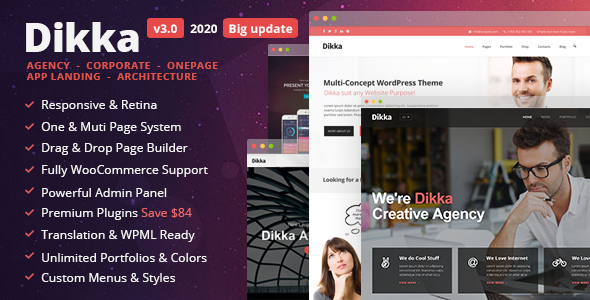
Stuck on your Dikka WordPress theme? Let's fix it.
No endless back-and-forth. Just send us the details and we'll get it done.
No obligation · Replies within 1 hour · Quote within 1 day
Setup · Customization · Bug fixes · WooCommerce integration
About Dikka WP Theme
Dikka is a multipurpose WordPress theme built by UX-Qode, designed for creative agencies, portfolio sites, and business pages. It ships with the WPBakery page builder and a solid set of pre-built demo layouts that cover a wide range of industries. The theme is retina-ready, translation-ready, and built on a clean, well-structured codebase.
Out of the box, Dikka gives you header and footer variations, custom post types for portfolios and team members, and a range of shortcodes to build pages without touching code. It also integrates with WooCommerce, making it viable for small online stores. The demo importer works reasonably well, letting you get a starter site live quickly. It suits freelancers and small agencies who want design flexibility without hiring a developer from day one.
Get matched with a Dikka developer in under one day
Tell us about your Dikka project. Small fixes, Dikka theme customization, or a full website build, whatever you need, we've got it covered.
We'll connect you to the right Dikka developers, define the scope, and get everything 100% clear.
You'll get one estimate, hire your preferred developer, and start collaborating.
Dikka gives you a strong starting point, but most sites need work beyond what the demo provides. Custom layouts, plugin conflicts, performance tuning, and WooCommerce configuration all take time if you’re not familiar with the theme’s internals. FoxyConcept works through Codeable, a vetted network of WordPress specialists. Every developer on the platform is screened, so you’re not taking a chance on unknown freelancers. You get a free estimate, no obligation to hire, and a clear scope before any work starts.
Pros
- Ships with WPBakery and Revolution Slider included, saving on plugin costs
- Multiple pre-built demo layouts covering agencies, portfolios, and business niches
- WooCommerce compatible out of the box with styled product and cart pages
- Retina-ready and translation-ready with WPML support
- One-click demo importer makes initial setup fast for most users
Cons
- WPBakery shortcode lock-in makes switching page builders messy later
- Bundled Revolution Slider adds noticeable page weight if not optimized
- Advanced header and layout changes require custom CSS or PHP
- Demo content can be slow to load on lower-tier hosting without caching
- Support from UX-Qode can be slow depending on the ticket volume
Who is Dikka for?
Creative Agency
Dikka’s agency-focused demo layouts include service sections, team grids, client logos, and case study portfolio types. Agencies can present work cleanly without building from scratch. WPBakery makes it easy to rearrange sections as pitches and offerings change over time.
Freelance Portfolio
Freelancers get a portfolio post type, filterable project grids, and full-width showcase layouts. The theme handles the presentation side well. Combined with a contact form and a simple about page, it covers everything a freelancer needs to attract clients and show past work.
Small Online Store
WooCommerce integration means Dikka can handle product listings, single product pages, and cart and checkout styling without heavy customization. It works best for stores with straightforward catalogs. For complex filtering or large inventories, additional plugins and some custom work are recommended.
Corporate Business Site
Dikka includes corporate demo templates with service blocks, statistics counters, team sections, and CTA areas. It presents a professional look without requiring a custom design. Companies that need a credible online presence quickly will find the pre-built pages cover most of the standard sections.
Photography Studio
Full-width image layouts, portfolio grids, and clean typography make Dikka a reasonable choice for photography studios. The theme handles large images well visually. Pairing it with a lazy-load plugin and proper image compression keeps performance at an acceptable level for image-heavy pages.

Customizing Dikka
Dikka’s customization options live across two places: the WordPress Customizer and WPBakery’s front-end editor. The Customizer handles global typography, colors, header layout, and logo settings. WPBakery handles page-level layouts, sections, and content blocks.
That split works fine for standard edits but gets complicated when you want something outside the default options. Custom header behavior, conditional logic, advanced animations, or deep WooCommerce styling all require code. A Dikka expert can modify child theme files, override shortcode output, and extend WPBakery with custom elements without breaking the base theme. If you need a layout that the demo doesn’t cover, or want to strip out sections you’ll never use, working with someone who knows the theme’s structure saves a lot of time and avoids messy workarounds.
Recommended plugins for Dikka
Dikka works with several popular plugins out of the box. WooCommerce adds product pages and cart functionality. Contact Form 7 and WPForms handle lead capture. WPML and Polylang cover multilingual setups. Revolution Slider is bundled, though it adds weight to page load times if not configured properly.
For performance, pairing Dikka with a caching plugin and optimizing the bundled scripts makes a noticeable difference. Check our WordPress performance service if load speed is a concern. For search visibility, the theme is structured to work with Yoast SEO and Rank Math. See our WordPress SEO service for deeper optimization work.
Not sure which plugins to use? This WordPress plugins directory covers the most popular options with reviews and setup guides.
Dikka common issues
Dikka theme demo import not working
Demo import failures in Dikka usually come from PHP memory limits, upload size restrictions, or a timeout during the import process. First, check your php.ini settings and increase memory_limit to at least 256MB and max_execution_time to 300. If the import still stalls, try importing just the content XML manually through WordPress’s built-in importer. If issues persist, our WordPress bug fixing service can diagnose and resolve it cleanly.
Dikka WPBakery elements not showing or broken
Missing or broken WPBakery elements in Dikka usually mean the bundled WPBakery version is outdated or conflicts with a separately installed copy. Check that only one instance of WPBakery is active. If you purchased WPBakery independently, deactivate it and use the theme-bundled version. Also verify the theme’s custom shortcodes are registered by confirming the child theme hasn’t overridden the core functions file incorrectly.
Dikka theme slow loading after setup
Dikka can load slowly due to Revolution Slider’s scripts loading on every page, unoptimized images from the demo import, and WPBakery’s front-end editor assets loading in production. Disable Revolution Slider’s global script loading in its settings, compress images, and enable a caching plugin like WP Rocket or LiteSpeed Cache. Visit our WordPress performance service for a full audit if speed remains an issue.
Dikka header not displaying correctly on mobile
Mobile header problems in Dikka typically involve the mobile menu toggle not appearing, the logo scaling incorrectly, or sticky header behavior conflicting with mobile viewport settings. Start by checking the Customizer header options for mobile-specific settings. If custom CSS has been added outside a child theme, it may be overriding responsive rules. Clear cache after any change, and test across multiple devices before assuming the issue is resolved.
Dikka FAQ
Dikka is built around WPBakery, not Elementor. While Elementor can technically be installed alongside it, the two builders will conflict if used on the same pages. Most of Dikka’s demo layouts rely on WPBakery shortcodes, so switching to Elementor would require rebuilding those pages. It’s not a simple swap.
Yes. Dikka includes WooCommerce-compatible templates for product listings, single product pages, cart, and checkout. Basic stores work well without extra configuration. For custom product layouts, advanced filtering, or subscription products, additional plugins and some custom styling work are usually needed.
WPBakery is deeply integrated into Dikka’s demo content and shortcode structure. You can build new pages using other tools, but any demo-imported content will show raw shortcode text if WPBakery is deactivated. For a WPBakery-free setup, you’d need to rebuild existing pages using your preferred editor.
UX-Qode has released updates for Dikka over the years, but update frequency has slowed. Check the ThemeForest changelog for the latest version date. If compatibility with newer WordPress or WooCommerce versions is a concern, testing updates on a staging environment before applying them to a live site is strongly recommended.
Migrating a Dikka site involves moving files, the database, and updating URLs for the new domain or host. Using a plugin like Duplicator or All-in-One WP Migration handles most of this. After migration, check that WPBakery and any bundled plugins are still active and licensed correctly. Our WordPress migration service can handle this for you.
Hire a Dikka Developer
Need help with your Dikka site? Whether it’s a custom layout, a broken feature, WooCommerce setup, or a full build from a demo import, FoxyConcept can help. We work through Codeable, so every project gets a screened WordPress developer and a clear estimate before work begins. Get a free estimate today. No obligation, no risk.
You'll need a free Codeable account so developers can ask questions and send their quotes.