Evently WordPress Theme
by Mikado-Themes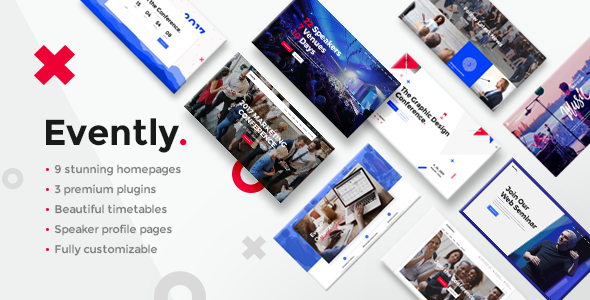
Stuck on your Evently WordPress theme? Let's fix it.
No endless back-and-forth. Just send us the details and we'll get it done.
No obligation · Replies within 1 hour · Quote within 1 day
Setup · Customization · Bug fixes · WooCommerce integration
About Evently WP Theme
Evently is a WordPress theme built by Mikado-Themes, designed specifically for event organizers, conference planners, and ticketing sites. It ships with a dedicated event post type, multiple listing layouts, countdown timers, speaker profiles, and schedule builders — all without requiring a separate event plugin.
The theme is built on Mikado’s own framework and uses Elementor for page building. It includes pre-built demo sites covering music festivals, corporate conferences, sports events, and community meetups. Import a demo in a few clicks, then swap out colors, fonts, and content to match your event brand.
Evently is a solid choice if you want an event-focused site out of the box without cobbling together a theme and plugin combination from scratch. It handles ticketing integrations, sponsor sections, and venue maps with purpose-built components rather than generic widgets.
Get matched with a Evently developer in under one day
Tell us about your Evently project. Small fixes, Evently theme customization, or a full website build, whatever you need, we've got it covered.
We'll connect you to the right Evently developers, define the scope, and get everything 100% clear.
You'll get one estimate, hire your preferred developer, and start collaborating.
Evently has a deep settings panel, a custom framework, and event-specific components that take time to understand properly. Getting them configured wrong means a broken schedule layout or a ticketing flow that drops users at checkout.
Working with a vetted Evently developer through Codeable means you get someone who knows the theme and can deliver clean, reliable work. No trial and error. No wasted time. Just a working site built the right way. See our WordPress development services to get started.
Pros
- Purpose-built event post type with schedules, speakers, and countdowns included out of the box
- Multiple pre-built demo sites covering festivals, conferences, sports events, and community meetups
- Elementor integration means visual drag-and-drop editing for non-developers
- Built-in sponsor sections, venue maps, and ticket CTA components avoid the need for extra plugins
- Regular updates from Mikado-Themes with active ThemeForest support
Cons
- Mikado's own framework adds complexity compared to themes built purely on the Customizer
- Heavy demo content and page builder markup can slow page load times without optimization
- Some advanced event management features require pairing with a third-party plugin like The Events Calendar
- Deep theme panel settings have a learning curve for first-time Mikado theme users
- Child theme setup is needed for any PHP-level customization to survive updates safely
Who is Evently for?
Music Festivals
Evently’s festival demo includes lineup grids, artist profile pages, stage schedules, and countdown timers. You can build a full multi-day festival site with ticket links, sponsor logos, and venue information without custom development. The visual layouts suit high-energy branding with full-width imagery and bold typography options.
Corporate Conferences
The conference demo ships with speaker profile pages, session schedule builders, and agenda layouts. These work well for one-day or multi-track events where attendees need to plan their time. Add WooCommerce for paid ticket tiers or use a registration form plugin for free attendance sign-ups.
Sports Events
Sports event organizers can use Evently to publish fixtures, results, team information, and venue details. The theme handles event listing pages cleanly and supports countdown timers for upcoming matches. Pair it with a custom post type or a sports plugin for deeper stats and league table functionality.
Community Meetups
Smaller recurring meetups benefit from Evently’s simple event listing pages and RSVP form integrations. You can display upcoming events in a grid or list, add location maps, and link to free ticketing tools like Eventbrite or Meetup. The theme scales down cleanly for smaller community organizations.
Wedding and Private Events
Wedding planners and private event companies can use Evently’s clean layouts to showcase venue galleries, event packages, and contact forms. The theme’s countdown and schedule components adapt naturally to wedding day timelines. Customizing fonts and color palettes makes it easy to match a specific event’s visual identity.

Customizing Evently
Evently gives you a lot of options through its theme panel, but the sheer number of settings can slow you down if you are not familiar with the Mikado framework. An Evently expert can cut through that setup time and configure the theme correctly from the start.
Common customization work includes building custom event archive pages, adjusting the schedule and speaker layouts to match a specific event structure, adding custom ticket call-to-action flows, and integrating third-party tools like Mailchimp or payment gateways. Typography, color palettes, and header styles all live in the theme panel rather than the Customizer, which trips up some users.
If you want changes beyond what the panel offers, a developer can write targeted CSS or child theme overrides without touching core files, keeping your site updatable and stable long term.
Recommended plugins for Evently
Evently works well with WooCommerce for ticket sales and the Events Calendar plugin if you want a more powerful event management layer on top. WPForms or Gravity Forms handle speaker submissions and attendee registration cleanly.
For performance, image optimization and caching plugins are worth adding since event pages often carry heavy media. If you need better search visibility for your events, structured data markup and proper SEO configuration matter. See our WordPress performance service and SEO optimisation service for both areas. Elementor Pro unlocks additional widget options that pair naturally with Evently’s existing components.
Not sure which plugins to use? This WordPress plugins directory covers the most popular options with reviews and setup guides.
Evently common issues
Evently demo import not working
Demo import failures in Evently usually come from a PHP memory limit that is too low, a max execution time timeout, or missing required plugins not activated before import. Set memory_limit to at least 256MB and max_execution_time to 300 in your php.ini or wp-config.php. Make sure all required plugins listed in the theme documentation are installed and activated before running the importer. If the issue persists, a WordPress bug fixing service can resolve it quickly.
Evently event countdown timer not displaying correctly
The countdown timer in Evently pulls from the event date field set in the event post type settings. If the timer shows wrong values or does not appear, check that the event date is saved correctly in the post meta and that your server timezone matches your WordPress timezone setting under Settings > General. JavaScript conflicts with other plugins can also stop the timer rendering. Deactivate plugins one by one to isolate the conflict, or check the browser console for JS errors.
Evently speaker layout broken after update
After a theme update, speaker layout breaks usually point to a conflict between updated template files and cached page builder data. Clear your Elementor CSS cache under Elementor > Tools > Regenerate CSS and clear any server-side or plugin caches. If you made customizations directly in theme files rather than a child theme, the update will have overwritten them. Always use a child theme for any file-level changes to avoid losing work on future updates.
Evently theme slow page load on event pages
Evently event pages load slowly when they carry large gallery images, unoptimized Elementor markup, or unminified scripts. Start by compressing images with a tool like ShortPixel and enabling lazy loading. Use a caching plugin like WP Rocket and enable CSS and JS minification. Limit the number of active Elementor widgets and remove any demo page content you are not using. Our WordPress performance service covers full audit and optimization if you need a thorough fix.
Evently FAQ
Evently has its own event post type built in, so it does not require The Events Calendar. However, you can run both together. The Events Calendar will add its own event management layer and shortcodes. Some layout overlap may occur between the two systems, so it is worth testing on a staging site before going live. A developer can configure both to work without conflict if you need the extended functionality.
Yes. WooCommerce works alongside Evently for paid ticket sales. You set up ticket products in WooCommerce and link them from your event pages using buttons or product blocks. The theme does not have native checkout functionality, so WooCommerce handles the full purchase flow. For more complex ticketing with seat selection or attendee management, a plugin like FooEvents or Tickera pairs well with this setup.
Evently supports recurring events when paired with a plugin like The Events Calendar or Advanced Custom Fields to manage repeat dates. The built-in event post type does not natively handle recurrence on its own. For sites running weekly or monthly recurring events, adding a dedicated event plugin gives you proper recurrence rules, individual occurrence editing, and cleaner archive filtering.
Create a folder in wp-content/themes/ named evently-child. Add a style.css file with the correct theme header including Template: evently and a functions.php file that enqueues the parent stylesheet. Activate the child theme from Appearance > Themes. Any CSS or PHP changes go in the child theme so updates to the parent theme do not overwrite your work.
Evently is developed by Mikado-Themes, an established ThemeForest author with a long track record of maintaining their themes. The theme receives periodic updates for WordPress core compatibility and plugin conflicts. You can check the changelog on its ThemeForest page to see how recent the last update was. If you need ongoing maintenance handled for you, see our WordPress maintenance service.
Hire an Evently Developer
Need an Evently expert to set up your event site, customize layouts, or fix something that is not working? We match you with a vetted WordPress developer through Codeable within 24 hours. You get a free estimate first, no obligation to hire, and no risk if the project does not move forward.
Get a free estimate and describe what you need. We will match you with the right person for the job.
You'll need a free Codeable account so developers can ask questions and send their quotes.