Agrikon WordPress Theme
by Ninetheme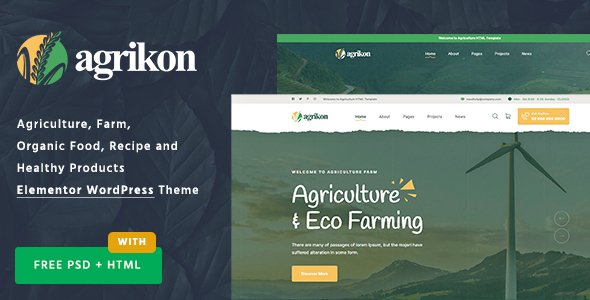
Stuck on your Agrikon WordPress theme? Let's fix it.
No endless back-and-forth. Just send us the details and we'll get it done.
No obligation · Replies within 1 hour · Quote within 1 day
Setup · Customization · Bug fixes · WooCommerce integration
About Agrikon WP Theme
Agrikon is a WordPress theme built by Ninetheme for agriculture, farming, and organic food businesses. It ships with multiple pre-built demo layouts covering farms, organic shops, livestock businesses, and agricultural equipment suppliers. Each demo can be imported in one click.
The theme is built on Elementor, so every section is editable without touching code. It includes WooCommerce support for selling products directly, a built-in mega menu, and dedicated post types for services and team members. The design leans heavily on earthy tones and nature photography, which suits farm-to-table brands and rural businesses well. Ninetheme keeps the theme updated and documents most features clearly, making it a solid starting point for any agri-focused website.
Get matched with a Agrikon developer in under one day
Tell us about your Agrikon project. Small fixes, Agrikon theme customization, or a full website build, whatever you need, we've got it covered.
We'll connect you to the right Agrikon developers, define the scope, and get everything 100% clear.
You'll get one estimate, hire your preferred developer, and start collaborating.
Agrikon looks straightforward until you need something beyond the demo layout. A developer who knows the theme can modify template files cleanly, extend WooCommerce for farm box subscriptions, or build custom delivery zone features without patching over core files.
FoxyConcept works through Codeable, a vetted WordPress developer network. Every developer on the platform is screened, which means you get someone who knows what they are doing, not a generalist working from a tutorial. Projects are scoped properly, priced fairly, and delivered without guesswork.
Pros
- Multiple one-click demo imports covering farms, organic shops, and equipment businesses
- Built on Elementor, so layouts are fully editable without code
- WooCommerce ready with styled product and shop pages included
- Dedicated service, team, and testimonial post types built into the theme
- Regularly updated by Ninetheme with documented changelog and support forum
Cons
- Page load times increase noticeably when multiple Elementor sections and large hero images are used together
- Demo content import can occasionally fail or import incomplete sections depending on server configuration
- WooCommerce customization beyond the included styles requires custom template work
- Some design elements feel dated compared to newer agriculture theme competitors
- Support from Ninetheme is limited to the ThemeForest comments section, which can be slow for complex issues
Who is Agrikon for?
Organic Farm Websites
Agrikon’s earthy color palettes, hero sliders, and farm-focused demo layouts make it a natural fit for organic farms selling direct to consumers. You can showcase seasonal produce, link to a WooCommerce shop, and add a blog for farming updates. The theme’s image-heavy sections work well for farms with strong visual content.
Agricultural Equipment Suppliers
The equipment supplier demo includes product grids, service sections, and a clear call-to-action structure suited to machinery businesses. WooCommerce integration means you can list products with specifications, pricing, and inquiry forms. A developer can extend this with custom filtering by equipment category or brand.
Farm Box and CSA Subscription Services
Agrikon’s WooCommerce support can be extended to handle weekly or monthly subscription boxes. With the right plugin setup and some custom WooCommerce template work, you can offer CSA shares, allow customers to customize their box contents, and manage recurring payments cleanly through the theme’s shop structure.
Livestock and Dairy Businesses
Livestock and dairy businesses benefit from Agrikon’s service post types and team sections, which can be repurposed to showcase animals, breeds, or farm partners. The clean layout and contact forms work well for businesses taking orders by phone or email rather than running a full online shop.
Farming Consultancy and Agronomy Services
Agronomy consultants and farming advisors can use Agrikon’s service layouts, testimonial sections, and blog post types to build a credible professional site. The theme supports multiple contact form plugins and can be paired with a booking plugin to handle consultation scheduling without needing a custom-built solution.

Customizing Agrikon
Agrikon gives you a reasonable amount of control through the WordPress Customizer and Elementor’s drag-and-drop editor. You can change colors, fonts, header layouts, and footer sections without writing code. The theme also uses custom widgets for pricing tables, team grids, and service blocks.
That said, deeper customization, like adjusting WooCommerce templates, building custom post type loops, or integrating third-party booking systems, often requires developer input. An Agrikon expert can extend the theme’s default structure without breaking future updates. Whether you need a tailored product catalog, a custom crop calculator, or a subscription box setup, working with someone who knows the theme’s codebase saves significant time and avoids conflicts.
Recommended plugins for Agrikon
Agrikon works well with a number of popular plugins. WooCommerce handles online sales for produce or equipment. WPML adds multilingual support for international farming businesses. Contact Form 7 or WPForms cover inquiry and quote forms. Yoast SEO or Rank Math pair cleanly with the theme for on-page SEO work.
For site speed, Agrikon can slow down if loaded with too many Elementor widgets and large images. Using a caching plugin alongside proper image optimization makes a real difference. See our WordPress performance service if page speed is a concern for your farming or food business site.
Not sure which plugins to use? This WordPress plugins directory covers the most popular options with reviews and setup guides.
Agrikon common issues
Agrikon demo import not working
Failed demo imports on Agrikon are usually caused by low PHP memory limits or execution timeouts on the server. Start by setting max_execution_time to 300 and memory_limit to at least 256MB in your php.ini or wp-config.php. Also confirm that all required plugins listed by Ninetheme are installed and activated before importing. If it still fails, a developer can import the demo manually using XML and the Customizer export file separately. Our bug fixing service covers this type of issue.
Agrikon WooCommerce shop page not displaying correctly
Agrikon’s WooCommerce styles are tied to its own template files. If your shop page looks broken, first check that you are using the WooCommerce version Ninetheme recommends in the theme documentation. Template overrides in a child theme can also conflict. Clear your cache, check for plugin conflicts by deactivating plugins one at a time, and confirm the shop page is assigned correctly under WooCommerce settings. Custom layout issues usually need a developer to check the template hierarchy.
Agrikon Elementor widgets not loading or showing errors
Elementor widget errors in Agrikon are often caused by version mismatches between Elementor, Elementor Pro, and the theme. Check that all three are updated to compatible versions. Some Agrikon-specific widgets are registered through a bundled plugin, so confirm that plugin is active. If widgets show as missing after an update, regenerating the Elementor CSS cache under Elementor’s Tools menu often resolves the display issue without any code changes needed.
Agrikon theme slow page load speed
Agrikon loads multiple scripts and styles by default, and Elementor adds to that overhead. Start by optimizing images with a tool like ShortPixel. Use a caching plugin such as WP Rocket or LiteSpeed Cache. Disable unused Elementor features under Elementor’s performance settings. Minify and combine CSS and JavaScript where possible. If your Google PageSpeed score is still poor after these steps, our WordPress performance service can audit and resolve deeper issues.
Agrikon FAQ
Yes. Agrikon includes WooCommerce-ready layouts with styled product pages, cart, and checkout templates. It works well for farms selling produce, seeds, or equipment online. For more advanced shop features like subscriptions, product bundles, or custom delivery zones, you will likely need additional plugins and some developer configuration on top of the default setup.
Agrikon is built primarily around the free version of Elementor but is compatible with Elementor Pro. Pro features like forms, popups, and dynamic content work alongside the theme without major conflicts. Keep both the theme and Elementor updated to avoid compatibility issues. Some advanced Pro widgets may need minor CSS adjustments to match Agrikon’s styling.
After purchasing and installing Agrikon from ThemeForest, install all the required plugins it prompts you to activate. Then go to Appearance and look for the theme’s demo importer. Select your preferred demo and click import. The process can take several minutes. Make sure your server has a high enough PHP memory limit and execution time before starting, or the import may time out.
Technically yes, but it takes extra work. The demos and design language are built around agriculture, farming, and organic food. Using it for unrelated businesses means replacing most of the imagery, copy, and color choices. For businesses outside the farming niche, a more neutral multipurpose theme will usually be faster to set up and easier to customize without fighting the theme’s default aesthetic.
Agrikon is compatible with WPML, which is the most widely used multilingual plugin for WordPress. You can translate pages, products, and custom post types. Some theme strings may need to be translated through WPML’s theme and plugin localization tool. For large multilingual farm or agricultural business sites, a developer can help configure WPML to avoid layout issues across language versions.
Hire an Agrikon WordPress Developer
If you need help setting up Agrikon, customizing a demo, fixing layout issues, or building out a WooCommerce shop for your farm or food brand, we can help. Work is scoped and delivered through Codeable, so there is no risk involved. Get a free estimate and describe what you need. You will hear back within 24 hours with a clear plan and price, no obligation to proceed.
You'll need a free Codeable account so developers can ask questions and send their quotes.