Pricom WordPress Theme
by HaruTheme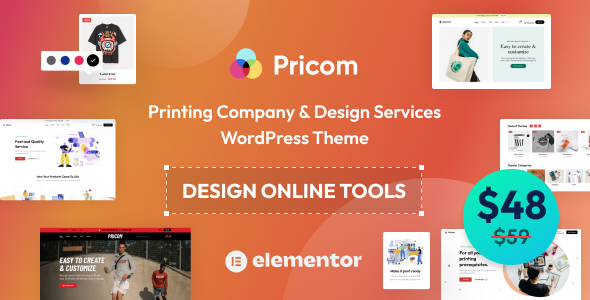
Stuck on your Pricom WordPress theme? Let's fix it.
No endless back-and-forth. Just send us the details and we'll get it done.
No obligation · Replies within 1 hour · Quote within 1 day
Setup · Customization · Bug fixes · WooCommerce integration
About Pricom WP Theme
Pricom is a multipurpose WordPress theme developed by HaruTheme. It targets creative agencies, portfolio sites, and business pages that need clean layouts without heavy page-builder overhead. Built on Elementor, it ships with a library of pre-built demo templates that cover a wide range of industries.
The theme handles typography, header styles, and color schemes through a well-organized Customizer panel. WooCommerce support is baked in, making it a reasonable choice for shops that want to keep a premium visual identity. HaruTheme keeps Pricom updated, and documentation covers the major setup steps. Where it falls short is deeper customization — anything beyond surface-level changes typically requires custom CSS or a developer familiar with the theme’s structure.
Get matched with a Pricom developer in under one day
Tell us about your Pricom project. Small fixes, Pricom theme customization, or a full website build, whatever you need, we've got it covered.
We'll connect you to the right Pricom developers, define the scope, and get everything 100% clear.
You'll get one estimate, hire your preferred developer, and start collaborating.
Pricom looks polished in demos but custom work is a different story. Modifying template files, creating Elementor widgets that match the theme’s design language, or integrating third-party APIs all require hands-on WordPress expertise. FoxyConcept connects you with vetted developers through Codeable, a platform built exclusively for WordPress. Every developer is screened. You get a clear estimate before any work starts, and you only pay if you decide to move forward.
Pros
- Elementor-based builder with a large library of pre-designed section blocks
- WooCommerce templates are included and styled to match the theme design
- Multiple header layouts with sticky and transparent options built in
- HaruTheme provides regular updates and responds to support tickets
- One-click demo import gets a basic site running quickly
Cons
- Deep customization beyond the Customizer requires custom CSS or PHP work
- Heavy reliance on Elementor means switching page builders later is painful
- Some demo assets require purchasing the premium plugin bundle separately
- Mobile layout fine-tuning often needs manual breakpoint adjustments
- Documentation covers basics but skips advanced developer-level integration
Who is Pricom for?
Creative Agencies
Pricom’s clean grid layouts and portfolio post type make it a practical pick for agency sites. You can showcase client work, display services with icon boxes, and build team pages using built-in Elementor widgets. The dark and light color modes give enough visual range to match different brand identities without starting from scratch.
WooCommerce Stores
The WooCommerce templates inside Pricom handle product grids, single product pages, and the cart flow with consistent styling. It works for fashion, tech accessories, or home goods stores where visual presentation matters. Adding custom product filters or checkout modifications will need a developer, but the base integration is solid out of the box.
Freelance Portfolios
Freelancers who want a portfolio site without a complex setup will find Pricom approachable. The portfolio post type, filterable grid, and project single page template cover most use cases. Typography controls let you match the site’s visual tone to your personal brand without touching code, which keeps the setup time short.
Corporate Business Sites
Pricom includes business-oriented demo templates with service sections, testimonial sliders, team grids, and contact pages. For a company site that needs to look polished without a custom design budget, it covers the core pages. Adding a careers section or custom forms requires additional configuration but nothing unusual for WordPress.
Event and Conference Pages
Event pages benefit from Pricom’s countdown timer widgets, speaker grid layouts, and schedule section templates available through the Elementor library. It handles single-event sites well. For recurring events or ticketing integration, you’ll want a plugin like The Events Calendar and a developer to connect it cleanly with the existing layout.

Customizing Pricom
Out-of-the-box, Pricom gives you header layout options, sticky navigation controls, footer widget areas, and per-page sidebar settings. Most visual changes happen inside Elementor’s drag-and-drop editor, but theme-specific controls live in the WordPress Customizer.
If you need something more specific — custom post types, modified WooCommerce templates, adjusted spacing, or a layout that doesn’t match any demo — a Pricom expert will save you hours of trial and error. HaruTheme’s options panel is functional, but it has limits. Custom child theme work, hook-based modifications, and conditional logic require developer-level knowledge of how Pricom structures its templates and filters.
Recommended plugins for Pricom
Pricom is built around Elementor, so any Elementor-compatible plugin extends it cleanly. WooCommerce integration works without additional configuration. Contact Form 7, WPML, and Rank Math all run without conflicts in standard setups.
For site speed, Pricom benefits from caching plugins like WP Rocket and image optimization tools. If your site is growing, consider pairing it with a WordPress performance service to reduce load times. SEO improvements beyond Rank Math defaults are worth handling through a dedicated WordPress SEO service.
Not sure which plugins to use? This WordPress plugins directory covers the most popular options with reviews and setup guides.
Pricom common issues
Pricom header not showing correctly after update
Header display issues after a Pricom update are usually caused by a conflict between the theme’s header options and a cached version of the layout. Start by clearing your caching plugin and browser cache. If you’re using a custom header saved in Elementor, re-save it. Check that your child theme’s header.php hasn’t overridden the parent template. If the issue persists, WordPress bug fixing can isolate the conflict quickly.
Pricom WooCommerce product page layout broken
Broken WooCommerce layouts in Pricom often happen when the WooCommerce plugin updates faster than the theme’s template files. Go to WooCommerce > Status > Tools and run the template file checker. Outdated template files need to be updated manually or through a child theme override. If you’re not comfortable editing PHP templates, a developer can update and test them without breaking your existing product pages.
Pricom Elementor widgets missing or not loading
Missing Elementor widgets from Pricom usually point to the HaruTheme plugin bundle not being active. Pricom relies on a companion plugin for its custom widgets. Go to Plugins and confirm the HaruTheme Core or equivalent plugin is installed and active. If it was deactivated during a cleanup, reactivating it should restore the widgets. A persistent issue may indicate a plugin version mismatch requiring a bug fix.
Pricom demo import failing or importing blank pages
Failed demo imports in Pricom are commonly caused by server memory limits, PHP execution timeouts, or missing required plugins. Check that max_execution_time is at least 300 seconds and memory_limit is 256M or higher. Install all required plugins before importing. If pages import but appear blank, the Elementor data likely didn’t transfer — try importing through the Elementor template library instead of the theme’s one-click tool.
Pricom FAQ
Pricom is a premium theme sold through ThemeForest and HaruTheme’s own marketplace. A free lite version has been available at certain points, but the full feature set — including all demo templates, header options, and WooCommerce layouts — requires a paid license. Check HaruTheme’s site for current pricing and license terms before purchasing.
Pricom works with Elementor Free for most layout tasks. However, some advanced features used in the demo templates, like custom popup builders or form integrations, may require Elementor Pro. The theme’s core design system and HaruTheme’s companion widgets function independently of Elementor Pro, so basic site builds don’t require the paid Elementor upgrade.
Yes. Pricom includes WooCommerce-specific templates for the shop archive, product single pages, cart, and checkout. The styling matches the rest of the theme. Standard store setups work without modification. If you need custom product layouts, subscription products, or advanced filtering, additional development work or plugins like WooCommerce Product Filter will be needed.
Create a child theme folder in your wp-content/themes directory with a style.css file that references Pricom as the template. Add a functions.php that enqueues the parent stylesheet. Activate the child theme from Appearance > Themes. All custom CSS and template overrides go into the child theme, which protects your changes when Pricom updates. If you’re moving an existing site to a child theme, a migration service can handle this safely.
Pricom is listed as WPML-compatible, meaning the theme’s text strings and layout areas can be translated using WPML or Polylang. Elementor-built pages are handled through WPML’s String Translation and the Elementor Multilingual integration. Full multilingual setup still requires proper configuration of both plugins and a clear content structure to avoid translation sync issues.
Hire a Pricom Developer
Need a Pricom developer who knows the theme inside out? Whether you’re building from a demo, creating a custom layout, or fixing something that broke after an update, we match you with a specialist who has done it before. Work is scoped clearly, delivered on time, and backed by the Codeable platform. Get a free estimate — no commitment required.
You'll need a free Codeable account so developers can ask questions and send their quotes.