Montoya WordPress Theme
by ClaPat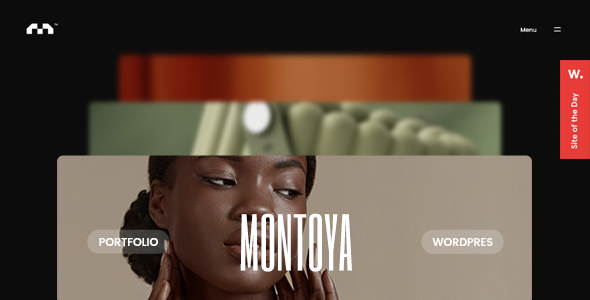
Stuck on your Montoya WordPress theme? Let's fix it.
No endless back-and-forth. Just send us the details and we'll get it done.
No obligation · Replies within 1 hour · Quote within 1 day
Setup · Customization · Bug fixes · WooCommerce integration
About Montoya WP Theme
Montoya is a WordPress theme developed by ClaPat, built for creative professionals who need a clean, portfolio-focused layout without excessive configuration. It targets photographers, designers, and agencies that want their work to speak first and their branding second.
The theme ships with a minimal aesthetic, smooth transitions, and a structure optimised for visual storytelling. It supports full-width image galleries, project case studies, and a straightforward homepage that keeps visitors focused on the work rather than the interface.
Montoya is compatible with the WordPress block editor and plays well with popular page builders. ClaPat maintains active updates, which keeps the theme stable across newer versions of WordPress. If you need a portfolio theme that stays out of its own way, Montoya is a solid starting point.
Get matched with a Montoya developer in under one day
Tell us about your Montoya project. Small fixes, Montoya theme customization, or a full website build, whatever you need, we've got it covered.
We'll connect you to the right Montoya developers, define the scope, and get everything 100% clear.
You'll get one estimate, hire your preferred developer, and start collaborating.
Montoya looks straightforward until you need it to do something specific. Custom layouts, plugin conflicts, or performance issues under a heavy image load are where things get complicated. FoxyConcept works with vetted WordPress developers through Codeable, matching you with someone who understands Montoya’s structure and can make precise changes without breaking what already works. No guesswork, no generic solutions applied to your specific site.
Pros
- Clean, minimal design that puts portfolio work front and centre without visual clutter
- Full-width gallery layouts display photography and design work at high impact
- Compatible with the WordPress block editor and major page builders
- ClaPat provides regular updates keeping the theme stable on current WordPress versions
- Lightweight code structure contributes to faster load times compared to bloated multi-purpose themes
Cons
- Limited built-in layout variety means heavier customisation is needed for non-standard portfolio structures
- Advanced typography controls require custom CSS or a child theme rather than Customizer settings
- WooCommerce shop pages need additional styling work to match the core theme aesthetic
- Documentation from ClaPat is sparse in places, making some features harder to configure without developer knowledge
- No built-in mega menu or complex navigation support, which limits multi-category site structures
Who is Montoya for?
Photographer Portfolio
Montoya’s full-width image handling and grid gallery options make it a natural fit for photographers. Projects can be grouped by category, and the minimal interface keeps the focus entirely on the images. A developer can extend this with custom filtering, lightbox adjustments, and a client proofing integration if needed.
Graphic Design Agency
Design agencies need case study pages that show process as well as outcomes. Montoya’s project template structure supports this well. With a Montoya developer adding custom meta fields and layout sections, each case study can carry more detail without disrupting the clean overall aesthetic of the site.
Freelance Creative Studio
Freelancers working across disciplines benefit from Montoya’s flexible grid and category-based portfolio organisation. You can separate branding, illustration, and motion work cleanly. Adding a contact or booking form integration alongside a services section gives the site enough functionality to replace a more complex multi-purpose theme.
Architecture Firm
Architecture firms rely on strong visual presentation and clear project documentation. Montoya’s layout handles large-format images and project descriptions without compression artifacts affecting quality. Custom project taxonomy and a refined typographic hierarchy, added by a developer, elevate the professional presentation further.
Fine Art Sales Site
Artists selling original work or prints need a portfolio that doubles as a shop. Montoya integrates with WooCommerce, though the shop pages benefit from custom styling to match the gallery aesthetic. Payment integration, product variants for print sizes, and a streamlined checkout can all be configured by a Montoya developer.

Customizing Montoya
Out of the box, Montoya gives you control over fonts, colours, header layouts, and portfolio grid styles through the WordPress Customizer. That covers most standard adjustments without touching code.
Beyond the basics, things get more specific. Custom project templates, unique hover effects, modified gallery behaviours, and layout changes that fall outside the Customizer all require direct theme file edits or child theme development. Without that foundation, you risk losing changes on the next update.
A Montoya expert can handle this properly. Whether you need a bespoke project page layout, a custom contact form integration, or a colour scheme that matches your brand precisely, working with someone who knows the theme’s structure saves time and avoids the common mistakes that break things quietly over time.
Recommended plugins for Montoya
Montoya works well with WooCommerce if you need to sell prints, services, or digital downloads directly from your portfolio site. WPForms and Contact Form 7 both integrate cleanly for enquiry and booking forms.
For SEO, the theme’s clean markup pairs well with Yoast or Rank Math. You can also improve site performance significantly by adding a caching plugin and optimising images through ShortPixel or Imagify. If you want stronger search visibility for your portfolio, a structured WordPress SEO strategy built on top of Montoya’s foundation will get results faster than theme-level tweaks alone.
Not sure which plugins to use? This WordPress plugins directory covers the most popular options with reviews and setup guides.
Montoya common issues
Montoya theme mobile menu not working
Mobile menu failures in Montoya usually come from a JavaScript conflict with another plugin or a cached version of a script not refreshing properly. Start by clearing all caches including server-side and CDN layers. Then deactivate plugins one at a time while testing the menu on a mobile device or browser dev tools. If the conflict is in a plugin you cannot remove, a targeted script deferral or load order fix applied through a child theme resolves it without touching the core theme files. If the issue persists, a WordPress bug fixing service can isolate it quickly.
Montoya portfolio grid not displaying correctly after update
Portfolio grid display issues after a Montoya update are typically caused by CSS changes in the updated files conflicting with custom styles added directly to the theme rather than a child theme. Check whether your customisations survived the update by comparing the current stylesheet against a backup. If grid items are misaligned or missing, inspect the elements in browser dev tools to find which CSS rule is being overridden. Moving all custom styles into a child theme prevents this from recurring on the next update.
Montoya theme slow loading with large image galleries
Slow load times on Montoya sites with heavy image galleries are almost always an image optimisation problem rather than a theme problem. Uncompressed files above 500KB per image will drag performance down regardless of the theme. Run images through ShortPixel or Imagify, enable lazy loading, and use a caching plugin. If scores are still low after that, check for render-blocking scripts. A full review of your WordPress performance setup will identify the remaining bottlenecks precisely.
Montoya custom CSS changes disappearing after theme update
Custom CSS disappearing after a Montoya update means the changes were saved inside the theme’s own files rather than in a child theme or the WordPress Additional CSS field. Any edits made directly to parent theme files are overwritten when ClaPat pushes an update. The fix is to create a child theme, move all custom styles into its stylesheet, and keep the parent theme updatable. Going forward, never edit parent theme files directly. A developer can migrate your existing customisations into a child theme without losing anything.
Montoya FAQ
ClaPat actively maintains Montoya and the theme is compatible with current WordPress versions including the 6.x line. That said, major WordPress releases occasionally introduce block editor or core changes that require a theme update to follow. Keep Montoya updated to the latest version and test on a staging environment before updating a live site to catch any compatibility issues before they affect visitors.
Montoya works with Elementor and WPBakery on most pages, but the portfolio-specific templates are built into the theme’s own structure. Page builder use works best on standard pages like contact, about, and services. Trying to rebuild the core portfolio grid inside a page builder often creates layout conflicts. If you need deeper page builder integration, a developer can set up templates that respect both systems without breaking the default portfolio functionality.
Custom fonts in Montoya can be added through Google Fonts via the Customizer if the theme includes that option, or by enqueuing a font directly in a child theme’s functions.php file. Self-hosted fonts require uploading the font files, adding the @font-face declaration in CSS, and then applying the font-family to the relevant elements. Doing this in a child theme keeps the changes intact through updates.
Montoya supports WooCommerce but the shop, product, and cart pages inherit minimal styling from the theme rather than a dedicated WooCommerce layout. The functional side works, but the visual integration between the portfolio aesthetic and the shop pages needs additional CSS work to look consistent. A developer familiar with both Montoya and WooCommerce can align the shop styling with the rest of the site without a full rebuild.
Migrating a Montoya site to a new host involves moving the database, all WordPress files, and updating the site URL in the database. The theme itself travels with the WordPress installation so no reinstallation is needed. The most common issue is URL references breaking after the move. A WordPress migration service handles this cleanly and verifies the site is fully functional on the new server before the old one goes offline.
Hire a Montoya WordPress Developer
If your Montoya site needs custom development, a layout that the Customizer cannot produce, or a fix that has been sitting unresolved, a specialist is faster and cheaper than trial and error. Get a free estimate through FoxyConcept. You describe what you need, a vetted Montoya developer reviews it, and you get a clear price before committing to anything. No obligation, no risk.
You'll need a free Codeable account so developers can ask questions and send their quotes.