Dine WordPress Theme
by withemes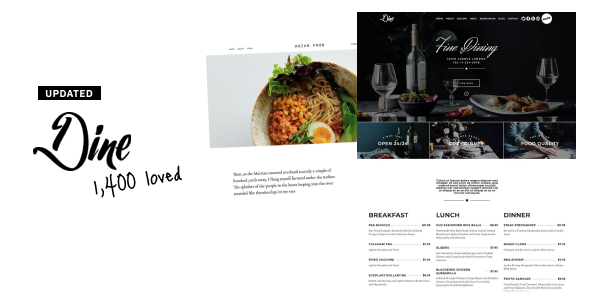
Stuck on your Dine WordPress theme? Let's fix it.
No endless back-and-forth. Just send us the details and we'll get it done.
No obligation · Replies within 1 hour · Quote within 1 day
Setup · Customization · Bug fixes · WooCommerce integration
About Dine WP Theme
Dine is a restaurant-focused WordPress theme built by WiThemes. It’s designed specifically for food businesses — restaurants, cafes, bars, and catering companies — that need a clean, visual-first website without hiring a developer from scratch.
The theme includes dedicated sections for menus, reservations, team profiles, and testimonials. It works with Elementor, making layout edits straightforward for most site owners. The design leans on large food photography, warm typography, and a clear hierarchy that guides visitors toward booking a table or viewing the menu.
Dine is a solid starting point for food and hospitality businesses. Out of the box, it covers most of what a restaurant site needs. Where it gets more specific — custom booking flows, multilingual menus, or brand-specific styling — you’ll likely want a developer to take it further.
Get matched with a Dine developer in under one day
Tell us about your Dine project. Small fixes, Dine theme customization, or a full website build, whatever you need, we've got it covered.
We'll connect you to the right Dine developers, define the scope, and get everything 100% clear.
You'll get one estimate, hire your preferred developer, and start collaborating.
Most Dine setups start simple and grow complicated fast — a reservation system here, a custom menu layout there, a mobile styling issue that only appears on one device. These aren’t problems you want to troubleshoot alone.
FoxyConcept works with vetted Dine developers through Codeable. Every developer on the platform has passed a thorough vetting process, so you’re not rolling the dice on quality. Whether you need a single fix or a full build, you get matched with someone who knows the theme and the WordPress ecosystem behind it.
Pros
- Purpose-built for restaurants — menu sections, reservation areas, and gallery layouts are all included out of the box
- Elementor compatibility makes visual editing accessible without touching code
- Clean, image-forward design that works well for food photography
- Responsive layout handles mobile and tablet views without major fixes needed
- Lightweight structure compared to bloated multipurpose themes — faster baseline performance
Cons
- Limited to food and hospitality niches — poor fit for any other business type
- No built-in reservation system — requires a third-party plugin integration
- Elementor dependency means you're locked into that page builder ecosystem
- Fewer layout variations than larger commercial themes — customization ceiling is lower
- WiThemes support and update cadence is less active than major theme shops like ThemeForest top sellers
Who is Dine for?
Independent Restaurants
Dine suits single-location restaurants well. The theme’s menu display, hours section, and reservation prompt cover what most independent spots need. A developer can connect it to OpenTable or a custom booking form, add a kitchen story section, and tune the mobile experience so it works on a diner’s phone in two seconds flat.
Cafes and Coffee Shops
Cafes need a site that’s fast, warm, and readable. Dine’s typography and image sections work for showcasing seasonal drinks and food menus. Add an Instagram feed, a simple online order link, and Google Maps embed, and the site does its job. A developer can wire those pieces together cleanly without bloating the page.
Bars and Cocktail Lounges
Bars benefit from Dine’s full-screen hero images and bold layouts. A custom cocktail menu, event calendar, and late-night hours display are all achievable. The theme’s dark color palette options suit the aesthetic. A developer handles the event plugin integration and makes sure the site reads well on mobile during a night out.
Catering Companies
Catering companies need to show menus, service tiers, and a clear inquiry form. Dine’s section structure supports that with some developer input. A custom quote request form, gallery of past events, and service area page can all be built on top of the theme without replacing it entirely.
Food Trucks
Food trucks run on location updates and rotating menus. Dine can handle the visual side — a strong hero, menu display, and contact section. A developer can add a dynamic schedule feature or embed a Google Calendar for weekly stops, making it easy for the owner to update without touching the backend constantly.

Customizing Dine
Dine ships with a set of pre-built sections you can rearrange through Elementor. That covers the basics: hero images, menu sections, gallery grids, and contact forms. Customizing beyond those templates takes more work.
Fonts, colors, and spacing can be adjusted through the WordPress Customizer or Elementor’s style panel. More involved changes — custom menu filters, interactive reservation integrations, or multi-location layouts — require direct theme or child theme edits.
A Dine expert can handle that properly. Rather than hacking the parent theme and losing changes on every update, a developer builds a child theme, makes targeted modifications, and keeps everything maintainable. If you’ve already started customizing Dine and hit a wall, a specialist can take over from wherever you are.
Recommended plugins for Dine
Dine pairs well with a few key plugins. WooCommerce works for online ordering or selling gift cards. OpenTable or Resy embeds handle reservations. WPML or Polylang adds multilingual support for menus and pages.
For SEO, Dine’s clean markup is a good foundation, but you’ll still need proper configuration. See our WordPress SEO service for that. On the performance side, large food photography can slow load times significantly — our WordPress performance service covers image optimization, caching, and Core Web Vitals improvements specific to visual-heavy themes like Dine.
Not sure which plugins to use? This WordPress plugins directory covers the most popular options with reviews and setup guides.
Dine common issues
Dine theme menu section not displaying correctly
Menu display issues in Dine usually come from a conflicting plugin, a corrupted Elementor template, or a CSS override from a custom stylesheet. Start by deactivating plugins one at a time and checking if the menu section recovers. If the issue started after a theme update, a child theme may not have been in place — meaning custom styles were wiped. A developer can audit the template, rebuild the section cleanly, and protect it going forward. See our WordPress bug fixing service if you need someone to handle it.
Dine WordPress theme slow on mobile
Dine’s heavy use of food photography is the most common cause of slow mobile performance. Images uploaded at full resolution without compression will fail Core Web Vitals tests. Check whether your images are being served in WebP format and whether lazy loading is enabled. A caching plugin like WP Rocket helps, but image optimization needs to happen at the source too. A performance audit will show exactly which assets are causing delays. Our WordPress performance service covers this end to end.
Dine theme Elementor sections not loading after update
After a Dine or Elementor update, saved templates sometimes break due to deprecated widgets or changed element names. Open the affected page in Elementor’s editor and check for elements flagged with a warning icon. Regenerating the CSS cache under Elementor > Tools usually clears minor rendering issues. If entire sections are missing, the template data may need to be rebuilt. This is a known Elementor compatibility issue and a developer can restore the layout without rebuilding the whole page from scratch.
Dine theme reservation form not sending emails
If the reservation or contact form in Dine isn’t sending emails, the problem is almost always server-side email delivery, not the form itself. WordPress uses PHP mail by default, which most hosts block or throttle. Install an SMTP plugin — WP Mail SMTP is reliable — and connect it to a transactional email service like Mailgun or SendGrid. Test with the plugin’s built-in email test tool. If the form still doesn’t send after that, the form plugin itself may need reconfiguring. Our bug fixing service covers email delivery issues.
Dine FAQ
Dine by WiThemes is available in both free and premium versions. The free version covers core layout sections and basic customization. The premium version unlocks additional templates, more styling options, and priority support from WiThemes. For most restaurant builds that go beyond a basic setup, the premium version or a developer is needed to get the full result.
Yes. Dine is built to work with Elementor, and the theme’s demo content is structured around Elementor page templates. You can drag, drop, and rearrange sections through the Elementor editor without touching code. For more complex layouts or custom widget configurations, a developer familiar with both Dine and Elementor will get you further faster.
Dine does not include a built-in reservation system. You can add one through plugins like OpenTable’s WordPress embed, Bookly, or Amelia. Each has different setup requirements and pricing. A developer can integrate the system cleanly into your Dine layout, style it to match the theme, and make sure confirmation emails are working correctly from day one.
Menu content in Dine is managed through Elementor’s page editor. Open the menu page, click into the relevant section, and update the text, prices, or images directly in the editor. If your menu is built using a dedicated menu plugin, updates happen in that plugin’s dashboard instead. Either way, no code is needed for routine menu content changes.
Yes, migrating an existing restaurant site to Dine is possible. Content can be moved over and rebuilt within Dine’s templates. The complexity depends on how custom your current site is. If you have a reservation system, custom post types, or a large gallery, a developer should handle the migration to avoid data loss or broken layouts. Our WordPress migration service covers this.
Hire a Dine WordPress Developer
Need a Dine developer for a custom menu layout, reservation integration, or a site build from scratch? FoxyConcept delivers WordPress work through Codeable, matching you with a vetted specialist within 24 hours.
Post your project, get a free estimate, and decide from there. No commitment required. Get your free estimate today and describe what you need — a developer will come back to you with a clear scope and price.
You'll need a free Codeable account so developers can ask questions and send their quotes.