Lumi WordPress Theme
by UiCore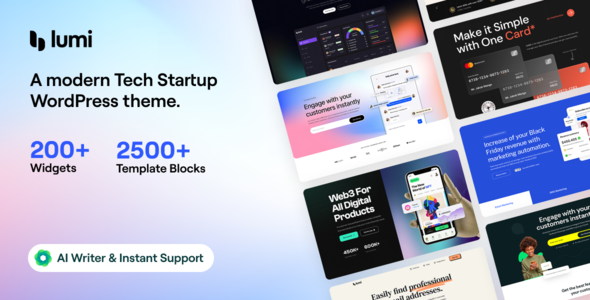
Stuck on your Lumi WordPress theme? Let's fix it.
No endless back-and-forth. Just send us the details and we'll get it done.
No obligation · Replies within 1 hour · Quote within 1 day
Setup · Customization · Bug fixes · WooCommerce integration
About Lumi WP Theme
Lumi is a multipurpose WordPress theme built by UiCore, the team behind the UiCore Framework. It ships with a library of pre-built website templates, a drag-and-drop page builder integration, and a settings panel that covers typography, colors, and layout without touching code.
The theme is built on UiCore’s own framework, which handles performance and compatibility under the hood. You get header and footer builders, WooCommerce support, and a clean admin interface. Lumi targets agencies, freelancers, and small businesses who want full design control without hiring a developer for every small change.
It works with Elementor and the native block editor, so your existing workflow is unlikely to need a full overhaul. Updates come through the WordPress dashboard. Licensing is handled directly through UiCore’s website.
Get matched with a Lumi developer in under one day
Tell us about your Lumi project. Small fixes, Lumi theme customization, or a full website build, whatever you need, we've got it covered.
We'll connect you to the right Lumi developers, define the scope, and get everything 100% clear.
You'll get one estimate, hire your preferred developer, and start collaborating.
Lumi gives you a capable starting point, but production sites usually need more than default settings. A developer who knows the UiCore framework can build custom templates, fix layout edge cases, and optimize the theme for real-world performance without breaking existing pages.
FoxyConcept connects you with vetted WordPress specialists through Codeable. Every developer on the platform has passed a strict vetting process. You describe your project, get a clear estimate, and only move forward when you’re comfortable. No retainers, no guesswork.
Pros
- Visual header and footer builder included without needing a separate plugin
- Works with both Elementor and the WordPress block editor
- Global typography and spacing controls apply site-wide from one settings panel
- WooCommerce styling is built in and inherits global theme settings automatically
- Large library of pre-built demo templates for fast project starts
Cons
- Relies on the UiCore Framework, so switching themes later requires a full rebuild
- Some advanced layout options are only accessible through custom CSS or developer knowledge
- Documentation gaps exist for less common use cases like custom post type archives
- Theme updates occasionally require checking for compatibility with active plugins
- Support quality can vary depending on the complexity of your issue
Who is Lumi for?
Agency Portfolio Sites
Lumi handles the visual complexity that agency portfolios need. The header builder supports transparent overlays and sticky navigation. Page templates can be fully customized per project showcase. The demo library includes agency-style layouts that are production-ready with content swaps and brand color updates applied through the theme panel.
WooCommerce Stores
WooCommerce integration is built directly into the theme, not bolted on. Product pages, cart, and checkout inherit global typography and spacing. The footer builder works well for trust badges and policy links. For stores needing custom product layouts or filtered archive pages, a developer can extend the theme without breaking core WooCommerce functionality.
Service Business Websites
Service businesses need clear calls to action and fast-loading pages. Lumi’s section-based templates support pricing tables, testimonials, and contact forms without needing heavy page builder setups. The theme’s clean output keeps page speed reasonable, and the global settings make brand consistency across multiple service pages straightforward to maintain.
Coaching and Online Courses
Coaches and course creators need landing pages that convert. Lumi supports full-width hero sections, video embeds, and testimonial blocks through its template library. It integrates with MemberPress, LearnDash, and similar plugins without layout conflicts. The typography controls help maintain a consistent visual tone across sales pages and lesson content.
SaaS and Tech Product Pages
SaaS landing pages need precise layout control and fast load times. Lumi’s container settings support asymmetric layouts and wide sections suited to feature breakdowns and pricing comparisons. The block editor compatibility means developers can build reusable patterns. The theme outputs minimal default styles, which gives developers more control over final presentation.

Customizing Lumi
Lumi’s customization options go beyond basic color pickers. The theme panel lets you control global typography, spacing, and container widths site-wide. The visual header builder handles sticky menus, transparent headers, and mobile breakpoints without extra plugins.
Inner page templates can be assigned per post type, and the footer builder supports multi-column layouts with widget areas. WooCommerce pages inherit global styles automatically, which saves time on shop builds.
That said, some configurations get complex quickly. If you want a non-standard layout, custom post type archives, or specific performance tuning, working with a Lumi expert will get you there faster than trial and error in the settings panel. A developer who knows the UiCore framework can also handle custom CSS and child theme setup properly from the start.
Recommended plugins for Lumi
Lumi pairs well with plugins that extend what the theme framework already provides. Elementor Pro adds popup builders and form widgets. WooCommerce handles ecommerce without conflicts. WPML and Polylang both work for multilingual builds.
For performance, the theme is compatible with caching plugins like WP Rocket and image optimization tools, though you should review WordPress performance best practices before stacking too many plugins.
If SEO is a priority, Lumi outputs clean markup that works well with Yoast or Rank Math. You can also review WordPress SEO setup options to get more from the theme’s structure out of the box.
Not sure which plugins to use? This WordPress plugins directory covers the most popular options with reviews and setup guides.
Lumi common issues
Lumi theme header not showing on mobile
Mobile header issues in Lumi usually come from the header builder’s breakpoint settings. Open the header builder and check the mobile menu settings tab. Make sure the mobile breakpoint is set correctly and that the mobile menu element is actually added to the header canvas. If a caching plugin is active, clear the cache after saving. If the header shows in the customizer but not on the live site, a caching or CDN issue is the likely cause. Check your WordPress troubleshooting options if the issue persists.
Lumi WordPress theme slow loading after update
Post-update slowdowns in Lumi are often related to font loading or unused CSS generated by the theme panel. Check whether Google Fonts are loading from an external request and consider self-hosting them. Also review whether the UiCore Framework is generating inline CSS that could be cached. Run a speed test with a tool like GTmetrix to identify the specific bottleneck. Disable recently updated plugins one at a time to rule out conflicts before adjusting theme settings.
Lumi page builder layout broken after plugin update
Layout breaks after a plugin update usually point to a CSS or JavaScript conflict introduced by the updated plugin. Start by deactivating the updated plugin and checking if the layout returns to normal. If it does, the conflict is in that plugin’s new version. Check the plugin’s changelog for known issues. If you’re using Elementor, regenerate CSS files from Elementor’s Tools panel. A developer can diagnose the exact conflict faster through WordPress bug fixing if the issue is difficult to isolate.
Lumi WooCommerce product page not using theme template
If WooCommerce product pages are not using the Lumi template, check the theme’s WooCommerce settings inside the Lumi panel. There is often a toggle to enable the theme’s custom product page layout. Also verify that no page builder template has been assigned at the individual product level, overriding the global setting. If you have a custom child theme active, check whether a woocommerce folder inside the child theme is overriding the parent theme’s templates unintentionally.
Lumi FAQ
Lumi is a premium theme sold through UiCore’s website. There is no free version, though UiCore offers a free theme called Uicore Framework with a subset of features. Lumi licensing is sold per site or as a bundle. Check UiCore’s pricing page for current rates, as they update plans periodically.
Yes, Lumi is compatible with Elementor and is frequently used with it. The theme’s header and footer builders operate independently from Elementor, so you use the UiCore builder for site-wide structure and Elementor for page content. Both can run together without conflicts in most standard setups.
Most site setup tasks in Lumi are manageable without coding. The settings panel covers typography, colors, and layout globally. The header and footer builders are visual. For advanced customizations like custom post type templates, specific archive layouts, or performance tuning, a developer will save you significant time.
Lumi has built-in WooCommerce support. Product pages, shop archives, cart, and checkout all inherit global theme styles. The theme includes WooCommerce-specific settings in its panel. For complex stores with custom product types, filtered archives, or checkout modifications, additional development work is usually needed beyond what the theme provides by default.
UiCore provides support through a ticket system on their website. Response times vary. For complex issues or custom development requests, their support team will typically point you toward documentation or suggest a developer. If you need faster resolution or custom work done, a vetted developer through a service like Codeable is a more reliable option for production sites.
Hire a Lumi WordPress Developer
Need a Lumi developer to build your site, fix a layout issue, or customize the theme beyond what the settings panel allows? FoxyConcept works through Codeable to match you with a vetted WordPress developer who knows the UiCore framework. You get a free estimate before any work begins, and there’s no obligation to hire.
Get your free estimate and describe what you need. A developer will review your project and get back to you within 24 hours.
You'll need a free Codeable account so developers can ask questions and send their quotes.