Mobimax WordPress Theme
by enovathemes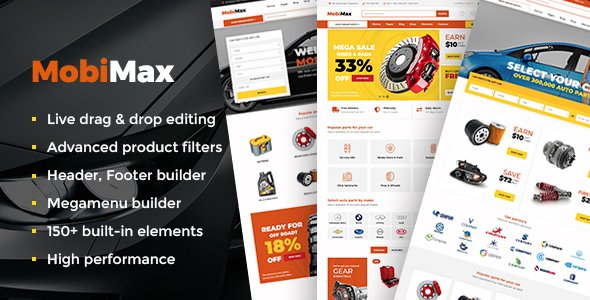
Stuck on your Mobimax WordPress theme? Let's fix it.
No endless back-and-forth. Just send us the details and we'll get it done.
No obligation · Replies within 1 hour · Quote within 1 day
Setup · Customization · Bug fixes · WooCommerce integration
About Mobimax WP Theme
Mobimax is a WordPress theme built by Enovathemes, designed specifically for car dealerships, auto parts stores, and automotive service businesses. It ships with a vehicle listing system, advanced search filters by make, model, year, and price, and a layout built around high-volume inventory display.
The theme integrates with WooCommerce for parts and accessories sales, includes a compare vehicles feature, and supports dealer-specific pages like financing, trade-in, and service booking. Enovathemes built Mobimax with their own page builder compatibility and a dedicated theme options panel, giving site owners control over colors, fonts, and layout without touching code. It is a purpose-built solution for automotive businesses that need more than a generic WordPress theme can offer.
Get matched with a Mobimax developer in under one day
Tell us about your Mobimax project. Small fixes, Mobimax theme customization, or a full website build, whatever you need, we've got it covered.
We'll connect you to the right Mobimax developers, define the scope, and get everything 100% clear.
You'll get one estimate, hire your preferred developer, and start collaborating.
Mobimax is not a difficult theme, but automotive sites have specific requirements that go beyond standard WordPress setup. Inventory management, lead tracking, DMS integrations, and performance under heavy listing loads all require hands-on experience.
Through Codeable, you get access to vetted WordPress developers who have worked with Mobimax and similar automotive themes. You post your project, get a fixed estimate within 24 hours, and only move forward if the scope and price work for you. No risk, no obligation.
Pros
- Purpose-built vehicle listing system with make, model, year, price, and mileage filters built in
- WooCommerce integration allows auto parts and accessories sales alongside the vehicle inventory
- Compare vehicles feature works out of the box without additional plugins
- Enovathemes releases regular updates and the theme has been maintained for several years
- Dedicated dealer pages for financing, trade-in, and service booking are included in the base theme
Cons
- The theme options panel has a learning curve and some settings are not clearly labeled
- The built-in page builder is less flexible than Elementor or Bricks for truly custom layouts
- Large vehicle inventories can slow the site down without proper caching and hosting configuration
- Third-party DMS or inventory feed integrations require custom development, nothing built in
- Enovathemes support covers bugs but does not help with customization or third-party plugin conflicts
Who is Mobimax for?
Used Car Dealerships
Mobimax is a strong fit for used car dealerships that need to list vehicles with detailed specs, photos, and pricing. The advanced search filters let buyers narrow by make, model, year, mileage, and price. The compare feature helps buyers evaluate multiple vehicles side by side, which reduces back-and-forth with sales staff.
Auto Parts Online Stores
The WooCommerce integration makes Mobimax usable for auto parts retailers. Products can be categorized by vehicle compatibility, and the store layout handles large catalogs. You will likely need custom work to connect a parts catalog database or set up fitment filtering by vehicle, but the foundation is there.
Car Rental Companies
Car rental businesses can use Mobimax to display their fleet with availability details and booking forms. The vehicle listing structure adapts reasonably well to rental use cases. A developer will need to set up a booking plugin and modify the listing fields to show rental-specific information like daily rates and availability.
Motorcycle Dealers
Motorcycle dealerships work well with Mobimax because the listing system is vehicle-type agnostic. Categories, search filters, and spec fields can be relabeled and configured for motorcycles, scooters, or powersports inventory without needing to rebuild the template structure from scratch.
Automotive Service Centers
Service centers can use Mobimax to present their services, allow appointment bookings, and maintain a professional automotive brand identity. The theme’s service page templates and contact forms support this. A booking plugin integration will likely be needed for real-time scheduling functionality.

Customizing Mobimax
Mobimax covers the basics out of the box, but most automotive businesses need customization to match their brand, workflow, or inventory system. That is where a Mobimax expert becomes useful.
Common customization work includes building custom vehicle listing templates, connecting to third-party dealer management systems, adding custom search filters, modifying the compare tool, and integrating booking or lead capture forms. WooCommerce extensions for parts sales often need configuration beyond the defaults.
Enovathemes provides documentation, but their support does not cover custom development. If you need Mobimax to behave differently from its defaults, you need a developer who has worked with the theme before and knows where its limits are.
Recommended plugins for Mobimax
Mobimax pairs well with several plugins that extend its core functionality. WPML handles multilingual dealer sites. Gravity Forms or WPForms work for lead capture and service booking. For inventory imports, plugins like Auto Listings or custom CSV importers are common additions.
WooCommerce powers the parts store side. On the performance side, caching plugins and image optimization matter a lot when you are displaying large vehicle galleries. If you are running paid ads, tracking setup and SEO configuration need attention. Hosting and WordPress performance tuning become critical once inventory grows past a few hundred listings.
Not sure which plugins to use? This WordPress plugins directory covers the most popular options with reviews and setup guides.
Mobimax common issues
Mobimax vehicle search not working after update
Search filter breakage after an update usually points to a JavaScript conflict or a database query issue with the vehicle taxonomy. First, check the browser console for JS errors. Disable recently added plugins to isolate the conflict. If the issue appeared after a Mobimax update specifically, check the Enovathemes changelog and support forum. Persistent search problems often need a developer to dig into the filter query logic. Our WordPress bug fixing service can diagnose and resolve this quickly.
Mobimax WooCommerce products not displaying correctly
WooCommerce display issues in Mobimax are often caused by a theme template override that has not been updated to match the current WooCommerce version. Check if Mobimax includes custom WooCommerce templates in its folder structure. If so, those need to be updated to match the WooCommerce template version you are running. Clearing the cache after template changes is also required. A developer familiar with WooCommerce template hierarchy can fix this cleanly.
Mobimax theme slow loading with large inventory
Large vehicle inventories put strain on WordPress databases and image loading. Start with a caching plugin, lazy loading for vehicle images, and a CDN. Check whether the listing queries are using proper indexing. Pagination settings in Mobimax also affect load times. If speed is still an issue after those steps, the problem may be at the server or database level. See our WordPress performance service for a full audit.
Mobimax contact form or lead form not sending emails
Email delivery failure in Mobimax contact or lead forms is almost always a server mail configuration issue, not a theme bug. WordPress sends email through PHP mail by default, which most hosting providers block or deprioritize. Install an SMTP plugin like WP Mail SMTP and connect it to a transactional email service. Also check that your form plugin is correctly configured and that no spam filter is catching outbound messages.
Mobimax FAQ
Yes, Mobimax is one of the more focused automotive themes available for WordPress. It includes vehicle listings, advanced search filters, a compare tool, and dealer-specific page templates. It is a better starting point than adapting a general multipurpose theme. That said, large or complex dealerships will still need custom development work to match their exact workflow.
Mobimax uses its own page builder system from Enovathemes and is not built to work natively with Elementor. You can install Elementor, but Mobimax’s vehicle listing components and custom post types will not integrate with Elementor’s widgets. If you want Elementor-based design control, you would be working around the theme rather than with it.
Mobimax does not include a built-in bulk import tool for vehicle listings. You would need a CSV import plugin or a custom importer script. Developers often build a workflow using WP All Import or a custom plugin to pull inventory from a feed or spreadsheet. The vehicle custom post type structure in Mobimax needs to be mapped correctly for this to work.
Mobimax updates the core theme files. If you made changes directly to theme files, those changes will be overwritten. The correct approach is to use a child theme for any code-level customizations before you update. If you did not set up a child theme initially, a developer will need to extract your changes and move them safely before the update is applied.
Migrating an existing dealer site to Mobimax is possible but involves more than a standard WordPress migration. Your existing vehicle data needs to be mapped to Mobimax’s custom post type fields. Images, specs, and metadata all need to transfer correctly. A developer experienced with Mobimax can plan and execute the migration without losing inventory data.
Hire a Mobimax Developer
Whether you need a full Mobimax setup, a custom vehicle listing template, a WooCommerce integration for parts, or help fixing something that broke, a dedicated Mobimax developer can handle it properly. Work is delivered through Codeable, a vetted network of WordPress specialists. Post your project, get a free estimate within 24 hours, and hire only if it makes sense. Get your free estimate here.
You'll need a free Codeable account so developers can ask questions and send their quotes.