Musea WordPress Theme
by Elated-Themes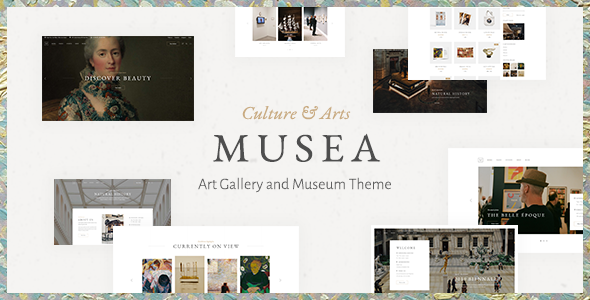
Stuck on your Musea WordPress theme? Let's fix it.
No endless back-and-forth. Just send us the details and we'll get it done.
No obligation · Replies within 1 hour · Quote within 1 day
Setup · Customization · Bug fixes · WooCommerce integration
About Musea WP Theme
Musea is a WordPress theme built by Elated-Themes, aimed at art galleries, museums, photographers, and creative agencies. It ships with a visual drag-and-drop page builder, a large library of pre-built demos, and portfolio layouts designed to put visual content first.
The theme includes Elated’s own shortcode system alongside WPBakery Page Builder, giving you control over grid layouts, parallax sections, hover effects, and custom typography. It also integrates with WooCommerce for selling prints or digital products.
Musea is a good fit if you want a polished, image-heavy site without starting from scratch. That said, the volume of options in the admin panel can slow down the build process for anyone not already familiar with Elated-Themes products.
Get matched with a Musea developer in under one day
Tell us about your Musea project. Small fixes, Musea theme customization, or a full website build, whatever you need, we've got it covered.
We'll connect you to the right Musea developers, define the scope, and get everything 100% clear.
You'll get one estimate, hire your preferred developer, and start collaborating.
Elated-Themes products have a specific structure that differs from standard WordPress themes. Options are stored in custom database fields, layouts depend on WPBakery shortcodes, and child theme setup has quirks worth knowing before you start. Hiring through Codeable connects you with vetted developers who have worked with Musea and similar Elated themes before. You get an accurate estimate upfront, no hourly billing surprises, and a developer who knows exactly where to look when something does not behave as expected.
Pros
- Large library of pre-built demos covering galleries, museums, photography studios, and agencies
- WooCommerce integration with styled templates for selling prints or digital artwork
- Multiple header styles including transparent, sticky, and split layouts built in
- Portfolio post type with filterable grid, masonry, and list layouts included
- WPML compatible for multilingual gallery or studio sites
Cons
- Relies on WPBakery shortcodes, making content difficult to migrate away from the theme
- Elated Options panel is separate from the WordPress Customizer and has a steep learning curve
- Theme ships with several bundled plugins that can conflict with third-party alternatives
- No built-in performance optimisation, and the demo content imports are image-heavy
- Support is limited to the Elated-Themes forum, with slower response times compared to premium dedicated support
Who is Musea for?
Art Gallery Website
Musea’s full-screen portfolio layouts and filterable gallery grids make it a natural fit for art galleries. You can organise work by medium, artist, or exhibition using the built-in portfolio categories. The hover effects and lightbox options let visitors inspect artwork without leaving the page, which keeps the browsing experience close to a real gallery visit.
Photography Portfolio
Photographers need layouts that get out of the way of the images. Musea’s masonry grids, full-width portfolio pages, and minimal header options keep the focus on the work. The built-in lightbox and slideshow elements handle image presentation without requiring additional plugins, which reduces page load overhead compared to stacking multiple gallery plugins.
Museum or Cultural Institution
Cultural institutions often need multiple content types on one site: exhibitions, events, collections, and ticketing. Musea’s multi-demo library includes museum-specific layouts, and the WPBakery builder gives enough flexibility to build distinct page templates for each content area. WPML support covers multilingual requirements common in public institutions.
Creative Agency
Creative agencies can use Musea to showcase client work through the portfolio post type while building out service and about pages using the drag-and-drop builder. The split-screen and parallax section options add visual variety without custom development. For agencies with specific branding requirements, a child theme keeps customisations separate from core theme files.
Artist Selling Prints Online
Artists selling limited edition prints or digital downloads can combine Musea’s portfolio layouts with WooCommerce product pages. The theme’s styled shop templates match the overall aesthetic without heavy customisation. Adding a payment gateway and setting up shipping or digital delivery requires standard WooCommerce configuration, which any experienced developer can handle quickly.

Customizing Musea
Musea’s admin panel gives you control over header styles, colour schemes, Google Fonts, footer layouts, and blog templates without touching code. Most adjustments happen through the Elated Options panel rather than the WordPress Customizer, which takes some getting used to.
For anything beyond the defaults, such as custom post type layouts, unique portfolio filtering, or bespoke WooCommerce templates, you will need PHP and CSS knowledge. A Musea expert can wire up child theme overrides cleanly, add custom shortcodes, or rebuild a section to match a specific design brief without breaking future updates.
If your project has specific layout requirements that the demo content does not cover, working with someone who knows the Elated codebase will save you significant time.
Recommended plugins for Musea
Musea works with several popular plugins out of the box. WooCommerce adds a shop, and the theme includes styled product and cart templates. Contact Form 7 and WPML are both supported for multilingual and contact functionality.
For performance, image optimisation and a caching layer are not included and need to be added separately. Check our WordPress performance service if page speed is a priority. If organic search matters to your gallery or studio, pairing Musea with a proper setup covered by our WordPress SEO service will make a measurable difference.
Not sure which plugins to use? This WordPress plugins directory covers the most popular options with reviews and setup guides.
Musea common issues
Musea theme portfolio not showing images correctly
Portfolio image display issues in Musea are usually caused by thumbnail size mismatches or a missing image regeneration step after import. Go to Settings > Media and confirm your image dimensions match the portfolio layout selected. Then run a thumbnail regeneration plugin such as Regenerate Thumbnails. If images are still cropped incorrectly, check the portfolio shortcode settings inside WPBakery for the image aspect ratio option.
Musea WPBakery elements not loading on frontend
If WPBakery elements appear as raw shortcode text on the frontend, the plugin is likely inactive or in Classic Editor mode. Go to WPBakery Page Builder > Role Manager and confirm the editor is enabled for your user role. Also check that WPBakery is activated under Plugins. If the issue appeared after a WordPress update, check the Elated-Themes forum for a theme patch or contact a developer through our WordPress bug fixing service.
Musea theme slow page load speed
Musea loads several scripts and stylesheets by default, and demo images are typically large. Start by enabling a caching plugin such as WP Rocket or W3 Total Cache. Use a CDN to serve images, and run all portfolio images through a compression tool before uploading. Disable any bundled Elated plugins you are not actively using. For a full audit, our WordPress performance service covers script optimisation and server-level caching configuration.
Musea child theme not applying custom CSS
If your Musea child theme CSS is not applying, first confirm the child theme is active under Appearance > Themes. Check that your child theme’s style.css includes the correct Template: musea header. If styles are being overridden, use browser dev tools to identify the conflicting rule. Elated-Themes uses high-specificity selectors in places, so you may need to increase specificity in your child theme rules rather than just adding the property.
Musea FAQ
Elated-Themes has released updates to maintain WordPress 6 compatibility, but the pace of updates is slower than some other theme developers. Always check the changelog on ThemeForest before updating WordPress on a live site. Running a staging environment before major WordPress core updates is strongly recommended when using Musea, given its reliance on bundled plugins and custom shortcodes.
Musea is built around WPBakery Page Builder. Most of the pre-built demo layouts depend on WPBakery shortcodes to render correctly. You can write custom page templates in a child theme without WPBakery, but you will effectively be rebuilding the layouts from scratch. For simple pages like contact or about, using the Classic Editor without WPBakery works fine.
After activating Musea, go to Elated Import in the WordPress admin. Select a demo from the list and run the one-click import. This pulls in demo pages, images, menus, and widget settings. Make sure your server has a PHP memory limit of at least 256MB and a max execution time of 300 seconds before importing, otherwise the process will time out halfway through.
Musea does not officially support Elementor. The theme is designed around WPBakery, and switching to Elementor would require rebuilding all layouts. If you want an Elementor-based creative theme, you would be better served choosing a theme built for it. Attempting to use both page builders on the same site often causes style conflicts and performance issues.
Always use a child theme for CSS and PHP customisations. This keeps your changes separate from Musea’s core files so updates do not overwrite them. Before updating, back up the site and check the theme changelog for breaking changes. If you have made direct edits to the parent theme files, document them or move them to the child theme before applying any update. Our WordPress maintenance service handles updates safely on your behalf.
Hire a Musea Developer
Whether you need a full Musea build, a layout fix, or custom functionality added to an existing site, working with a developer who knows the theme saves time and avoids trial-and-error. Our WordPress development services are delivered through Codeable, so every developer is vetted and the estimate is free. Get a free estimate and describe what you need. No obligation, no upfront payment, and you only move forward if the proposal works for you.
You'll need a free Codeable account so developers can ask questions and send their quotes.