Artale WordPress Theme
by ThemeGoods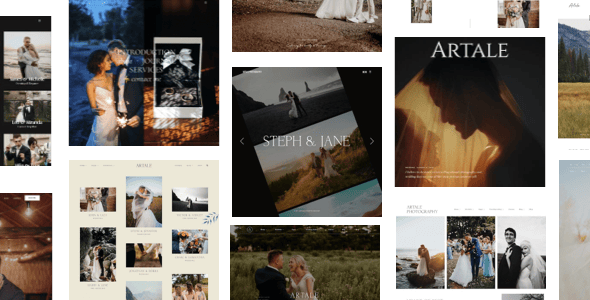
Stuck on your Artale WordPress theme? Let's fix it.
No endless back-and-forth. Just send us the details and we'll get it done.
No obligation · Replies within 1 hour · Quote within 1 day
Setup · Customization · Bug fixes · WooCommerce integration
About Artale WP Theme
Artale is a WordPress theme built by ThemeGoods, designed primarily for creative portfolios, agencies, and freelancers who want a clean, visual-first layout without excessive setup overhead. It ships with a drag-and-drop page builder, a library of pre-built demo sections, and smooth scroll animations baked in.
ThemeGoods has a solid track record producing themes that balance visual impact with practical usability. Artale follows that pattern. It supports WooCommerce for light shop functionality, integrates with popular plugins, and keeps the admin experience relatively simple. The theme is regularly updated and carries good ratings on ThemeForest, which matters for long-term compatibility with WordPress core updates.
If you run a studio, sell creative services, or need a portfolio site that looks polished without a custom build, Artale is a capable starting point.
Get matched with a Artale developer in under one day
Tell us about your Artale project. Small fixes, Artale theme customization, or a full website build, whatever you need, we've got it covered.
We'll connect you to the right Artale developers, define the scope, and get everything 100% clear.
You'll get one estimate, hire your preferred developer, and start collaborating.
Artale is not a difficult theme, but getting it to match a specific creative vision takes more than clicking through the demo importer. A developer who has worked with ThemeGoods themes understands where the customization options stop and where custom PHP, CSS, or JavaScript begins. Through Codeable, you get access to vetted WordPress developers with proven experience. No junior freelancers, no bidding wars. Post your project and receive a fixed estimate within 24 hours. Explore our WordPress development services to see what is possible.
Pros
- Clean portfolio layouts that work well for creative agencies and freelancers without heavy customization
- Smooth scroll animations included natively, no separate plugin needed
- Multiple header styles and a sticky navigation option built into the theme settings
- WooCommerce compatible for selling services, prints, or digital products alongside portfolio content
- Regularly updated by ThemeGoods with good ThemeForest support ratings
Cons
- Page builder dependency means switching builders later can break existing layouts
- Animation-heavy demos can cause performance issues on shared hosting without caching
- Limited blog layout variety compared to dedicated blogging themes
- Some advanced portfolio filtering options require custom CSS or JavaScript to modify
- Demo content import occasionally fails or produces layout inconsistencies on certain server configurations
Who is Artale for?
Creative Agency Portfolio
Artale suits agencies that need a polished case study layout without building from scratch. The portfolio grid, project detail pages, and team section cover the basics a small-to-mid agency needs. A developer can extend these with custom post types for services or client testimonials if the default sections fall short.
Freelance Photographer
Photographers get a lot of value from Artale’s full-width image layouts and gallery options. The theme handles large images cleanly when performance is configured correctly. You can build distinct gallery pages per shoot, add a simple pricing page, and connect a contact form for booking inquiries without needing a separate plugin stack.
Graphic Design Studio
Graphic designers use Artale to present branding work, print projects, and digital deliverables in a structured portfolio. The grid layouts support mixed media formats. Adding a filterable portfolio by project type is possible through the theme’s built-in taxonomy options, with a developer able to extend the filtering logic further.
Architecture Firm
Architecture firms need project pages that handle large photography and technical details side by side. Artale’s wide layout options and minimal aesthetic fit that requirement well. Custom project templates can be built to include specifications, team credits, and location data without cluttering the visual presentation of the work.
Digital Product Shop
Artale’s WooCommerce compatibility makes it a reasonable choice for creative sellers offering prints, templates, presets, or digital assets alongside a portfolio. The shop pages adopt the theme’s visual style without major styling conflicts. For larger catalogs or complex product types, additional development work brings the store up to a professional standard.

Customizing Artale
Out of the box, Artale gives you a range of customization options through the WordPress Customizer and its bundled page builder. You can adjust typography, color schemes, header layouts, and portfolio grid styles without touching code. Demo content imports help you get a working layout fast.
But most serious projects push past what the theme controls panel offers. An Artale expert can restructure templates, build custom post type integrations, modify the portfolio filtering logic, or wire up advanced animations that go beyond the defaults. If you need white-label work, a custom header behavior, or a layout that does not quite fit the existing demo patterns, working with a developer who knows Artale saves significant time compared to trial and error in the customizer.
Recommended plugins for Artale
Artale works well with several plugins that extend its core functionality. WooCommerce adds a shop layer for selling prints, services, or digital downloads. WPML handles multilingual setups if you serve international clients. Contact Form 7 and WPForms both integrate cleanly for inquiry and booking forms.
For performance, pairing Artale with a caching plugin and a CDN is recommended since animation-heavy themes can slow down without proper optimization. See our WordPress performance service for specifics. On the SEO side, Yoast and Rank Math both work without conflicts. If you need deeper SEO work alongside theme setup, our WordPress SEO service covers that.
Not sure which plugins to use? This WordPress plugins directory covers the most popular options with reviews and setup guides.
Artale common issues
Artale demo import not working
Demo import failures in Artale usually come down to server memory limits or upload size restrictions. Check that your php.ini settings allow at least 256MB memory and a 64MB upload limit. Some hosts block the XML import entirely. If the one-click importer stalls, try importing the demo XML manually through Tools > Import. If the issue persists, our WordPress bug fixing service can diagnose and resolve it quickly.
Artale portfolio grid not displaying correctly
Portfolio grid issues in Artale often trace back to a JavaScript conflict with another plugin, usually a caching plugin that minifies scripts incorrectly. Start by disabling caching and checking the browser console for JS errors. Also confirm you are using the correct portfolio post type rather than standard pages. If the grid worked previously and broke after a plugin update, deactivate plugins one by one to isolate the conflict.
Artale page builder elements breaking after update
After a theme or plugin update, page builder elements can lose their styling or display broken shortcodes. This happens when the builder version bundled with Artale falls out of sync with a separately installed version. Always update the theme and its bundled plugins together. If elements are already broken, reverting to a backup and re-running the update with all components synchronized usually fixes it. Our bug fixing service handles these conflicts.
Artale site loading slowly on mobile
Artale uses scroll animations and large background images that add weight on mobile. Run the site through Google PageSpeed Insights to identify the specific bottlenecks. Common fixes include enabling lazy loading for images, removing unused animation libraries via a child theme, and serving scaled images using a plugin like ShortPixel or Imagify. Pair that with a caching layer and CDN. See our WordPress performance service for a full audit.
Artale FAQ
ThemeGoods updates Artale to maintain compatibility with current WordPress releases. As of recent versions, the theme runs on WordPress 6.x without major issues. That said, always test updates on a staging environment before applying them to a live site, particularly after major WordPress releases. Check the ThemeForest changelog for specific version compatibility notes before updating.
Artale ships with its own bundled builder and is optimized for that tool. You can install Elementor alongside it, but layout conflicts and styling inconsistencies are common. Most developers recommend sticking with the bundled builder for Artale-specific elements. If you prefer Elementor, a developer can help migrate content and resolve conflicts, though a different base theme may ultimately be a cleaner solution.
Yes. Artale includes WooCommerce support and the shop pages adopt the theme’s styling. Basic product listings, cart, and checkout pages work without extra configuration. For more complex store setups, custom product templates, or advanced filtering, additional development work is needed. The WooCommerce integration suits smaller shops better than large catalogs.
Create a child theme folder in wp-content/themes/ with a style.css file that references Artale as the parent template and a functions.php file that enqueues the parent styles. Activate the child theme in the WordPress dashboard. Any customizations you make in the child theme survive Artale updates. This is essential before making any code-level changes to the theme.
Artale sites can be migrated without breaking layouts if the process is handled correctly. The main risks are database URL mismatches and file path issues after moving to a new domain or host. Using a migration plugin like Duplicator or All-in-One WP Migration handles most of this automatically. Our WordPress migration service covers full site moves with layout verification included.
Hire an Artale WordPress Developer
Whether you need a full Artale setup from scratch, a layout that does not look like the demo, or specific functionality added on top of the theme, we can match you with a developer who has done it before. Work is handled through Codeable, so you get a transparent estimate before any commitment. Get a free estimate and describe what you need. No obligation, no risk.
You'll need a free Codeable account so developers can ask questions and send their quotes.