Skole WordPress Theme
by vamtam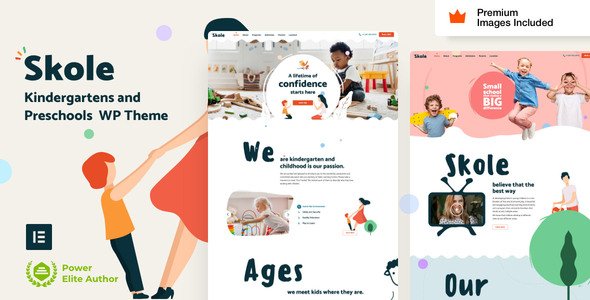
Stuck on your Skole WordPress theme? Let's fix it.
No endless back-and-forth. Just send us the details and we'll get it done.
No obligation · Replies within 1 hour · Quote within 1 day
Setup · Customization · Bug fixes · WooCommerce integration
About Skole WP Theme
Skole is a WordPress theme built by VamTam, a developer known for clean code and education-focused designs. The theme targets schools, universities, kindergartens, and training centres that need a structured, information-heavy site without hiring a designer from scratch.
It ships with multiple homepage layouts, pre-built inner pages for courses, staff profiles, and events, plus WooCommerce support for paid enrolments. VamTam built Skole on their own page builder, which gives you more layout control than most education themes offer out of the box.
Performance is reasonable for a feature-heavy theme, and it integrates cleanly with popular plugins like The Events Calendar and LearnDash. If you are running a school website or an online learning platform, Skole covers the structure without requiring a ground-up build.
Get matched with a Skole developer in under one day
Tell us about your Skole project. Small fixes, Skole theme customization, or a full website build, whatever you need, we've got it covered.
We'll connect you to the right Skole developers, define the scope, and get everything 100% clear.
You'll get one estimate, hire your preferred developer, and start collaborating.
Skole is not a difficult theme, but it has enough moving parts that inexperienced tinkering causes real problems. VamTam’s page builder behaves differently from Elementor or Gutenberg, and the course and event templates have their own logic.
Working with a vetted Skole developer through Codeable means you get someone who has handled the theme before. No trial and error on your live site. Fixes and customisations get done right the first time, and you know exactly what you are paying before work starts.
Pros
- Multiple pre-built education layouts covering schools, kindergartens, and universities
- Built-in course, staff, and events page templates reduce setup time significantly
- Clean WooCommerce integration for paid course enrolments and school merchandise
- VamTam provides regular theme updates and maintains compatibility with current WordPress versions
- WPML compatible, making it practical for bilingual or multilingual school websites
Cons
- VamTam's custom page builder has a learning curve if you are used to Elementor or Gutenberg
- Theme options panel can feel cluttered, making it harder to find specific settings quickly
- Default page load includes multiple scripts and stylesheets that need trimming for good Core Web Vitals scores
- LMS features require a separate plugin like LearnDash, which adds cost and configuration overhead
- Support quality depends on your licence tier, with faster responses reserved for extended licence holders
Who is Skole for?
Primary and Secondary Schools
Skole’s school-specific demo includes timetable layouts, staff profile pages, news sections, and event listings. It gives primary and secondary schools a professional structure without starting from a blank theme. Parent-facing pages for admissions, contact, and term dates slot in cleanly using the existing template system.
Universities and Colleges
Universities need multi-department layouts with course catalogues, faculty directories, and application pages. Skole handles the hierarchy well, and a developer can extend it with custom post types for departments or faculties. Paired with an LMS plugin, it supports course previews and enrolment flows without requiring a fully custom build.
Online Course Providers
For businesses selling online courses, Skole’s WooCommerce integration and course listing templates give you a strong starting point. Connect LearnDash or LifterLMS to add lessons, quizzes, and certificates. The theme’s visual layout communicates course value clearly, which matters for conversion on course sales pages.
Kindergartens and Nurseries
The kindergarten demo layout uses warm visuals, bold typography, and section-based content blocks suited to parent audiences. Gallery sections, daily schedule layouts, and staff introduction pages are all pre-built. It is one of the cleaner kindergarten website starting points available in a premium education theme.
Training Centres and Academies
Training centres and professional academies benefit from Skole’s course grid layouts, pricing table support, and testimonial sections. Whether you run in-person workshops or hybrid programmes, the theme’s structure communicates credibility. Custom certificate programmes and booking integrations can be added by a developer familiar with the theme.

Customizing Skole
Skole gives you control over colours, fonts, headers, and footers through the WordPress Customizer, but the real flexibility comes from VamTam’s page builder. You can rearrange sections, swap layouts, and adjust spacing without touching code.
That said, deeper changes like custom course structures, enrolment workflows, or branded student portals need developer input. A Skole expert will know where the theme’s options end and where custom PHP, CSS, or plugin integration needs to take over.
Common customisation requests include modifying the course listing templates, adjusting the events calendar display, adding custom post types for staff or departments, and tweaking the mobile header. These are all achievable but require someone who has worked inside Skole’s architecture before rather than learning it on your project.
Recommended plugins for Skole
Skole pairs well with LearnDash or LifterLMS for full LMS functionality, adding quizzes, progress tracking, and certificates. WooCommerce handles paid course enrolments cleanly with the theme’s existing styles.
For events, The Events Calendar slots in without major styling conflicts. WPML and Polylang work for multilingual school sites. If site speed is a concern, dedicated WordPress performance optimisation helps, since Skole loads several assets by default. For schools investing in organic search, pairing the theme with a solid WordPress SEO strategy makes a measurable difference in local and course-specific rankings.
Not sure which plugins to use? This WordPress plugins directory covers the most popular options with reviews and setup guides.
Skole common issues
Skole theme header not displaying correctly on mobile
Mobile header issues in Skole are usually caused by conflicting CSS from a plugin or a child theme override that does not account for VamTam’s header classes. Start by disabling plugins one at a time to isolate the conflict. If the header works in a staging environment without plugins, re-enable them in batches. For persistent layout breaks, a developer can audit the CSS and apply targeted fixes through a child theme without touching core files.
Skole page builder elements not saving or reverting on update
VamTam’s page builder stores layout data in the post meta. If elements revert after saving, the issue is often a server-side timeout during the save request, a caching plugin clearing meta too aggressively, or a database permission issue. Check your PHP max execution time, temporarily disable your caching plugin, and retry. If the problem persists, a developer can inspect the save mechanism and identify whether it is a hosting or plugin conflict causing the data loss.
Skole theme slow loading speed and poor Core Web Vitals
Skole loads a notable number of CSS and JavaScript files by default. To improve load time, start by enabling caching, combining scripts where possible, and removing unused Google Fonts variants. A dedicated WordPress performance audit will identify the specific assets causing delays. Image optimisation and lazy loading for the homepage slider also make a significant difference on mobile connections where Skole’s visual elements load slowly.
Skole WooCommerce course pages showing wrong layout
If your WooCommerce course pages are pulling the wrong template, Skole may be overriding WooCommerce’s default template hierarchy with its own. Check the theme’s WooCommerce folder for conflicting template files. If you are using an LMS plugin alongside WooCommerce, template conflicts between the three are common. A WordPress bug fixing service can trace the template load order and apply the correct override without breaking existing page styles.
Skole FAQ
Yes, Skole works with LearnDash. The theme does not include native LMS functionality, so LearnDash handles the course, lesson, and quiz logic while Skole provides the visual templates. Some styling adjustments are needed to match LearnDash output to your Skole design, particularly on course and lesson archive pages. A developer can handle those overrides cleanly through a child theme.
Skole uses VamTam’s own page builder rather than Elementor. You can install Elementor alongside it, but you will likely encounter conflicts on pages built with VamTam’s builder. It is not a recommended combination. If you prefer Elementor, you would be better served by an education theme built specifically around it, or migrating the Skole design into a new Elementor-based setup.
Always use a child theme for customisations. If you have made changes directly to Skole’s parent theme files, those will be overwritten on update. With a child theme in place, updates to the parent are safe. Before any update, back up your site fully. If you are unsure whether your current setup uses a child theme, a developer can check and set one up before you proceed with the update.
Yes. Skole works well for small school websites. The pre-built pages cover the essentials: homepage, about, staff, events, and contact. You do not need to build from scratch. For a basic school site, you can be live within days using the demo content as a starting point. Customisation is optional and scales with your actual requirements rather than being forced upfront.
Skole is WPML compatible, which is the most reliable way to run a multilingual site on WordPress. Polylang also works. With either plugin, you can translate pages, course listings, and navigation into additional languages. Setup requires some configuration time, and menu management across languages needs attention. A developer experienced with WPML can get a bilingual school site running cleanly without translation overlap issues.
Hire a Skole WordPress Developer
If you need a Skole expert to customise your school website, fix a layout issue, or extend the theme with LMS or ecommerce functionality, we can match you with a vetted developer fast. Post your project and get a free estimate within 24 hours, with no obligation to proceed. Get your free estimate here and have a qualified developer reviewing your project today.
You'll need a free Codeable account so developers can ask questions and send their quotes.