Kalles WordPress Theme
by The4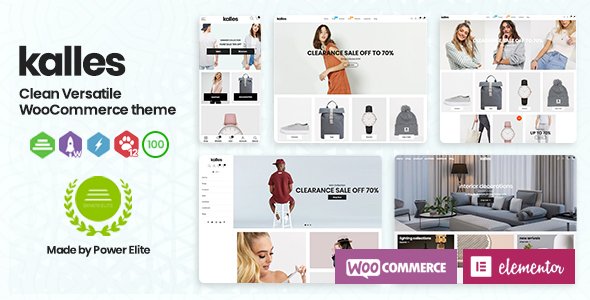
Stuck on your Kalles WordPress theme? Let's fix it.
No endless back-and-forth. Just send us the details and we'll get it done.
No obligation · Replies within 1 hour · Quote within 1 day
Setup · Customization · Bug fixes · WooCommerce integration
About Kalles WP Theme
Kalles is a premium WooCommerce theme built by The4, a Bangkok-based team known for high-quality Shopify and WordPress themes. It targets fashion, electronics, furniture, and general merchandise stores that need a fast, flexible storefront without hiring a developer for every change.
The theme ships with over 60 pre-built demo layouts, a drag-and-drop page builder, and a product filter system built in. Ajax cart, wishlist, quick view, and multi-currency support come out of the box. It runs on WPBakery and also supports Elementor, giving store owners two ways to build pages.
Kalles is regularly updated and has a strong rating on ThemeForest. It suits store owners who want an agency-quality design without starting from scratch, but it does take time to configure properly before launch.
Get matched with a Kalles developer in under one day
Tell us about your Kalles project. Small fixes, Kalles theme customization, or a full website build, whatever you need, we've got it covered.
We'll connect you to the right Kalles developers, define the scope, and get everything 100% clear.
You'll get one estimate, hire your preferred developer, and start collaborating.
Kalles has a lot of moving parts. Between demo content, the page builder, WooCommerce settings, and the theme panel, setup takes longer than most store owners expect. A developer who has worked with Kalles before knows which settings conflict, which demo sections are worth keeping, and how to get the store live without months of trial and error.
Through Codeable, you get matched with vetted WordPress developers who have hands-on WooCommerce and Kalles experience. Post your project and get an estimate within 24 hours, with no obligation to hire.
Pros
- 60+ demo layouts covering most ecommerce niches out of the box
- Built-in Ajax filter, wishlist, quick view, and sticky cart without extra plugins
- Supports both WPBakery and Elementor for page building
- Active development with regular updates and ThemeForest support
- Multi-currency and multi-language ready without third-party plugins for basic use
Cons
- Demo import can be slow and sometimes fails on lower-spec hosting
- Theme options panel is large and can overwhelm first-time users
- Heavy on scripts by default, which affects Core Web Vitals without optimisation
- Mixing elements from multiple demos requires CSS knowledge to avoid layout issues
- Support response times from The4 can be slow during high-volume periods
Who is Kalles for?
Fashion & Apparel
Kalles was built with fashion stores in mind. The lookbook layouts, size guide integration, and full-width product images suit clothing brands well. The wishlist and quick view features work especially well for stores with large seasonal collections where customers browse before buying.
Electronics & Gadgets
The comparison table feature and spec-heavy product layouts make Kalles a practical choice for electronics retailers. Customers can compare multiple products side by side, and the tabbed product description area handles technical specifications cleanly without custom coding.
Home & Furniture
Kalles includes wide-format section demos suited to furniture and interior brands. Large imagery, room scene headers, and category-focused navigation work well for stores where browsing by style or room type matters more than searching by keyword.
Beauty & Cosmetics
Beauty brands get a lot of mileage from Kalles’s soft typography options, pastel color palette support, and ingredient list formatting in product tabs. The review and rating display is clean and converts well for products where social proof is a primary buying signal.
Multi-Category Stores
Kalles handles multi-category stores through mega menu support and category-based homepage sections. Store owners selling across several unrelated product lines can build a clear hierarchy without everything feeling disjointed, as long as the navigation is set up carefully.

Customizing Kalles
Kalles offers a lot of options, which is both a strength and a challenge. The theme panel controls typography, color schemes, header layouts, footer styles, and product page structure. Most changes can be made through the WordPress Customizer without touching code.
That said, matching a specific brand vision, combining multiple demo sections, or modifying the checkout flow often requires custom CSS or PHP work. A Kalles expert can strip away the parts you don’t need, speed up the demo import, and make sure your product pages are built to convert rather than just look good.
If you want Kalles to look like your brand rather than a template, working with someone who knows the theme’s structure inside out saves a lot of back-and-forth and avoids breaking things that are hard to undo.
Recommended plugins for Kalles
Kalles integrates well with the main WooCommerce extensions: Subscriptions, Bookings, Bundles, and Points and Rewards all work without major conflicts. The theme also plays nicely with WPML for multilingual stores and Yoast or Rank Math for on-page SEO.
For speed, Kalles supports lazy loading and works with caching plugins, though getting the best WordPress performance scores usually means some image optimisation and disabling unused scripts. Adding third-party review apps, loyalty tools, or custom product configurators may need developer help to integrate cleanly.
Not sure which plugins to use? This WordPress plugins directory covers the most popular options with reviews and setup guides.
Kalles common issues
Kalles demo import not working
Demo import failures in Kalles usually come down to PHP memory limits or upload size restrictions on your host. Set memory_limit to at least 256MB and upload_max_filesize to 64MB in your PHP configuration. If the import stalls mid-way, clear the database, reset the theme settings, and try again with a fresh WordPress install. Some hosts block the XML importer entirely, in which case manual import of individual files is the only option.
Kalles product filter not showing correctly
Kalles uses its own AJAX filter system, which depends on product attributes being assigned correctly in WooCommerce. If filters aren’t appearing or returning no results, check that your products have attributes set and that variations are published. Also confirm the filter widget is placed in the correct sidebar and that the shop page template is set to the Kalles default, not a custom page template, which bypasses the filter output.
Kalles slow page speed on mobile
Kalles loads several scripts globally that many stores don’t use, including sliders, counters, and hover effects. Use a plugin like Asset CleanUp to disable scripts on pages where they’re not needed. Also enable lazy loading for images if it’s not already on, and run your product images through compression before upload. These steps alone usually bring mobile scores up significantly. Our WordPress performance service can handle this end to end.
Kalles header layout broken after update
Header breakage after a Kalles update is often caused by a conflict between the saved header builder settings and the new template structure. Start by clearing all caches, then go to Kalles Settings and re-save the header configuration. If the layout is still broken, temporarily switch to a child theme fallback header to isolate whether the issue is in the builder output or a CSS change from the update. A WordPress bug fix can resolve this quickly.
Kalles FAQ
Yes. Kalles was built specifically for WooCommerce and includes features like Ajax product filters, quick view, wishlist, comparison tables, and sticky cart that most WooCommerce stores need. It handles product pages, category pages, and checkout styling out of the box, which reduces how much you need to configure through WooCommerce settings alone.
Kalles supports Elementor for page building, but the theme’s own header, footer, and shop templates are managed through its built-in builder and the Customizer. You can use Elementor for content pages and landing pages, but for shop and product page layouts, you’ll mostly work within the Kalles settings panel rather than Elementor’s drag-and-drop interface.
Kalles is sold on ThemeForest for a one-time fee, typically around $59 for a regular license covering one site. Extended licenses for use on client sites or multiple deployments cost more. The purchase includes six months of support from The4, with the option to extend support when it expires.
Kalles is WPML-compatible, which covers most multilingual WooCommerce setups. You can also use Polylang with some manual configuration. The theme strings are translatable through the standard WordPress localization system. For stores selling across multiple languages and currencies, getting the configuration right usually benefits from developer input.
You can set up Kalles yourself using one of the demo imports and the Customizer. However, if you want a store that doesn’t look like the demo template, loads fast, and is structured properly for conversions, a developer will save you significant time. The theme has many settings, and getting them wrong early causes compounding problems later in the build.
Hire a Kalles Developer
Whether you need help with the initial setup, a design that doesn’t look like the demo, or fixes to a Kalles store that’s already live, the right developer makes the difference. Our experts have worked with Kalles across fashion, electronics, and multi-category stores.
Get a free estimate and describe your project. You’ll hear back within 24 hours, and there’s no obligation to move forward.
You'll need a free Codeable account so developers can ask questions and send their quotes.