Luxa WordPress Theme
by ypromo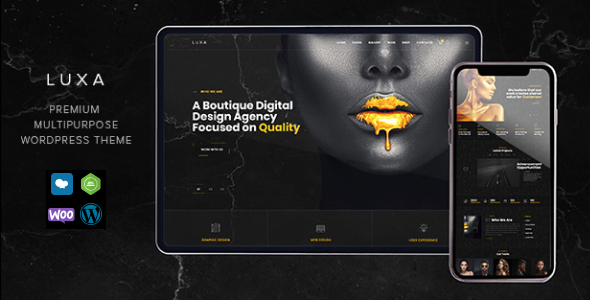
Stuck on your Luxa WordPress theme? Let's fix it.
No endless back-and-forth. Just send us the details and we'll get it done.
No obligation · Replies within 1 hour · Quote within 1 day
Setup · Customization · Bug fixes · WooCommerce integration
About Luxa WP Theme
Luxa is a WordPress theme built by ypromo, designed for businesses and creatives who want a clean, minimal layout with room to grow. It ships with a block-based structure that works well with the WordPress Site Editor, giving you control over headers, footers, and page templates without touching code.
The theme leans on whitespace and typography to create a polished look out of the box. It suits service businesses, portfolios, and small agencies that want something professional without excessive visual noise. Luxa is lightweight by default, which means faster load times compared to feature-heavy multipurpose themes. Updates from ypromo have kept it compatible with recent WordPress versions, and the theme follows standard WordPress coding practices, making it straightforward to extend or hand off to a developer.
Get matched with a Luxa developer in under one day
Tell us about your Luxa project. Small fixes, Luxa theme customization, or a full website build, whatever you need, we've got it covered.
We'll connect you to the right Luxa developers, define the scope, and get everything 100% clear.
You'll get one estimate, hire your preferred developer, and start collaborating.
Luxa is approachable for DIY setups, but once you need custom templates, plugin compatibility fixes, or anything beyond the Site Editor’s default options, the work gets technical quickly. FoxyConcept works through Codeable, a vetted network where every developer is screened before taking client work. You post your project, get an estimate within 24 hours, and only move forward if the scope and price make sense. No risk, no obligation.
Pros
- Lightweight codebase with fast default load times
- Full Site Editor compatibility including template and template part editing
- Clean typographic hierarchy that works well without heavy customization
- Minimal dependencies, no bundled page builder or plugin bloat
- Maintained by ypromo with updates tracking current WordPress releases
Cons
- Limited built-in demo content makes initial setup slower for non-developers
- WooCommerce styles require manual CSS to match the base theme design
- Fewer pre-built block patterns compared to larger commercial themes
- No dedicated theme options panel, everything lives inside the Site Editor
- Smaller community means fewer third-party tutorials and troubleshooting resources
Who is Luxa for?
Freelance Portfolio
Luxa’s typographic focus and whitespace-first layout work naturally for freelancers showing off design, development, or writing work. Project pages stay readable without clutter, and the Site Editor makes it straightforward to create unique portfolio templates without writing custom code for every section.
Small Agency Website
Small agencies with three to ten pages of content benefit from Luxa’s clean structure. The theme handles service pages, a team section, and a contact form without needing a heavy multipurpose theme underneath. A developer can extend the default templates to match brand guidelines without a full custom build.
Local Service Business
Plumbers, consultants, photographers, and similar local businesses can use Luxa as a fast, professional base. The theme loads quickly on mobile, which matters for local search rankings. Core pages like services, about, and contact can be built using native WordPress blocks without additional plugins.
Minimal Blog
Writers and content creators get a clean reading experience with Luxa. The default font sizing and line spacing suit long-form content. Category and archive templates are functional from the start, and the minimal design keeps focus on the writing rather than decorative elements around it.
SaaS Landing Page
SaaS products that need a focused landing page with a clear call to action fit well with Luxa’s structure. The theme does not fight against custom hero sections or pricing tables built with blocks. Load time stays low, which reduces friction between an ad click and a signup form submission.

Customizing Luxa
Luxa customization works primarily through the WordPress Site Editor and Global Styles panel. You can adjust typography, color palettes, spacing, and block templates from a single interface. For more specific changes, like custom header layouts, unique section designs, or third-party plugin integration, you will need some CSS or PHP knowledge.
If you want to go further without risking your site, a Luxa expert can help. Whether that means building custom block patterns, adjusting the theme’s template hierarchy, or wiring up a page builder on top of the existing structure, working with someone who knows Luxa specifically saves time. FoxyConcept connects you with developers who have direct experience with the theme and can scope your project accurately before any work begins.
Recommended plugins for Luxa
Luxa pairs well with WooCommerce for product pages, though you may need styling adjustments to match the base theme design. Contact Form 7 and WPForms both integrate cleanly. For SEO, Luxa’s clean markup works well alongside a proper SEO setup using Yoast or Rank Math.
If performance is a priority, Luxa’s lightweight base is a good starting point, but combining it with caching, image optimization, and a CDN will take it further. See our WordPress performance service for details on what improvements are realistic for your setup.
Not sure which plugins to use? This WordPress plugins directory covers the most popular options with reviews and setup guides.
Luxa common issues
Luxa theme header not showing on mobile
Mobile header problems in Luxa are usually caused by a conflicting CSS rule in a child theme or plugin stylesheet. Open browser dev tools, inspect the header element on mobile viewport, and look for any display: none or visibility: hidden being applied by an external source. If the issue appeared after a plugin install, deactivate plugins one at a time to isolate the conflict. If you need a faster fix, our WordPress bug fixing service can resolve this the same day.
Luxa WordPress theme fonts not loading correctly
Font loading issues in Luxa typically trace back to a caching plugin serving a stale CSS file, or a content security policy blocking Google Fonts requests. Clear all cache layers first. If you are hosting fonts locally through a plugin like OMGF, check that the font files were generated correctly after the last theme update. Also confirm no CSS rule is overriding the font-family applied by Luxa’s Global Styles settings.
Luxa theme WooCommerce pages unstyled
Luxa does not include dedicated WooCommerce templates by default, so shop, product, and cart pages inherit generic WooCommerce styles. This often results in layout mismatches with the base theme. The fix is adding targeted CSS to align WooCommerce elements with Luxa’s color and spacing tokens, or creating custom WooCommerce template files inside a child theme. A developer can handle this in a few hours without breaking existing pages.
Luxa Site Editor changes not saving
If Site Editor changes in Luxa are not persisting, the most common cause is a file permission issue on wp-content/uploads/ where theme JSON overrides are stored, or a caching layer serving the old template. Check folder permissions are set to 755 and files to 644. If you use a security plugin that restricts file writes, temporarily disable it and test again. Persistent issues may point to a hosting configuration problem worth escalating to your host.
Luxa FAQ
Yes, Luxa is built to work with the WordPress Site Editor and the full block editing experience. You can edit templates, template parts, and Global Styles directly from the editor. It follows the block theme structure introduced in WordPress 5.9, so features like template hierarchy editing and block patterns work as expected without plugins.
Luxa works with WooCommerce at a functional level, but it does not ship with custom WooCommerce templates. Product, shop, and cart pages will display using WooCommerce’s default templates, which may not match the base theme styling. Some CSS work or custom template files are usually needed to make WooCommerce pages look consistent with the rest of the site.
You can technically use Elementor with Luxa by installing the plugin and building pages with it, but Luxa is designed as a block theme. Using a page builder adds extra scripts and can conflict with Site Editor templates. If your project needs heavy visual customization, it is worth discussing with a developer whether Luxa is the right base or if a different theme would suit better.
Create a new folder in wp-content/themes/ named something like luxa-child. Add a style.css file with the Template: luxa header and a functions.php that enqueues the parent stylesheet. Activate the child theme from the WordPress dashboard. Any custom CSS or template overrides go into the child theme folder, keeping your changes safe across parent theme updates.
Luxa is available from ypromo and pricing details are listed on their distribution page, whether that is ThemeForest or a direct site. Verify the current pricing and licensing terms directly with ypromo before purchasing. Licensing typically covers a set number of sites, and a developer license is needed if you are building client sites using the theme.
Hire a Luxa WordPress Developer
Need help with your Luxa site? Whether it’s a layout issue, a custom feature, or a full build from scratch, FoxyConcept can match you with a developer who knows the theme. Work is scoped before it starts, so you know exactly what you are paying for. Get a free estimate and have a developer review your project within 24 hours. No commitment required.
You'll need a free Codeable account so developers can ask questions and send their quotes.