Fusion WordPress Theme
by LiveMesh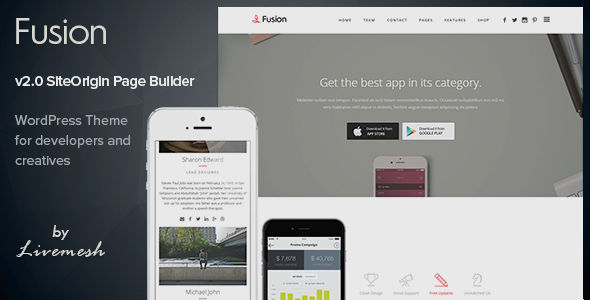
Stuck on your Fusion WordPress theme? Let's fix it.
No endless back-and-forth. Just send us the details and we'll get it done.
No obligation · Replies within 1 hour · Quote within 1 day
Setup · Customization · Bug fixes · WooCommerce integration
About Fusion WP Theme
Fusion is a WordPress theme built by LiveMesh, a developer known for clean code and block-based design tools. It is built around the WordPress block editor and pairs with LiveMesh’s own Gutenberg blocks plugin to give you a flexible page-building experience without relying on a separate page builder.
The theme is lightweight and minimal by default, which makes it a solid starting point for agencies, freelancers, and business owners who want full control over layout without fighting against opinionated design choices. It supports full-site editing (FSE), meaning you can edit headers, footers, and templates directly from the site editor.
Fusion works well with custom post types and integrates cleanly with popular plugins. If you need a theme that gets out of the way and lets you build, Fusion is worth a close look.
Get matched with a Fusion developer in under one day
Tell us about your Fusion project. Small fixes, Fusion theme customization, or a full website build, whatever you need, we've got it covered.
We'll connect you to the right Fusion developers, define the scope, and get everything 100% clear.
You'll get one estimate, hire your preferred developer, and start collaborating.
Fusion is a well-structured theme, but block-based full-site editing still trips up a lot of WordPress users. Template parts, block patterns, and Global Styles all behave differently from classic themes. A developer who knows Fusion and the LiveMesh ecosystem can build faster, avoid common pitfalls, and deliver a site that actually performs.
Through Codeable, you get matched with vetted WordPress developers who have real experience with block themes. No agencies, no junior freelancers, no guesswork. Just a developer who knows what they are doing.
Pros
- Built for the block editor with full-site editing support out of the box
- Lightweight default styles that do not impose heavy design choices on your build
- Pairs directly with LiveMesh Gutenberg Blocks for a cohesive plugin and theme ecosystem
- Clean code structure makes child theme development and customization straightforward
- WooCommerce compatible with sensible default product page styling
Cons
- Full-site editing has a steep learning curve for non-developers unfamiliar with block templates
- Limited pre-built starter templates compared to more popular multipurpose themes
- Some LiveMesh blocks require the premium version of the plugin, adding cost
- Community and third-party resources are smaller than themes like Astra or Kadence
- Design flexibility depends heavily on knowing how Global Styles and block patterns work together
Who is Fusion for?
Creative Agencies
Fusion suits creative agencies well. The clean base theme lets you build distinct layouts for case studies, team pages, and service sections using LiveMesh blocks. Portfolio grids are handled natively without a separate plugin. The FSE architecture means brand-consistent headers and footers across every template without duplicating work.
Freelance Portfolios
Freelancers who want a professional portfolio without bloated theme overhead will find Fusion practical. Project grids, client testimonials, and a contact section can all be assembled using the LiveMesh block library. The minimal default styling keeps the focus on your work rather than the theme itself.
Corporate Business Sites
Fusion works well for corporate sites that need clean service pages, team sections, and a reliable contact experience. It does not impose decorative styling that conflicts with conservative brand guidelines. A developer can configure custom block patterns for repeated content like feature rows and stat counters quickly and consistently.
WooCommerce Stores
With solid WooCommerce support, Fusion handles product listings, single product pages, and cart flows without requiring a dedicated WooCommerce theme. You can extend the shop layout using block templates. For stores needing performance tuning or custom product filters, a developer will be needed to configure those correctly.
Membership and Community Sites
Fusion’s flexible template system suits membership sites built on plugins like MemberPress or Restrict Content Pro. You can create distinct templates for member dashboards, gated content pages, and login flows. The block editor integration keeps the experience consistent without needing a separate page builder running alongside your membership plugin.

Customizing Fusion
Fusion gives you a lot of room to customize, but getting the most out of it takes some WordPress knowledge. The theme uses Global Styles for typography and color palettes, and its block-based templates mean any structural change happens inside the site editor rather than a traditional Customizer panel.
For teams without a dedicated developer, this can slow things down. A Fusion expert can set up a consistent design system, build out custom block patterns, and configure the LiveMesh blocks plugin to match your brand without leaving unnecessary code behind.
Custom post type integrations, portfolio layouts, team grids, and testimonial sections all need careful setup to look right across screen sizes. Getting that done properly the first time saves a lot of rework later.
Recommended plugins for Fusion
Fusion is designed to work with the LiveMesh Blocks for Gutenberg plugin, which adds post grids, team layouts, counters, testimonials, and more. These blocks extend what the theme can do without needing WooCommerce, Elementor, or other heavy dependencies.
For eCommerce, Fusion is WooCommerce compatible and styles product pages cleanly. You can also pair it with plugins like Yoast or Rank Math for SEO, and a caching plugin for WordPress performance improvements. If you need stronger search engine visibility, a specialist can handle WordPress SEO optimisation alongside the build.
Not sure which plugins to use? This WordPress plugins directory covers the most popular options with reviews and setup guides.
Fusion common issues
Fusion theme header not showing correctly in site editor
Header display issues in FSE themes usually come from a corrupted template part or a block that was edited and saved incorrectly. Open the site editor, navigate to Template Parts, and check the header part directly. Look for missing or broken blocks inside it. If the header was customized, resetting it to the theme default and rebuilding is often faster than debugging the saved markup. A developer can also check for plugin conflicts affecting the editor rendering.
LiveMesh blocks not displaying on Fusion theme pages
If LiveMesh blocks are installed but not rendering on the front end, the most common causes are a plugin version mismatch, a caching plugin serving stale output, or a JavaScript conflict from another plugin. Clear all caches first. Then check the browser console for JS errors. If blocks show in the editor but not on the front end, check whether block assets are being enqueued properly. The WordPress bug fixing service can trace the root cause quickly.
Fusion theme layout broken after WordPress update
Core WordPress updates can affect FSE themes when block markup standards change. If your Fusion layout breaks after an update, check whether the issue is in a specific template or site-wide. Review the site editor for template warnings. Sometimes a block pattern referencing a deprecated block attribute causes the problem. Keeping a staging environment and testing updates before applying them to production prevents this from affecting live sites.
Fusion theme Global Styles not applying to custom templates
Global Styles in FSE themes apply to the default template hierarchy but can be overridden at the template or block level without you realizing it. If your custom templates are not picking up font or color changes made in Global Styles, check whether those templates have inline style overrides from earlier edits. Removing those local overrides usually restores the Global Styles inheritance. A developer can audit all templates and ensure consistent style application across the build.
Fusion FAQ
Yes. Fusion is built as a block theme and supports full-site editing. You can edit headers, footers, page templates, and template parts directly inside the WordPress site editor. This means it behaves differently from classic themes and requires familiarity with block-based template editing to get the most from it.
You do not need it to run the theme, but Fusion is designed to work alongside the LiveMesh Gutenberg Blocks plugin. Without it, you are limited to core WordPress blocks. The plugin adds grids, testimonials, team sections, counters, and other elements that make building full pages with Fusion practical.
Yes, Fusion is WooCommerce compatible. It includes default styling for shop pages, product listings, single product pages, and the cart. For more advanced store customization, including custom product templates or checkout modifications, you will likely need a developer to handle the block template configuration.
Block themes handle child themes differently from classic themes. You can create a child theme by registering a new theme with a style.css referencing Fusion as the parent. However, for template-level customization in FSE, you edit templates directly in the site editor and those changes are saved to the database, not a child theme folder.
Fusion by LiveMesh is available as a free theme on the WordPress theme directory. Some advanced features, particularly within the LiveMesh Blocks plugin that pairs with it, require a premium plugin license. Check the LiveMesh website for current pricing on the blocks plugin before planning your project budget.
Hire a Fusion WordPress Developer
Need help building or customizing a site on the Fusion theme? Whether you are starting from scratch, fixing something broken, or improving an existing build, a specialist can get it done properly. Post your project and get a free estimate within 24 hours, no obligation to hire. Get your free estimate here and get matched with a vetted Fusion developer through Codeable.
You'll need a free Codeable account so developers can ask questions and send their quotes.