Aoki WordPress Theme
by Select-Themes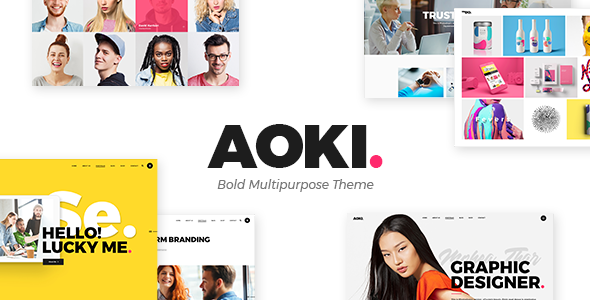
Stuck on your Aoki WordPress theme? Let's fix it.
No endless back-and-forth. Just send us the details and we'll get it done.
No obligation · Replies within 1 hour · Quote within 1 day
Setup · Customization · Bug fixes · WooCommerce integration
About Aoki WP Theme
Aoki is a minimalist WordPress theme built by Select-Themes, designed with clean typography and generous whitespace at its core. It suits portfolios, creative agencies, and small businesses that want content to speak without visual clutter getting in the way.
The theme is built on a lightweight foundation with full-width layouts, smooth scroll behaviour, and a focus on imagery. Select-Themes has a reputation for producing well-coded, carefully structured themes, and Aoki reflects that. It supports the WordPress block editor and plays well with popular page builders. Setup is straightforward, but getting the most out of the layout options and customizer settings takes some familiarity with how the theme is structured.
If you need a clean, image-forward site without heavy plugin dependencies, Aoki is a practical starting point worth considering.
Get matched with a Aoki developer in under one day
Tell us about your Aoki project. Small fixes, Aoki theme customization, or a full website build, whatever you need, we've got it covered.
We'll connect you to the right Aoki developers, define the scope, and get everything 100% clear.
You'll get one estimate, hire your preferred developer, and start collaborating.
Aoki looks simple from the outside, but production-ready customisation requires knowing where the theme’s limits are. Select-Themes builds opinionated themes, and working against those opinions creates maintenance problems down the line.
FoxyConcept delivers Aoki work through Codeable, a vetted network of WordPress specialists. You post your project, get a clear estimate within 24 hours, and only proceed if the scope makes sense. No obligation, no risk. Just experienced developers who know the theme.
Pros
- Minimal, clean design that loads fast without heavy CSS or JavaScript overhead
- Well-structured theme files from Select-Themes make child theme development straightforward
- Full-width layout options suit image-heavy portfolios and creative agency sites
- Compatible with the WordPress block editor without requiring a page builder dependency
- Responsive across devices with solid baseline mobile styling out of the box
Cons
- Limited built-in demo content makes initial setup slower for non-technical users
- WooCommerce support works but requires additional CSS to match the theme's aesthetic precisely
- Fewer layout variations compared to more feature-heavy commercial themes
- Typography customisation beyond preset options requires CSS or a child theme
- Smaller community than major themes like Astra or GeneratePress, so fewer third-party tutorials exist
Who is Aoki for?
Creative Portfolio
Aoki’s full-width image support and minimal chrome make it a natural fit for creative portfolios. Projects stay front and centre without navigation bars or sidebars competing for attention. A developer can configure custom post types for case studies and add filtering without touching the core theme files.
Boutique Agency
Agencies with fewer than ten service pages benefit from Aoki’s structured layouts. The theme handles a clear homepage, services section, and team page well. Custom header and footer work, along with brand colour integration, is manageable in a child theme without significant overhead.
Photographer Website
Photography sites need fast image delivery and clean gallery presentation. Aoki’s whitespace-first design lets photos breathe. Pair it with a proper lazy-load setup and optimised image compression, and you get a site that looks sharp without sacrificing page speed scores.
Freelance Designer
Freelancers need a professional site that doesn’t require ongoing maintenance. Aoki covers the basics well: a homepage with a clear pitch, a work section, and a contact page. The block editor makes content updates straightforward once the initial build is done correctly.
Small Business Brochure Site
Local businesses with a handful of pages get a clean, credible web presence from Aoki without over-engineering it. The theme handles service pages, contact forms, and basic SEO structure well. It avoids the bloat that slows down sites built on feature-heavy multipurpose themes.

Customizing Aoki
Aoki gives you a solid base, but most sites need more than the defaults. Customisation typically involves adjusting typography scales, setting up custom colour palettes, configuring the header layout, and fine-tuning spacing across breakpoints. These changes live in the WordPress Customizer and, where blocks are used, inside the site editor.
More involved work includes custom post templates, WooCommerce styling, conditional sidebars, and integrating third-party tools without breaking the theme’s visual consistency. An Aoki expert understands how Select-Themes structures its theme files, which hooks are available, and where child theme overrides are the right call versus direct customizer changes.
FoxyConcept works with Aoki regularly. Whether you need minor adjustments or a full custom build on top of it, we can scope the work accurately and deliver without guesswork.
Recommended plugins for Aoki
Aoki pairs well with WooCommerce for simple shop setups, and most contact form plugins work without styling conflicts. For portfolio sites, adding filterable gallery functionality usually requires a lightweight plugin or custom block.
If site speed matters, Aoki’s clean codebase gives you a head start, but image optimisation, caching, and a CDN are still worth setting up properly. See our WordPress performance service for that. For search visibility, structured content and proper metadata matter more than the theme itself. Our WordPress SEO service covers both technical and on-page work.
Not sure which plugins to use? This WordPress plugins directory covers the most popular options with reviews and setup guides.
Aoki common issues
Aoki theme header not displaying correctly on mobile
Mobile header issues in Aoki are usually caused by a CSS conflict with a plugin adding its own styles, or a child theme rule overriding the theme’s responsive breakpoints. Open browser developer tools, inspect the header element on a small viewport, and look for conflicting margin or display properties. If you recently installed a new plugin, deactivate them one at a time to isolate the cause. Persistent issues may need a targeted CSS fix in your child theme. Our WordPress bug fixing service can handle this quickly.
Aoki WordPress theme fonts not loading or showing wrong typeface
Font issues in Aoki typically come from a Content Security Policy blocking Google Fonts, a caching plugin serving a stale stylesheet, or a customizer setting that was reset after an update. Check your browser console for blocked resource errors first. If fonts load in an incognito window, clear your cache. If the issue persists across browsers, check the Customizer typography settings and confirm the correct font is still selected after the last theme update.
Aoki theme homepage layout broken after WordPress update
Homepage layout breaks after a WordPress update are usually caused by block markup changes in the site editor or a plugin that modifies the query loop. Check whether the homepage is built with blocks or a classic template. If blocks, open the editor and look for invalid block notices shown in red. Restoring from a backup before the update is the safest first step. Going forward, always test updates on a staging environment before applying them to production. See our WordPress maintenance service for managed update handling.
Aoki theme slow to load images on portfolio pages
Slow image loading on Aoki portfolio pages is almost always an optimisation gap rather than a theme fault. Uncompressed images, no lazy loading, and missing a CDN are the common causes. Install a plugin like Imagify or ShortPixel to compress existing uploads, enable lazy loading if it isn’t already active, and consider serving images through a CDN. Aoki’s codebase is light, so image handling is usually where the speed problem lives. Our WordPress performance service covers a full audit and fix.
Aoki FAQ
Aoki is compatible with WooCommerce, but the default styling is minimal. Product pages, cart, and checkout will function correctly, but you will likely need custom CSS to match the shop’s appearance to the rest of your site. A developer can build these styles into a child theme so they survive future theme updates without being overwritten.
Aoki works with Elementor and similar page builders, but Select-Themes designed it around native WordPress layouts. Adding a page builder introduces an additional layer that can conflict with the theme’s spacing and typography defaults. For most sites, using the block editor natively with Aoki gives better results and avoids plugin dependency issues down the line.
Creating a child theme for Aoki follows the standard WordPress process. Create a new folder in /wp-content/themes/, add a style.css file with the correct Template: aoki header, and enqueue the parent stylesheet in functions.php. Any template overrides go in the child theme folder. Always use a child theme before modifying Aoki directly so your changes survive updates.
Aoki supports the WordPress block editor and is compatible with current WordPress 6.x releases. Select-Themes maintains the theme with updates when core WordPress changes require it. That said, always check the theme’s changelog before updating, and test on staging first if your site uses a heavily customised block setup or a page builder on top of the theme.
Migrating an existing site to Aoki is possible, but it involves rebuilding your page layouts to match the new theme’s structure. Content in the database transfers fine, but template-specific layouts, custom widgets, and sidebar content will need reconfiguring. If your current site uses a different page builder, expect significant rebuild work. Our WordPress migration service can manage this end to end.
Hire an Aoki WordPress Expert
Need help with Aoki, whether that’s a small fix or a full custom build? FoxyConcept handles Aoki projects through Codeable. You get a free estimate within 24 hours, a clear scope before any work starts, and a developer who has worked with Select-Themes products before. Get your free estimate here and describe what you need. No commitment required.
You'll need a free Codeable account so developers can ask questions and send their quotes.