ZikZag WordPress Theme
by WebGeniusLab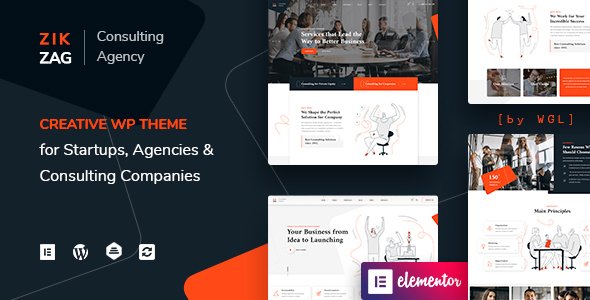
Stuck on your ZikZag WordPress theme? Let's fix it.
No endless back-and-forth. Just send us the details and we'll get it done.
No obligation · Replies within 1 hour · Quote within 1 day
Setup · Customization · Bug fixes · WooCommerce integration
About ZikZag WP Theme
ZikZag is a multipurpose WordPress theme built by WebGeniusLab. It ships with over 40 pre-built demo sites covering niches from creative agencies and portfolios to online stores and corporate websites. The theme is built on Elementor, meaning most layout work happens visually without touching code.
Under the hood, ZikZag includes a custom header and footer builder, WooCommerce support, WPML compatibility for multilingual sites, and a dedicated options panel powered by Redux Framework. Page load performance is reasonable out of the box, but like most feature-heavy themes, it benefits from proper configuration. WebGeniusLab updates the theme regularly, and support is available through ThemeForest’s comment system. It holds a strong rating with thousands of sales, making it a well-tested choice for freelancers and small agencies who need a flexible starting point without building from scratch.
Get matched with a ZikZag developer in under one day
Tell us about your ZikZag project. Small fixes, ZikZag theme customization, or a full website build, whatever you need, we've got it covered.
We'll connect you to the right ZikZag developers, define the scope, and get everything 100% clear.
You'll get one estimate, hire your preferred developer, and start collaborating.
ZikZag has enough features to build almost any site, but that flexibility comes with complexity. Misconfigured options, plugin conflicts, or poorly structured demos can slow down a build fast. FoxyConcept works with vetted ZikZag developers through Codeable, a platform where every developer is hand-screened. You get a fixed estimate before any work starts, no surprises on cost, and a developer who has worked with themes like ZikZag before. Whether you need a full build, a single feature added, or something broken fixed, the process is straightforward.
Pros
- 40+ pre-built demos covering a wide range of industries, reducing initial setup time significantly
- Elementor-based page builder means layout edits are visual and accessible to non-developers
- Includes Slider Revolution and other premium plugins bundled in the theme price
- Custom header and footer builder gives layout control without needing extra plugins
- Strong WooCommerce integration with dedicated product page templates and shop layouts
Cons
- Loading all bundled plugins by default adds weight to pages even when features are not used
- Mixing elements from multiple demos often requires custom CSS to avoid visual inconsistencies
- Redux Framework options panel has a learning curve and is not intuitive for first-time users
- Support is handled through ThemeForest comments, which can be slower than a dedicated ticket system
- Heavy reliance on Elementor means swapping page builders later would require rebuilding most pages
Who is ZikZag for?
Creative Agency
ZikZag includes several agency-focused demos with portfolio grids, team sections, and service layouts. The header builder handles sticky navigation well, which matters for agencies presenting case studies. Custom animations and scroll effects built into the Elementor widgets add polish without requiring a separate animation plugin.
WooCommerce Store
The theme’s WooCommerce templates cover product pages, cart, checkout, and shop archive layouts. You can adjust product grid columns, display styles, and quick-view functionality from the options panel. It works with most popular WooCommerce extensions, making it a solid base for small to mid-size online stores.
Freelance Portfolio
ZikZag’s portfolio post type comes with multiple grid and masonry layout options. Filtering by category works out of the box. For freelancers who want a professional-looking site without spending weeks on setup, importing one of the portfolio demos and swapping in real content is a practical starting point.
Corporate Business Site
Several ZikZag demos target corporate and consulting businesses, with service sections, team pages, and pricing tables built in. The theme handles multilingual setups via WPML, which is useful for companies operating across regions. Clean typography options keep the presentation professional without much manual adjustment.
Event or Conference Website
ZikZag works with event plugins like The Events Calendar and includes countdown timers and speaker section layouts in some demos. For conferences or single-event landing pages, the full-width section options in Elementor allow for high-impact visual layouts. Ticket sales can be handled by connecting a WooCommerce or third-party booking plugin.

Customizing ZikZag
ZikZag gives you a lot of control through Elementor’s drag-and-drop editor combined with the theme’s own options panel. You can build custom headers and footers, switch between demo layouts, adjust typography site-wide, and modify color schemes without writing CSS.
That said, getting ZikZag to look exactly how you want takes time. Matching a specific brand, combining elements from multiple demos, or extending the layout beyond what the built-in widgets offer often requires custom CSS or PHP work. A ZikZag expert knows which settings interact with each other, where conflicts tend to appear between the theme and third-party plugins, and how to build on the existing structure without creating maintenance problems down the line. If your project has specific design requirements, working with someone experienced in ZikZag saves significant back-and-forth.
Recommended plugins for ZikZag
ZikZag bundles several premium plugins at no extra cost, including Slider Revolution, WPBakery, and Elementor Pro compatibility. For WooCommerce stores, the theme includes dedicated shop templates and product page layouts.
If you need to extend further, ZikZag works well with plugins for booking systems, membership areas, and event management. Performance-focused additions like caching plugins and image optimization tools pair well with the theme. Need better search rankings? Pairing ZikZag with a structured WordPress SEO setup makes a measurable difference. For sites with heavy traffic or media, investing in WordPress performance optimisation is worth considering early.
Not sure which plugins to use? This WordPress plugins directory covers the most popular options with reviews and setup guides.
ZikZag common issues
ZikZag demo import not working or stuck
Demo import failures in ZikZag are usually caused by PHP memory limits or execution time limits set too low on the server. Set memory_limit to at least 256MB and max_execution_time to 300 in your php.ini or via your host’s control panel. Also confirm all required plugins listed in the theme’s import wizard are installed and activated before running the import. If problems persist, a WordPress bug fixing service can resolve import failures quickly.
ZikZag Elementor layout broken after update
After updating ZikZag or Elementor, widget layouts can break if the theme and plugin versions fall out of sync. First, clear all caches, including any server-side cache, Elementor’s CSS cache under Elementor > Tools, and your browser cache. If the layout is still broken, regenerate Elementor’s CSS files and check whether any custom CSS targeting Elementor selectors needs updating. Avoid updating Elementor and ZikZag at the same time on a live site without testing on staging first.
ZikZag header not displaying correctly on mobile
ZikZag’s header builder has separate mobile breakpoint settings that are easy to overlook. Open the header builder, switch to the mobile view, and check that elements are assigned to the correct rows and columns for smaller screens. The mobile menu trigger and logo sizing are controlled separately from desktop settings. If the header still overlaps content, check for conflicting CSS in child theme stylesheets or custom CSS added through the theme panel.
ZikZag site loading slowly after setup
ZikZag ships with several bundled plugins active by default. Deactivate any you are not using, particularly WPBakery if you are building with Elementor only. Enable lazy loading for images, reduce the number of custom fonts loaded, and install a caching plugin like WP Rocket or LiteSpeed Cache. For sites with persistent speed issues, a structured WordPress performance audit identifies exactly where time is being lost and what to fix first.
ZikZag FAQ
Yes. ZikZag is built with Elementor compatibility as a core feature. You can use Elementor Free or Elementor Pro alongside the theme. Elementor Pro’s Theme Builder also works for building custom post templates and archive pages, extending what ZikZag’s built-in layouts offer. Most demos are Elementor-based, so the two work well together out of the box.
Yes. ZikZag includes WPBakery but you are not required to use it. If you prefer Elementor, simply keep WPBakery inactive. Running both simultaneously can cause editor conflicts and slow down the admin panel. Pick one and stick with it. Most developers working with ZikZag today choose Elementor since most demos are built with it.
ZikZag includes full WooCommerce support with custom shop, product, cart, and checkout templates. You can adjust product grid layouts, enable quick view, and modify the shop sidebar through the theme options panel. It is a workable base for small to medium online stores, though larger stores may need additional WooCommerce plugins for advanced functionality.
Before updating ZikZag, back up your site and test the update on a staging environment first. Updates can occasionally affect Elementor layouts or custom CSS. After updating, clear all caches and check key pages visually. If you have made changes directly to theme files rather than using a child theme, those changes will be overwritten. Using a child theme protects your customizations across updates.
Yes. ZikZag is WPML compatible, which is the most widely used multilingual plugin for WordPress. You can translate pages, menus, and theme strings. RTL language support is also built in for right-to-left scripts like Arabic and Hebrew. If you are building a multilingual site and need help with the setup, a developer familiar with both ZikZag and WPML will save you time.
Hire a ZikZag Developer
Whether you are starting a new ZikZag build or need changes to an existing site, we can match you with a developer who knows the theme well. Work is handled through Codeable, so you get a transparent estimate before anything starts. No retainers, no vague quotes. Get a free estimate and describe what you need. A qualified ZikZag developer will review your project and come back with a clear plan.
You'll need a free Codeable account so developers can ask questions and send their quotes.