Columns WordPress Theme
by Dannci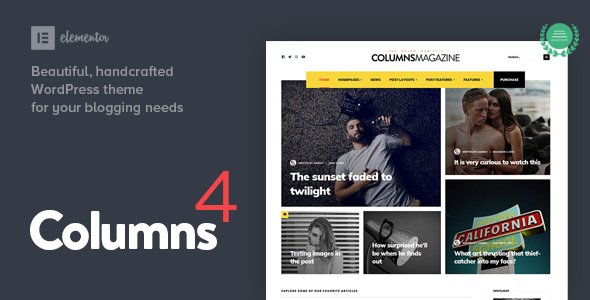
Stuck on your Columns WordPress theme? Let's fix it.
No endless back-and-forth. Just send us the details and we'll get it done.
No obligation · Replies within 1 hour · Quote within 1 day
Setup · Customization · Bug fixes · WooCommerce integration
About Columns WP Theme
Columns is a minimalist WordPress theme developed by Dannci. It is built around a clean grid-based layout that puts content first. The theme is lightweight, fast-loading, and designed with bloggers and writers in mind who want typography and structure without visual clutter.
Columns ships with a straightforward options panel, supports the WordPress block editor out of the box, and keeps dependencies minimal. There are no bundled page builders or plugin requirements. What you get is a theme that loads quickly, looks sharp, and stays out of your way.
It suits personal blogs, portfolio sites, and small editorial publications. If you want a theme that prioritises readability and grid-based presentation over flashy effects, Columns is worth a close look.
Get matched with a Columns developer in under one day
Tell us about your Columns project. Small fixes, Columns theme customization, or a full website build, whatever you need, we've got it covered.
We'll connect you to the right Columns developers, define the scope, and get everything 100% clear.
You'll get one estimate, hire your preferred developer, and start collaborating.
Columns is simple by design, but getting it to behave exactly as you want still takes real WordPress knowledge. Custom templates, layout adjustments, and plugin compatibility work all require hands-on development.
Through Codeable, you get matched with a vetted WordPress developer who knows themes like Columns well. You post your project, receive a clear estimate within 24 hours, and only move forward if the scope and price work for you. No risk, no obligation. Explore our WordPress development services to get started.
Pros
- Minimal codebase keeps page load times low without extra optimisation work
- Full block editor compatibility means content editing works as expected in Gutenberg
- Clean typographic defaults make text-heavy sites readable without extra CSS
- Low plugin dependency reduces conflict risk when adding third-party tools
- Straightforward Customizer options suit users who want simple control without a learning curve
Cons
- Limited built-in layout variety means custom designs require template overrides
- No bundled demo content, so initial setup requires more manual configuration
- WooCommerce shop pages need custom CSS to match the theme's grid style
- Smaller community compared to major themes means fewer third-party tutorials available
- Advanced header or footer changes require child theme development rather than Customizer options
Who is Columns for?
Personal Blog
Columns works well for personal blogs focused on writing. The grid layout organises posts clearly, and the typography defaults make long-form content easy to read. Writers who want a clean, distraction-free presentation for their archive and single post pages will find the theme fits without heavy customisation.
Portfolio Site
For portfolio sites with a text-and-image mix, Columns provides a structured grid that displays work samples neatly. A developer can extend the theme with custom post types for projects, giving you a proper portfolio archive without conflicting with the theme’s minimal style.
Editorial Publication
Small editorial sites or online magazines benefit from Columns’ grid-first approach. Category archives and featured post layouts can be shaped to reflect an editorial hierarchy. Custom template work by a Columns developer lets you differentiate article types while keeping the visual language consistent.
Photography Blog
Photography blogs that rely on image quality over complex layouts suit the Columns theme well. The minimal surrounding design keeps focus on images. Pairing the theme with a lazy-load plugin and optimised image delivery keeps performance strong even with large image files in post content.
Small Business Website
A small business site with a blog, about page, and contact form is a natural fit for Columns. The theme handles standard WordPress page structures cleanly. Adding Contact Form 7 for enquiries and a simple SEO plugin rounds out a functional business site without overcomplicating the build.

Customizing Columns
Customising Columns is done through the native WordPress Customizer. You can adjust fonts, colours, layout widths, and sidebar settings without touching code. The theme respects WordPress standards, so changes feel predictable.
For anything beyond surface-level adjustments, a Columns expert can help. Custom column layouts, modified archive templates, unique header structures, or integration with specific plugins all require direct PHP and CSS work inside the theme files.
Child theme setup is strongly recommended before making any edits. A Columns expert will build a proper child theme first, keeping your customisations safe through future updates. This is especially important if you need recurring layout changes or plan to extend the theme over time.
Recommended plugins for Columns
Columns pairs well with lightweight plugins that do not conflict with its minimal structure. WooCommerce can be added for simple product listings, though you may need custom CSS to align shop templates with the theme’s grid. Contact Form 7 and Yoast SEO integrate without issues.
If you plan to improve site speed further, pairing Columns with a caching plugin and optimised image handling is straightforward. For deeper performance work, see our WordPress performance service. For search visibility improvements specific to your content, our WordPress SEO service covers technical and on-page work.
Not sure which plugins to use? This WordPress plugins directory covers the most popular options with reviews and setup guides.
Columns common issues
Columns theme sidebar not showing on single posts
The sidebar visibility in Columns is controlled by template settings in the Customizer and individual page/post settings. Check the Customizer sidebar options first. If the sidebar is enabled globally but not appearing on single posts, a template override in a child theme may be needed. Avoid editing the parent theme files directly. If the issue persists after a recent update, a WordPress bug fix can isolate the cause quickly.
Columns theme custom CSS not applying after update
If custom CSS stops applying after a theme update, it is usually because the CSS was added to the parent theme’s stylesheet rather than through the Customizer or a child theme. Changes in the parent theme files get overwritten on update. Move all custom CSS to the Additional CSS section in the Customizer or to a child theme stylesheet. This preserves your changes through any future Columns updates.
Columns WordPress theme menu not displaying correctly on mobile
Mobile menu issues in Columns typically come from CSS conflicts with plugins or custom styles that affect the navigation toggle. Check the browser console for JavaScript errors first. Disable recently added plugins one by one to isolate the conflict. If the menu was working before a plugin installation, that plugin is likely the cause. A developer can trace and fix the conflict without breaking other parts of the theme.
Columns theme featured image not showing on blog archive
Featured images not displaying on the blog archive usually points to a template condition in the theme. Columns may have a minimum image size requirement or a specific setting in the Customizer for archive image display. Check Customizer options under the blog settings panel. If the option is enabled but images still do not appear, the uploaded images may not meet the required dimensions. Regenerating thumbnails with a plugin often resolves this.
Columns FAQ
Yes, Columns by Dannci is available for free in the WordPress theme repository. There is no premium version currently listed. You can install it directly from your WordPress dashboard under Appearance > Themes > Add New. Search for Columns by Dannci to find the correct theme, as several themes share the name Columns.
Yes. Columns is compatible with the WordPress block editor. You can build post and page content using Gutenberg blocks without issue. The theme’s styling applies consistently to standard block output. Custom block patterns or full-site editing features are not part of this theme, so it works as a classic theme alongside the block editor.
You can add WooCommerce to a site running Columns, but the theme does not include dedicated WooCommerce templates. Shop pages and product listings will use WooCommerce’s default templates, which may not match the Columns grid style. Custom CSS or template overrides in a child theme are needed to bring the shop design in line with the rest of the site.
To create a child theme for Columns, create a new folder in your themes directory, add a style.css file with the correct Template header pointing to the parent theme, and enqueue both stylesheets in a functions.php file. Activate the child theme from the dashboard. All customisations go into the child theme to stay safe through updates.
Yes, migrating an existing site to the Columns theme is possible. Content and data stay intact during a theme switch. Layout and styling will change to match the new theme, so you should expect to adjust widget areas, menus, and custom CSS after switching. Our WordPress migration service can handle the transition cleanly.
Hire a Columns WordPress Developer
Need help setting up, customising, or extending the Columns theme? Whether it is a child theme build, a layout change, or a bug that needs fixing, a developer can handle it properly. Work is delivered through Codeable, so you get a vetted professional and a clear estimate before any work begins. Get a free estimate and describe what you need. No obligation to hire.
You'll need a free Codeable account so developers can ask questions and send their quotes.