Mystik WordPress Theme
by ThemeREX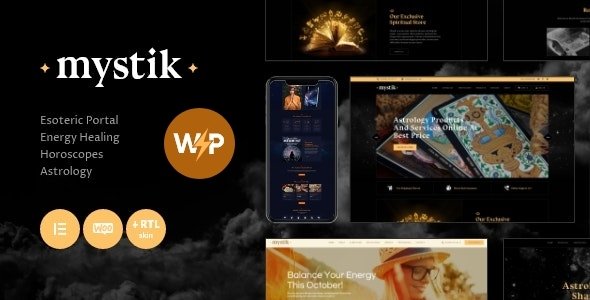
Stuck on your Mystik WordPress theme? Let's fix it.
No endless back-and-forth. Just send us the details and we'll get it done.
No obligation · Replies within 1 hour · Quote within 1 day
Setup · Customization · Bug fixes · WooCommerce integration
About Mystik WP Theme
Mystik is a WordPress theme by ThemeREX built for spiritual, wellness, astrology, and esoteric businesses. It ships with a dark, atmospheric design that suits tarot readers, healers, coaches, and holistic practitioners who need a site that feels intentional rather than generic.
The theme is built on ThemeREX’s own framework and includes a drag-and-drop page builder, multiple pre-built demo layouts, and WooCommerce support for selling readings, courses, or physical products. Typography and color controls let you shift the mood without writing code. It supports Elementor as well, giving you more flexibility if you’re already familiar with that builder. Overall, Mystik is a focused theme with a clear audience in mind rather than a multipurpose theme trying to do everything.
Get matched with a Mystik developer in under one day
Tell us about your Mystik project. Small fixes, Mystik theme customization, or a full website build, whatever you need, we've got it covered.
We'll connect you to the right Mystik developers, define the scope, and get everything 100% clear.
You'll get one estimate, hire your preferred developer, and start collaborating.
Mystik uses ThemeREX’s proprietary framework, which has its own logic for hooks, shortcodes, and options. Most WordPress developers won’t know it well enough to work confidently without time spent learning it first. A developer with direct ThemeREX experience skips that learning curve entirely.
Through Codeable, you get matched with vetted WordPress specialists. FoxyConcept works with clients who need Mystik customization done properly, without guesswork or workarounds that cause issues six months later.
Pros
- Dark, atmospheric design that suits spiritual and wellness niches out of the box
- Multiple pre-built demos covering astrology, tarot, coaching, and holistic health
- WooCommerce support built in for selling services, readings, or products
- Elementor compatibility gives more layout control beyond the native builder
- WPML ready for multilingual spiritual or wellness businesses
Cons
- ThemeREX framework has a steeper learning curve than standard Customizer-based themes
- Heavy demo content can slow down initial setup and requires cleanup before launch
- Some shortcodes are framework-specific, making it harder to switch themes later
- Limited community support compared to larger multipurpose themes like Avada or Divi
- Styling third-party plugins to match Mystik's dark aesthetic usually requires custom CSS
Who is Mystik for?
Astrology and Tarot Reading Businesses
Mystik’s default aesthetic suits astrology and tarot businesses immediately. The dark color palette, celestial typography options, and service-focused layouts mean you spend less time fighting the design and more time setting up your booking flow and content. WooCommerce lets you sell readings or consultations directly from the site.
Spiritual Coaches and Healers
Spiritual coaches need a site that communicates trust and atmosphere before a visitor reads a single word. Mystik handles that visually. You can configure service pages, testimonial sections, and contact forms without custom development. For coaches who want a more tailored layout, a Mystik developer can build it cleanly within the existing framework.
Wellness and Holistic Health Practitioners
Naturopaths, energy healers, and holistic health practitioners benefit from Mystik’s calm, focused layouts. The theme supports appointment-style pages and integrates well with booking plugins. A practitioner with multiple service types can organize them cleanly using Mystik’s built-in post structures and page templates.
Online Courses and Membership Sites
Mystik can support membership content and online courses when paired with LearnDash or MemberPress. The visual style works well for course creators in the spiritual and personal development space. Custom styling is usually needed to match the course interface to Mystik’s aesthetic, but the underlying structure handles it without major conflicts.
Esoteric and Metaphysical Product Shops
WooCommerce integration makes Mystik a practical choice for shops selling crystals, oracle decks, ritual tools, or digital downloads. Product pages sit naturally within the theme’s design language. For shops with large inventories or complex shipping needs, additional development work helps configure WooCommerce properly alongside the theme.

Customizing Mystik
Mystik gives you a decent starting point, but most sites need adjustments beyond what the demo provides. The ThemeREX framework has its own options panel, which can feel unfamiliar if you’re used to the WordPress Customizer. Getting the header, fonts, and color palette to match your brand takes time if you haven’t worked with the framework before.
Common customization requests include modifying the booking or services layout, adding custom post types for offerings or practitioners, and integrating third-party tools like Calendly or payment gateways. A Mystik expert who knows the ThemeREX codebase can handle these changes cleanly, without breaking the theme’s built-in styling or creating technical debt that causes problems later.
Recommended plugins for Mystik
Mystik works with WooCommerce for product and service sales. It also supports popular plugins like WPForms, WPML for multilingual sites, and The Events Calendar if you run workshops or live sessions.
If you’re running paid membership content or online courses, plugins like MemberPress or LearnDash can be integrated, though styling them to match Mystik’s aesthetic usually needs custom CSS. For site speed, image optimization and caching are worth setting up early. You can find specific guidance on WordPress performance and WordPress SEO to get more out of your setup.
Not sure which plugins to use? This WordPress plugins directory covers the most popular options with reviews and setup guides.
Mystik common issues
Mystik theme page builder not loading after update
This usually happens when a ThemeREX plugin dependency gets out of sync after a theme or WordPress update. Start by checking that the ThemeREX Utilities plugin is active and updated to the matching version. Deactivate and reactivate it. If the builder still won’t load, check for JavaScript errors in your browser console. Plugin conflicts, especially with caching or security plugins, frequently block the builder from initializing. A WordPress bug fixing service can isolate the conflict quickly.
Mystik WooCommerce product pages showing wrong layout
Mystik’s WooCommerce templates can be overridden by the theme, and after a WooCommerce update those overrides sometimes fall out of sync. Go to WooCommerce > Status > Tools and check for outdated templates. Updating them through the theme files or rebuilding the product template to match the current WooCommerce version usually fixes display issues. If you’ve made custom changes to those templates, a developer should handle the merge carefully to avoid losing work.
Mystik theme fonts not displaying correctly on mobile
Font rendering issues on mobile in Mystik often come down to how custom Google Fonts or ThemeREX typography settings interact with mobile breakpoints. Check the Customizer’s mobile typography settings first. If fonts look correct on desktop but break on mobile, the issue is likely a CSS specificity conflict or a missing font weight being called. Clearing your cache after any typography change is essential before testing.
Mystik demo import failing or incomplete on WordPress
Demo import failures in Mystik are common on shared hosting where memory limits or execution time limits are too low. The demo files, including images and content, can be large. Increase max_execution_time and memory_limit in your PHP settings before retrying. If the import completes but looks incomplete, re-import the demo data only without images first, then import media separately. A fresh install on a staging environment gives the cleanest result.
Mystik FAQ
Yes, Mystik supports Elementor alongside the native ThemeREX page builder. You can use Elementor for page layouts while the theme handles global styles, fonts, and colors. Some sections built with ThemeREX shortcodes won’t appear in Elementor’s editor, so it’s worth deciding early which builder you’ll use as your primary tool to avoid mixing the two inconsistently.
Yes. Mystik includes built-in WooCommerce support with styled product pages, cart, and checkout templates. It works well for selling services, digital products, and physical goods. For more complex shop setups, such as variable products, subscriptions, or custom checkout flows, some additional configuration or development work is usually needed.
Before updating Mystik, create a full site backup. Any customizations made directly to theme files will be overwritten. Use a child theme for code changes so they survive updates. ThemeREX Customizer settings are stored in the database and persist through theme updates, but testing on a staging site before updating live is always the safer approach.
Mystik is listed as WPML compatible. String translations for theme-specific text work through WPML’s String Translation module. Page content is translated through WPML’s standard workflow. Some ThemeREX-specific shortcodes may need manual attention during translation setup, but overall the integration is stable for multilingual spiritual or wellness sites.
You can migrate an existing WordPress site and apply the Mystik theme, but your current content won’t automatically match Mystik’s demo layouts. Rebuilding key pages using Mystik’s templates is usually necessary. For a smooth transition, WordPress migration support helps avoid data loss and keeps your SEO intact during the switch.
Hire a Mystik Developer for Your WordPress Site
Whether you need a full Mystik setup from scratch, a redesign of an existing site, or specific feature work, working with someone who knows the theme saves time and avoids mistakes. FoxyConcept delivers Mystik development through Codeable’s vetted network. You get a free estimate with no obligation to hire. Post your project and get a free estimate today.
You'll need a free Codeable account so developers can ask questions and send their quotes.