Viseo WordPress Theme
by ProgressionStudios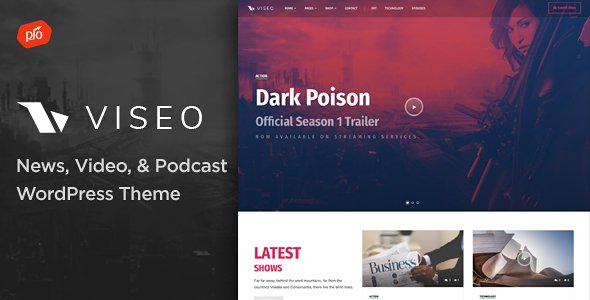
Stuck on your Viseo WordPress theme? Let's fix it.
No endless back-and-forth. Just send us the details and we'll get it done.
No obligation · Replies within 1 hour · Quote within 1 day
Setup · Customization · Bug fixes · WooCommerce integration
About Viseo WP Theme
Viseo is a WordPress theme built by ProgressionStudios, designed primarily for video-focused websites. It works well for video bloggers, YouTubers, streaming platforms, and media publishers who want a clean, content-forward layout without building from scratch.
The theme ships with a video-first homepage layout, multiple post formats, and support for self-hosted video as well as embeds from YouTube, Vimeo, and Dailymotion. Navigation is built around category filtering, making it easy for visitors to find content by topic or channel.
Viseo is compatible with standard WordPress plugins and uses the Customizer for basic styling changes. It is a solid starting point for a video portal, though teams with specific branding or feature requirements will typically need custom development work to get the result they are after.
Get matched with a Viseo developer in under one day
Tell us about your Viseo project. Small fixes, Viseo theme customization, or a full website build, whatever you need, we've got it covered.
We'll connect you to the right Viseo developers, define the scope, and get everything 100% clear.
You'll get one estimate, hire your preferred developer, and start collaborating.
Viseo has a specific use case and a specific template structure. Generic WordPress developers often underestimate how much work video portals require once real content and real users are involved. The developers available through Codeable have been vetted specifically for WordPress work. You get someone who understands theme architecture, plugin conflicts, and how to build features that hold up over time, not just someone who can copy-paste shortcodes.
Pros
- Built specifically for video content with native support for multiple video embed sources
- Category-based filtering on archive pages makes large video libraries browsable
- Multiple post formats supported including video, gallery, and standard posts
- Customizer-based settings keep basic changes accessible without touching code
- Developed by ProgressionStudios, a theme shop with a track record in media-focused WordPress themes
Cons
- Limited layout flexibility compared to page builder themes if your design needs to deviate from the default
- No built-in membership or paywall system, third-party plugins are required for monetization
- Documentation is basic and does not cover advanced customization scenarios
- Performance can degrade on video-heavy pages without additional caching and CDN configuration
- Child theme is necessary for safe customization, which adds setup time for non-developers
Who is Viseo for?
YouTube Channel Companion Site
Viseo works well as a standalone site for YouTubers who want to host their content outside YouTube’s algorithm. Embed videos directly from your channel, organize by playlist category, and use the theme’s archive layout to keep older videos discoverable. A developer can also add an email signup and auto-post from an RSS feed to reduce manual work.
Online Video Course Platform
With plugins like LearnDash or LifterLMS added to Viseo, you can build a structured course site around video lessons. The theme’s video-forward layout keeps learners focused on content. A Viseo developer can configure course access restrictions, add progress tracking, and connect a payment gateway so you can sell access without switching to a dedicated LMS platform.
Sports and Fitness Video Blog
Fitness brands and sports coaches use Viseo to organize workout videos, tutorials, and training series by category. Visitors can filter by difficulty, muscle group, or coach. The theme handles this kind of taxonomy-driven browsing well. Add a membership plugin and you have a subscription fitness site without building from scratch.
Film and Review Publication
Film bloggers and review publications benefit from Viseo’s post format support. Embed trailers, pair them with long-form written reviews, and use the category system to organize by genre or release year. The theme handles media-heavy editorial content cleanly, and a developer can add a star-rating system or structured data for review snippets in search results.
Church or Non-Profit Media Hub
Churches and non-profits use Viseo to publish sermon recordings, event recaps, and educational content for members. The theme’s clean layout keeps the focus on the video and message rather than design elements. Access can be restricted to members using a free plugin, and categories keep different content series separated and easy to navigate.

Customizing Viseo
Out of the box, Viseo gives you control over colors, fonts, header layout, and widget areas through the WordPress Customizer. That covers the basics, but most site owners want more: custom video submission forms, membership tiers, filtered archives, or a branded look that does not resemble the default theme.
That is where a Viseo expert comes in. A developer who knows the theme’s template structure can modify archive loops, add custom post type support, build out a video upload workflow, or integrate WooCommerce for paid content. Trying to do this through child theme overrides without experience usually leads to layout breaks and wasted time.
Working with a Viseo expert means changes are made cleanly, without patching core files that will be overwritten on the next update.
Recommended plugins for Viseo
Viseo pairs well with several plugins depending on your goals. VideoWhisper or Paid Memberships Pro can add video submission and subscription features. WooCommerce handles paid content or digital downloads. For performance, a caching plugin like WP Rocket is worth adding early, especially if you are embedding or hosting video files. Proper image optimization and a CDN also help significantly.
If you are building traffic through search, structured data for video content is important. Need help with speed or search visibility? See our WordPress performance and WordPress SEO services.
Not sure which plugins to use? This WordPress plugins directory covers the most popular options with reviews and setup guides.
Viseo common issues
Viseo theme video not displaying correctly on mobile
Mobile video display issues in Viseo are usually caused by a missing or misconfigured responsive embed wrapper. Check whether your video embed code is wrapped in a fluid container class. If you are using a page builder or custom HTML block, the embed may be overriding the theme’s default responsive handling. A developer can add a CSS fix or adjust the template file to force consistent responsive behavior across devices. See our WordPress bug fixing service if you need hands-on help.
Viseo homepage layout broken after WordPress update
Layout breaks after a WordPress core update in Viseo often happen when custom changes were made directly to theme files rather than through a child theme. Core CSS or template changes can conflict with updated WordPress markup. The fix depends on what was modified. A developer will compare the current theme files against a clean copy, identify the conflict, and move customizations into a child theme so future updates do not cause the same problem.
Viseo theme slow loading on pages with multiple video embeds
Multiple video embeds on one page load external scripts for each player, which stacks up fast. The quickest fix is to use a lazy-load plugin that delays video loading until the user scrolls to it. You can also replace YouTube embeds with a facade image that only loads the iframe on click. For self-hosted video, a CDN makes a significant difference. Check our WordPress performance service for a full site speed audit.
Viseo featured video not showing on front page
If the Viseo featured video is not showing on the front page, the most common causes are a misconfigured homepage setting in WordPress Reading Settings, a missing video URL in the post meta field, or a widget area that has not been populated. Check that your front page is set to a static page if the theme requires it, and verify that the video URL or embed code has been entered in the correct custom field within the post editor.
Viseo FAQ
Viseo is a premium WordPress theme sold by ProgressionStudios. It is available through their website or the ThemeForest marketplace. A standard license covers one website and includes access to updates and support for a set period. Renewal is required to continue receiving updates after the support period ends.
Viseo is not built around Elementor or WPBakery. It uses its own template system and the WordPress Customizer. You can install Elementor, but you may encounter conflicts with the theme’s video layouts and archive templates. It is better to work within the theme’s native structure or have a developer extend it rather than adding a full page builder on top.
Viseo does not include built-in membership or paywall features. You can add them using plugins like Paid Memberships Pro, MemberPress, or Restrict Content Pro. These plugins control access to video posts by membership level. A developer will usually need to configure the integration to work cleanly with Viseo’s archive and single post templates.
The safest way to update Viseo without losing changes is to use a child theme. Any modifications made in a child theme are not overwritten when the parent theme updates. If you have been editing the parent theme directly, a developer can migrate those changes to a child theme before the next update. See our WordPress maintenance service for ongoing help.
Yes, migrating an existing video site to Viseo is possible. The main work involves mapping your current content structure to Viseo’s post formats and taxonomy system, and ensuring video embeds display correctly in the new template. If you are moving between hosts or platforms at the same time, see our WordPress migration service for a clean transfer.
Hire a Viseo Developer for Your WordPress Project
Whether you need a custom homepage layout, a video submission system, or help fixing something that broke after an update, a Viseo developer can handle it. Work is scoped clearly before anything starts, so you know what you are paying for. Get a free estimate and hear back within 24 hours. No obligation, no risk.
You'll need a free Codeable account so developers can ask questions and send their quotes.