Artemis WordPress Theme
by SmartWPress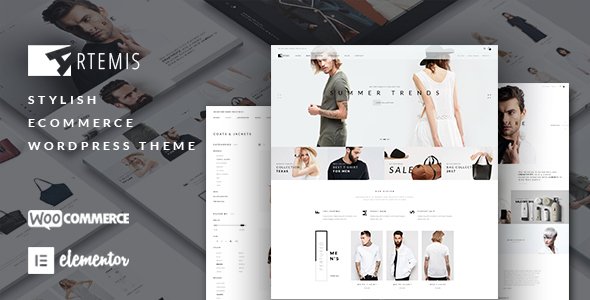
Stuck on your Artemis WordPress theme? Let's fix it.
No endless back-and-forth. Just send us the details and we'll get it done.
No obligation · Replies within 1 hour · Quote within 1 day
Setup · Customization · Bug fixes · WooCommerce integration
About Artemis WP Theme
Artemis is a WordPress theme built by SmartWPress, designed for creative agencies, portfolio sites, and service-based businesses. It ships with a clean, minimal layout and a focus on visual presentation. The theme is built on a custom framework by SmartWPress and comes bundled with Elementor support, giving you drag-and-drop control over page layouts without touching code.
Out of the box, Artemis includes multiple demo layouts, header and footer builders, and WooCommerce compatibility. It supports custom post types for portfolio and team sections, making it practical for studios and freelancers who want to showcase work quickly. Performance is generally solid on a well-configured server, and the theme follows WordPress coding standards closely. It targets users who want a polished result without hiring a developer for every small change.
Get matched with a Artemis developer in under one day
Tell us about your Artemis project. Small fixes, Artemis theme customization, or a full website build, whatever you need, we've got it covered.
We'll connect you to the right Artemis developers, define the scope, and get everything 100% clear.
You'll get one estimate, hire your preferred developer, and start collaborating.
SmartWPress themes like Artemis have their own options framework, hook structure, and update patterns. A generic WordPress developer may not know where to look when something breaks or how to extend the theme without creating conflicts. The developers available through Codeable have hands-on experience with commercial themes like Artemis and can handle customization, fixes, and integrations without guesswork. You get a vetted specialist, a clear estimate upfront, and work that holds up over time.
Pros
- Clean, minimal design that works well for creative and agency sites without heavy customization
- Native Elementor support gives non-developers full control over page layouts
- Built-in portfolio and team custom post types save setup time on typical agency builds
- WooCommerce compatibility is solid out of the box with no additional configuration required
- Regular updates from SmartWPress keep the theme compatible with current WordPress versions
Cons
- The SmartWPress options panel has a learning curve for users unfamiliar with the framework
- Advanced header customization requires digging into the custom header builder, which isn't intuitive
- Child theme setup documentation is thin, making safe customization harder for beginners
- Some demo content relies on specific plugin combinations that aren't always clearly listed before purchase
- Performance can drop noticeably when Elementor and the built-in page options both load scripts on the same page
Who is Artemis for?
Creative Agency Website
Artemis suits creative agencies well. The portfolio custom post type handles case studies and client work cleanly. Header and footer builders let you match brand guidelines without custom development. Agencies that need to update content regularly will find the Elementor integration practical for maintaining pages without developer help on every edit.
Freelance Portfolio
Freelancers benefit from Artemis’s ready-made portfolio layouts and minimal design. You can have a professional-looking site live quickly using one of the included demos. The theme handles project galleries, service descriptions, and contact sections without needing additional plugins for basic functionality.
Photography Studio
Photography studios need fast-loading image-heavy pages. Artemis supports full-width gallery layouts and handles large images reasonably well when paired with proper image optimization. The clean design keeps focus on the work rather than the interface, which suits photographers who want their portfolio to speak for itself.
Small Business Service Site
Small businesses offering services like consulting, coaching, or trades work can use Artemis to build a clear, functional site. The theme handles service pages, team sections, and contact forms without much configuration. It avoids the visual clutter that slows down smaller sites built on heavier multipurpose themes.
WooCommerce Design Shop
Designers selling digital products or merchandise can use the built-in WooCommerce support to add a shop to an Artemis site. Product pages inherit the theme’s clean styling, and the layout holds up without needing a separate WooCommerce child theme or significant CSS overrides.

Customizing Artemis
Artemis gives you a reasonable amount of control through the WordPress Customizer and the bundled SmartWPress options panel. You can adjust typography, colors, header layouts, and section spacing without writing CSS. The Elementor integration extends this further, letting you build custom page templates visually.
That said, deeper customization, such as modifying the header builder logic, creating custom post type templates, or integrating third-party plugins cleanly, often requires PHP and a solid understanding of how the SmartWPress framework is structured. An Artemis expert familiar with the theme’s hook system and child theme setup will get that work done faster and without breaking updates. If your project needs go beyond what the options panel offers, working with a specialist saves time and avoids mistakes that are hard to undo.
Recommended plugins for Artemis
Artemis works well with plugins that extend core WordPress functionality. WooCommerce integration is built in, so adding a shop to a portfolio or agency site is straightforward. The theme also supports WPML for multilingual builds and works with most major form plugins.
For performance, pairing Artemis with a caching plugin and an image optimization tool makes a measurable difference. You can read more about that on our WordPress performance page. If you’re running an SEO-focused site, check out our WordPress SEO service to make the most of the theme’s clean markup.
Not sure which plugins to use? This WordPress plugins directory covers the most popular options with reviews and setup guides.
Artemis common issues
Artemis theme header not displaying correctly after update
Header display issues after an Artemis update are usually caused by cached styles conflicting with new CSS. Start by clearing your site cache and any server-level caching. If you’re using a child theme, check whether your custom header styles reference classes that SmartWPress renamed in the update. If the header builder settings look correct but the output is wrong, regenerating the header template through the SmartWPress panel often resolves it. Persistent issues may need a developer. See our WordPress bug fixing service for help.
Elementor sections not saving in Artemis theme
When Elementor sections won’t save in Artemis, the most common cause is a JavaScript conflict between the SmartWPress options scripts and the Elementor editor. Open your browser console while saving and check for JS errors. Deactivating plugins one by one helps isolate the conflict. Also confirm you’re running a supported version of Elementor for your current Artemis version. SmartWPress lists compatibility requirements in the theme changelog. If the issue only appears on specific templates, a corrupted template cache in Elementor is likely the cause.
Artemis portfolio custom post type not showing on page
If your Artemis portfolio posts aren’t appearing on the page, check the page template assigned to that page first. Artemis uses a specific portfolio template that must be selected from the page attributes panel. Also verify that the portfolio custom post type is enabled in the SmartWPress theme settings. If you’ve recently migrated or changed your permalink structure, flushing rewrite rules by visiting Settings > Permalinks and saving fixes missing post type archives in most cases.
Artemis theme slow loading on mobile devices
Slow mobile load times with Artemis often come from render-blocking scripts loaded by both Elementor and the SmartWPress framework at the same time. Use a tool like PageSpeed Insights to identify which scripts are causing the delay. Deferring non-critical JavaScript through a performance plugin helps. Also check that mobile-specific images are properly sized. Artemis doesn’t always serve smaller images to mobile by default unless your image handling is configured correctly. More detail on this is available on our WordPress performance page.
Artemis FAQ
Artemis is manageable for beginners who are comfortable with WordPress basics and Elementor. The options panel from SmartWPress adds a layer of settings that can be confusing at first. If you’re building a straightforward portfolio or service site using one of the included demos, the learning curve is reasonable. For anything custom, having a developer available helps avoid time-consuming mistakes.
Artemis works with both Elementor Free and Elementor Pro. The core page building features function with the free version. Pro features like the Theme Builder, which lets you create custom headers, footers, and archive templates visually, require Elementor Pro. SmartWPress’s own header and footer builder covers some of that ground without needing the Pro upgrade.
Yes. Artemis includes WooCommerce support and styled templates for shop, product, and cart pages. It handles standard store setups without additional configuration. More complex builds, such as custom product layouts or checkout modifications, may need developer work to maintain the Artemis design alongside WooCommerce functionality.
Artemis demo content is installed through the SmartWPress one-click demo importer included with the theme. Go to Appearance > SmartWPress Demo Import, choose your preferred demo, and run the import. Make sure required plugins are activated first, as the importer will list them before proceeding. Demo import works best on a fresh WordPress install to avoid conflicts with existing content.
Migrating an existing site to Artemis is possible but requires planning. Your current content transfers cleanly, but layouts built with a different page builder or theme won’t carry over automatically. You’ll need to rebuild pages using Artemis’s tools. For a smooth move, our WordPress migration service can handle the technical side and reduce the risk of losing content or settings.
Hire an Artemis WordPress Developer
Need a customization built, a bug fixed, or help setting Artemis up the right way? FoxyConcept connects you with vetted Artemis developers through Codeable. Post your project and get a free estimate within 24 hours, no obligation to hire. Whether it’s a layout tweak or a full site build, you get a developer who knows the theme. Get your free estimate here and see who’s available for your project today.
You'll need a free Codeable account so developers can ask questions and send their quotes.