Growler WordPress Theme
by ProgressionStudios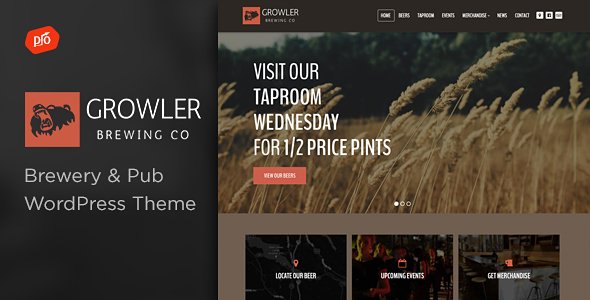
Stuck on your Growler WordPress theme? Let's fix it.
No endless back-and-forth. Just send us the details and we'll get it done.
No obligation · Replies within 1 hour · Quote within 1 day
Setup · Customization · Bug fixes · WooCommerce integration
About Growler WP Theme
Growler is a WordPress theme built by ProgressionStudios, designed specifically for bars, breweries, craft beer venues, and taprooms. It ships with a clean, dark-toned aesthetic that suits the craft beverage industry without requiring heavy customisation out of the box.
The theme includes dedicated templates for beer menus, event listings, and location pages. It works with the WPBakery page builder and integrates with popular plugins like The Events Calendar and WooCommerce for merchandise sales.
ProgressionStudios built Growler with hospitality businesses in mind, so the structure leans toward showcasing products, hours, and atmosphere rather than blogging or portfolio use. It is a niche theme, which means it does one thing well but requires a developer when your needs go beyond the default setup.
Get matched with a Growler developer in under one day
Tell us about your Growler project. Small fixes, Growler theme customization, or a full website build, whatever you need, we've got it covered.
We'll connect you to the right Growler developers, define the scope, and get everything 100% clear.
You'll get one estimate, hire your preferred developer, and start collaborating.
Growler is a niche theme with a specific structure. When something breaks or you need to build outside its default templates, generic WordPress advice rarely applies. You need someone who has worked inside ProgressionStudios themes and understands how the custom post types and theme options interact. FoxyConcept connects you with vetted Growler developers through Codeable, a platform where every developer is screened before they take on client work. No bidding, no guessing, just a qualified developer matched to your project.
Pros
- Purpose-built for bars and breweries, so the default layout fits craft beverage businesses without major restructuring
- Custom post types for beer menus and events mean content is organised and easy to manage from the dashboard
- WooCommerce compatibility allows online merchandise or subscription sales without a separate storefront theme
- Dark, atmospheric design aesthetic works well visually for the hospitality and nightlife niche
- WPBakery integration gives non-developers a way to rearrange homepage sections without touching code
Cons
- WPBakery page builder adds page bloat and is slower than block-based editors like Gutenberg
- Niche focus means it is a poor fit for anything outside bars, breweries, or similar hospitality businesses
- ProgressionStudios update cadence can be slow, which creates compatibility risks with newer WordPress and PHP versions
- Theme options panel lacks granular typography controls, limiting font customisation without custom CSS
- Limited community and documentation compared to mainstream themes, making self-troubleshooting harder
Who is Growler for?
Craft Brewery Website
Growler was essentially built for this. Breweries can list their core range and seasonal beers using the custom menu post type, display tasting room hours, and embed a location map. The dark visual style suits the craft brewery brand without needing a designer to make it work from day one.
Bar or Taproom
Bars and taprooms get a lot of mileage from Growler’s homepage sections, which are structured around atmosphere, drink menus, and location info. Displaying daily specials, happy hour times, and rotating tap lists is manageable through the dashboard once a developer has set up the initial structure correctly.
Craft Beer Subscription Box
With WooCommerce connected, Growler can support a subscription model for beer clubs or mixed case deliveries. The shop pages will need styling to match the theme, and checkout flows should be tested thoroughly, but the foundation is there. A developer can wire up the subscription plugin and adjust the product templates to fit the brand.
Brewery Events and Ticketing
The Events Calendar plugin integrates cleanly with Growler and lets venues publish ticketed events, brewery tours, trivia nights, and tap takeovers. Recurring events are supported, and the calendar layout can be styled to stay consistent with the overall Growler design. Good for venues running weekly programming.
Bottle Shop or Beer Retailer
Independent bottle shops can use Growler as a base for a retail site with WooCommerce handling the product catalogue and checkout. The visual style works for a beer-focused retail brand. That said, the theme was not designed for large catalogues, so performance and filtering will need attention from a developer as the product count grows.

Customizing Growler
Growler gives you a Theme Options panel where you can control colours, fonts, header layout, and background settings. You can swap the logo, adjust the navigation style, and configure the homepage sections through the WPBakery drag-and-drop editor.
Beer menu pages use custom post types, so adding new items is straightforward once the structure is in place. Event listings follow a similar pattern.
Where things get more involved is when you want to go off-template. Custom layouts, third-party integrations, booking system connections, or changes to the menu structure typically require PHP and CSS knowledge. A Growler expert can handle those modifications without breaking the existing design or creating conflicts with future updates.
Recommended plugins for Growler
Growler pairs well with several plugins that extend its core functionality. WooCommerce adds an online shop for merchandise or beer subscriptions. The Events Calendar handles ticketed events and recurring nights. WPForms or Gravity Forms covers reservations and contact. For sites that need better Google rankings, pairing Growler with a solid WordPress SEO strategy makes a real difference in local search visibility. If page load times are slow on image-heavy menu pages, a WordPress performance audit can identify exactly where the bottleneck is and fix it.
Not sure which plugins to use? This WordPress plugins directory covers the most popular options with reviews and setup guides.
Growler common issues
Growler theme beer menu not displaying correctly
Menu display issues in Growler usually come from the beer custom post type not being assigned to the correct menu template, or a plugin conflict affecting the loop output. First, check that the page template is set to the dedicated menu template in Page Attributes. If items are missing, verify that the custom post type is visible in the Reading settings. Persistent display issues often trace back to a caching plugin serving a stale version of the page. Our WordPress bug fixing service can diagnose and resolve this quickly.
Growler WordPress theme WPBakery not loading on frontend
If WPBakery is not loading on the frontend in Growler, the most likely cause is a JavaScript conflict with another plugin or a browser caching issue. Open the browser console and look for JS errors. Deactivate plugins one at a time to isolate the conflict. Also confirm that WPBakery is activated and licensed correctly, as an expired or unactivated licence can disable frontend editing. If the issue appeared after a WordPress core update, the WPBakery version may need updating to match.
Growler theme homepage sections not saving changes
When homepage section changes are not saving in Growler, the issue is usually tied to the Theme Options panel hitting a PHP input variable limit. Open your server’s php.ini file and increase the max_input_vars value to at least 3000. If you are on shared hosting, this may require a custom .htaccess rule or a request to your host. Once the limit is raised, changes should save properly. Clearing any server-side cache after saving is also recommended.
Growler theme broken after WordPress update
Growler theme breakage after a WordPress update is typically caused by PHP version incompatibility or a deprecated function in the theme code. Check the site’s error log for specific PHP errors and compare the theme’s required PHP version against what your server is running. If the theme has not been updated to support PHP 8.x, you may see white screen or layout errors. A temporary workaround is reverting the PHP version, but a proper fix requires updating the theme or patching the affected functions. See our WordPress bug fixing service for hands-on help.
Growler FAQ
ProgressionStudios still lists Growler on their site, but update frequency has slowed in recent years. Before purchasing or continuing to use the theme, check the changelog for recent updates and confirm it has been tested against the current WordPress version. Sites running outdated versions of niche themes like Growler are at higher risk from security and compatibility issues. Ongoing WordPress maintenance helps keep the site stable regardless of theme update pace.
Growler is built around WPBakery, and switching to Elementor is not a straightforward swap. WPBakery shortcodes will render as plain text if you deactivate it, and the theme templates rely on its structure. You can use Elementor alongside WPBakery, but running two page builders on the same site creates performance and conflict issues. The cleaner path is staying with WPBakery or rebuilding key pages in Elementor with the help of a developer.
Growler uses a custom post type called Beer Menu. In your WordPress dashboard, look for the Beer Menu section in the left sidebar after the theme is activated. Add individual items there, assigning them to categories like lagers, ales, or seasonals. The menu page template then pulls in these entries automatically. If the post type is not visible, it may need to be registered or a plugin conflict may be hiding it.
Yes, Growler supports WooCommerce for selling merchandise, branded items, or beer subscriptions. After installing and activating WooCommerce, the shop pages will inherit basic styling from the theme. Some manual CSS adjustments are usually needed to make the shop pages match Growler’s design more closely, particularly on product and cart pages. A developer can handle that alignment without affecting the rest of the theme.
Yes, migrating an existing bar or brewery site to Growler is possible. Content like posts and pages can be moved using WordPress export tools, but you will need to rebuild page layouts inside WPBakery and re-enter beer menu items using Growler’s custom post types. Domain and hosting migration is separate from the theme switch. Our WordPress migration service can handle the technical side of moving the site safely.
Hire a Growler WordPress Developer
Whether you need a full Growler site build, a specific feature added, or something fixed that stopped working, FoxyConcept can match you with a developer who knows this theme. Work is delivered through Codeable, so you get a vetted professional, a clear estimate, and no obligation to proceed until you are satisfied with the plan. Get a free estimate today and have a developer matched to your project within 24 hours.
You'll need a free Codeable account so developers can ask questions and send their quotes.