Jobhunt WordPress Theme
by MadrasThemes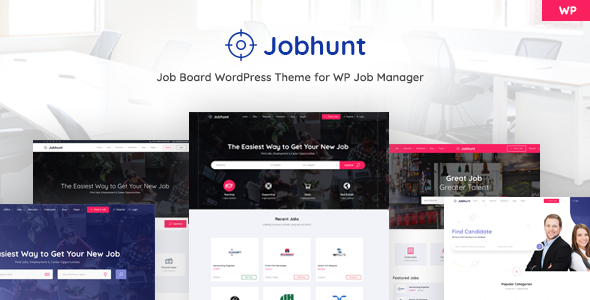
Stuck on your Jobhunt WordPress theme? Let's fix it.
No endless back-and-forth. Just send us the details and we'll get it done.
No obligation · Replies within 1 hour · Quote within 1 day
Setup · Customization · Bug fixes · WooCommerce integration
About Jobhunt WP Theme
Jobhunt is a WordPress job board theme built by MadrasThemes. It is designed specifically for recruitment platforms, staffing agencies, and niche job portals. The theme runs on WP Job Manager, one of the most widely used job listing plugins in the WordPress ecosystem.
Out of the box, Jobhunt supports employer profiles, candidate resumes, job alerts, and application management. It ships with multiple homepage layouts, a clean search interface, and support for several WP Job Manager paid add-ons. The design is modern without being overloaded, and performance is reasonable on a well-configured server.
MadrasThemes maintains the theme actively and keeps it compatible with current versions of WordPress and WP Job Manager. If you need a job board up quickly without building from scratch, Jobhunt is a solid starting point.
Get matched with a Jobhunt developer in under one day
Tell us about your Jobhunt project. Small fixes, Jobhunt theme customization, or a full website build, whatever you need, we've got it covered.
We'll connect you to the right Jobhunt developers, define the scope, and get everything 100% clear.
You'll get one estimate, hire your preferred developer, and start collaborating.
Jobhunt has a lot of moving parts. WP Job Manager, its add-ons, payment logic, user roles, and frontend templates all interact in ways that are not obvious from the documentation. Getting it wrong means broken applications, missed job alerts, or a candidate portal that does not work on mobile.
Through Codeable, you get matched with vetted WordPress developers who have worked with Jobhunt and WP Job Manager specifically. No guesswork, no junior freelancers learning on your project.
Pros
- Built specifically for job boards, not adapted from a generic theme
- Deep integration with WP Job Manager and its official add-ons
- Multiple homepage layouts included, useful for different recruitment niches
- Separate dashboard areas for employers and candidates out of the box
- Actively maintained by MadrasThemes with regular compatibility updates
Cons
- Relies heavily on WP Job Manager, so add-on costs stack up quickly
- Customizing templates requires PHP knowledge, not just Customizer settings
- Documentation is sparse for advanced configurations and hooks
- Payment and monetisation features need WooCommerce, which adds complexity
- Page speed can drop noticeably when multiple WP Job Manager extensions are active
Who is Jobhunt for?
General Job Board
Jobhunt works well as a broad job board where multiple employers post listings and candidates apply directly. The built-in search filters, job categories, and employer profile pages give you the structure you need. Monetise with paid job listings using WooCommerce job packages.
Staffing and Recruitment Agency
Recruitment agencies can use Jobhunt to manage job listings on behalf of clients, collect candidate applications in one place, and maintain a searchable resume database. The employer dashboard makes it straightforward for agency staff to post and manage roles without needing WordPress access.
Niche Industry Job Portal
Tech, healthcare, legal, creative, and other niche sectors benefit from a focused job board. Jobhunt supports custom job types and categories, so you can tailor listings to a specific industry. A developer can add custom fields relevant to your sector, such as licensing requirements or salary bands.
Freelance Marketplace
With the Resume Manager add-on, Jobhunt can be adapted for freelance project listings where clients post work and freelancers apply. It is not a purpose-built freelance marketplace, but with development work it can handle short-term project postings alongside a talent directory.
Remote Work Job Board
Remote job boards have grown significantly. Jobhunt supports location-based filtering and job type tags, making it easy to flag roles as fully remote. Custom homepage layouts can highlight remote-first employers, and job alerts keep candidates notified of new remote opportunities in their field.

Customizing Jobhunt
Jobhunt works with the WordPress Customizer for basic changes like colors, fonts, header layout, and homepage sections. For anything beyond surface-level adjustments, you will need to get into the theme settings panel or write custom CSS.
Employers and candidates each get dedicated dashboard pages, and these can be restructured, but doing so requires PHP knowledge and familiarity with WP Job Manager hooks. Adding custom fields, changing the application flow, or integrating a payment gateway takes real development work.
A Jobhunt expert can handle these customizations without breaking existing functionality. Whether you need a custom employer onboarding process, a specific search filter setup, or a branded candidate portal, working with someone who knows this theme and the underlying plugin stack saves significant time and avoids costly mistakes.
Recommended plugins for Jobhunt
Jobhunt is built to work alongside WP Job Manager add-ons including Applications, Resume Manager, Alerts, and Bookmarks. Each extension adds functionality but also adds weight to your site.
Third-party integrations like WooCommerce job packages, Stripe payments, and WPML for multilingual job boards are all possible but need careful configuration. Poorly set up extensions are one of the most common causes of slow load times on Jobhunt sites. If performance matters to you, check out our WordPress performance service. For visibility in search results, see our WordPress SEO service.
Not sure which plugins to use? This WordPress plugins directory covers the most popular options with reviews and setup guides.
Jobhunt common issues
Jobhunt job listings not showing on homepage
This is usually caused by a permalink conflict or a WP Job Manager page assignment issue. Go to Settings > Permalinks and save without changing anything to flush rewrite rules. Then check WP Job Manager > Pages Setup and confirm the correct pages are assigned for job listings. If the homepage uses a custom template, verify it includes the correct WP Job Manager shortcode. Our bug fixing service can diagnose this quickly.
WP Job Manager application form not working with Jobhunt
Application form issues in Jobhunt usually stem from a plugin conflict, a missing WP Job Manager Applications add-on, or a JavaScript error caused by a caching or optimisation plugin. Start by disabling caching plugins temporarily and testing the form. Check the browser console for JS errors. If the Applications add-on is active, confirm its version is compatible with your current WP Job Manager version. Mismatched versions break the form silently.
Jobhunt theme slow loading with multiple extensions
Each active WP Job Manager extension adds HTTP requests and database queries. Run a performance audit using Query Monitor to identify which plugins are causing slowdown. Common culprits are the Alerts and Resume Manager extensions running heavy queries on page load. Consider a caching layer and lazy loading for listings. For a thorough fix, see our WordPress performance service.
Jobhunt employer dashboard returning 404 error
A 404 on the employer dashboard is almost always a permalink or page setup issue. Go to WP Job Manager > Pages Setup and check that the employer dashboard page exists and has the correct shortcode. Then flush permalinks under Settings > Permalinks. If you recently migrated the site, the page IDs stored in the plugin settings may point to pages that no longer exist at the same URL.
Jobhunt FAQ
MadrasThemes updates Jobhunt regularly to maintain compatibility with current WordPress releases. Before updating either WordPress core or the theme, check the theme changelog on ThemeForest and test updates in a staging environment first. Running outdated versions of WP Job Manager alongside a current WordPress install is a more common source of breakage than the theme itself.
No. Jobhunt is built entirely around WP Job Manager. Without it, the job listing pages, employer dashboard, candidate portal, and application system will not function. WP Job Manager is free, but most of the functionality that makes Jobhunt useful in production requires paid add-ons like Applications and Resume Manager.
Yes. Jobhunt supports paid job listings through WooCommerce and the WP Job Manager WooCommerce add-on. You can create job packages with different listing durations, featured placement, or listing limits. Setting up pricing and package logic correctly requires careful WooCommerce configuration, and a developer can help structure this cleanly.
Resume search requires the WP Job Manager Resume Manager add-on. Once active, employers can search candidate profiles by keyword, location, and resume category. Jobhunt includes templates for the resume listing and single resume pages. Customising how search results display or adding filters beyond the defaults requires template overrides or custom development.
Jobhunt is translation-ready and compatible with WPML and Polylang for multilingual job boards. The theme files are properly internationalised. Running a multilingual job board with separate listing sets per language does add complexity, particularly around WP Job Manager settings and URL structures. A developer familiar with WPML and WP Job Manager can set this up correctly.
Hire a Jobhunt Developer
Whether you need Jobhunt installed and configured from scratch, custom features added, or an existing job board fixed and improved, a dedicated developer makes the difference. Post your project and get a free estimate within 24 hours. No obligation to hire. Get your free estimate here and describe exactly what your job board needs to do.
You'll need a free Codeable account so developers can ask questions and send their quotes.