Hook WordPress Theme
by Pirenko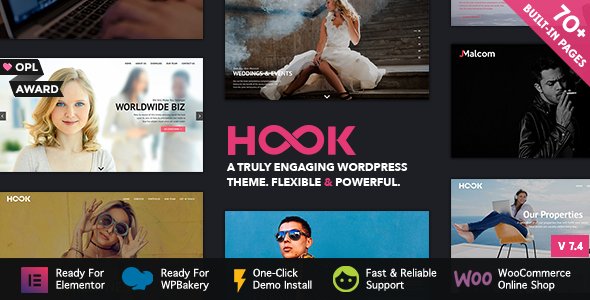
Stuck on your Hook WordPress theme? Let's fix it.
No endless back-and-forth. Just send us the details and we'll get it done.
No obligation · Replies within 1 hour · Quote within 1 day
Setup · Customization · Bug fixes · WooCommerce integration
About Hook WP Theme
Hook is a WordPress theme built by Pirenko, the same developer behind popular themes like Bento and MeSo. It is built around a full-width, scroll-based layout designed for agencies, portfolios, and creative studios that want bold visual impact without a complicated page builder.
The theme uses a section-stacking approach, where each block of content fills the screen and transitions on scroll. Typography is large and expressive. Color control is handled through a live customizer panel, so you can restyle the theme without touching code.
Hook ships with demo content you can import in one click, making initial setup fast. It supports WooCommerce, custom post types for portfolio work, and a built-in contact form. It is a Themeforest theme with consistent update history and active support from Pirenko.
Get matched with a Hook developer in under one day
Tell us about your Hook project. Small fixes, Hook theme customization, or a full website build, whatever you need, we've got it covered.
We'll connect you to the right Hook developers, define the scope, and get everything 100% clear.
You'll get one estimate, hire your preferred developer, and start collaborating.
Hook has a specific way of doing things. Its scroll-based sections, demo structure, and Pirenko’s custom options panel mean that generic WordPress advice does not always apply. You need someone who has worked inside this theme before.
Through Codeable, you get matched with vetted WordPress developers who know Hook and themes like it. No agencies, no juniors on a team you never meet. Post your project, get an estimate within 24 hours, and decide from there with no obligation. That is how we work at FoxyConcept.
Pros
- Full-screen scroll sections create strong visual impact with minimal setup
- One-click demo import gets a working site live in under an hour
- Live customizer lets you change colors, fonts, and layout without code
- Clean, well-commented PHP codebase makes developer customization straightforward
- Consistent update history from Pirenko with active Themeforest support
Cons
- Full-screen section layout is rigid and hard to adapt for content-heavy sites
- Not built for blogging, news sites, or pages with long-form text content
- WooCommerce product pages need custom CSS to match the theme's design properly
- No native page builder, so complex layout changes require direct template editing
- Heavy use of background images can slow performance if not optimized early
Who is Hook for?
Creative Agency Portfolio
Hook’s full-screen sections and bold typography make it a natural fit for creative agencies that want to show case studies and service offerings in a visually confident way. Each scroll section holds a distinct message, which suits agency sites structured around services, work, team, and contact blocks.
Freelance Designer Website
Freelancers who design, illustrate, or develop benefit from Hook’s portfolio post type and clean layout. The theme puts work front and center without requiring a complex setup. Adding a contact form and linking social profiles covers everything most freelance sites need.
Photography Studio
Photography studios need large images and minimal distraction. Hook’s full-width background sections let photos fill the screen, and the dark color scheme options suit editorial and portrait work. A custom Hook developer can add lightbox galleries and category filtering beyond the defaults.
Digital Product Launch Page
Hook works well as a product launch or landing page. The single-page scroll structure guides visitors through a narrative, from problem to solution to call to action, without page reloads. WooCommerce or a payment link can be dropped into a section to handle purchases.
Architecture or Interior Design Firm
Architecture and interior design firms rely on strong imagery and a spare layout. Hook’s section stacking lets firms present projects one at a time with full visual focus. Custom post types for projects and a filterable portfolio grid can be added by a developer to handle larger catalogs.

Customizing Hook
Hook gives you a solid starting point, but most clients need changes that go beyond the customizer. Rearranging sections, adding custom animations, integrating third-party APIs, or building out a WooCommerce store with Hook’s design language all require developer work.
A Hook expert can modify the theme’s PHP templates directly, add custom CSS that survives updates using a child theme, and wire up Advanced Custom Fields to give clients editable content areas where Hook’s default editor falls short.
If you need the theme to behave differently from its demo, custom JavaScript for scroll behavior, or a layout that does not exist in the included demos, working with someone who knows Pirenko’s code structure saves time. Hook’s codebase is clean and well-organized, which makes customization straightforward for an experienced developer.
Recommended plugins for Hook
Hook works well with a focused set of plugins. WooCommerce fits into Hook’s layout cleanly if the product templates are styled to match the theme. Contact Form 7 and WPForms both integrate without issues.
For performance, Hook’s full-screen sections and background images can add page weight. Pairing it with image optimization and caching is worth doing early. See our WordPress performance service for help with that.
If you are using Hook for a business site, structured data and on-page SEO work matters. Our WordPress SEO service covers the technical and content side. Yoast SEO and Rank Math both install cleanly alongside Hook.
Not sure which plugins to use? This WordPress plugins directory covers the most popular options with reviews and setup guides.
Hook common issues
Hook theme sections not displaying correctly after update
Section display issues after a Hook update usually come from cached styles conflicting with new CSS. Clear your caching plugin and browser cache first. If the issue persists, check whether a child theme is in use. Direct edits to the parent theme files get overwritten on update. A developer can audit which templates changed and restore your customizations properly. See our WordPress bug fixing service if you need help fast.
Hook WordPress theme mobile menu not working
Hook’s mobile menu relies on specific JavaScript that can conflict with other plugins or script optimization tools. Check whether a minification or defer plugin is reordering scripts. Disable script optimization temporarily to confirm. If the menu works without it, the scripts need to be excluded from optimization. A developer familiar with Hook’s JS structure can identify the exact conflict and fix it cleanly.
Hook theme contact form not sending emails
Hook uses a built-in contact form that depends on WordPress’s wp_mail function. If emails are not arriving, the issue is almost always the hosting server’s mail configuration, not the theme itself. Install an SMTP plugin like WP Mail SMTP and connect it to a transactional email service such as SendGrid or Mailgun. That resolves delivery issues on the majority of shared hosting setups.
Hook theme slow loading on mobile
Hook’s full-screen sections with large background images are the most common source of slow mobile load times. Run the site through PageSpeed Insights to identify the heaviest images. Convert them to WebP format, use lazy loading, and set background images to load at lower resolution on small screens using CSS media queries. A developer can also defer non-critical scripts that Hook loads on every page.
Hook FAQ
Yes. Pirenko has maintained Hook on Themeforest with updates that cover WordPress core compatibility and security. Check the changelog on the Themeforest product page for the most recent update date. Active support through Themeforest comments is also available, which is useful for version-specific questions before hiring a developer.
Hook is not designed for Elementor or WPBakery. Adding a page builder can conflict with Hook’s section system and create layout problems. Most customization is better handled through the theme’s own customizer and direct template edits. If you want a page builder-driven workflow, a different base theme would be a better starting point than trying to force Hook into that pattern.
Hook includes WooCommerce support, but the default product and shop templates inherit basic WooCommerce styling rather than Hook’s full design system. For a shop that looks consistent with the rest of a Hook site, custom template work and CSS are needed. A developer familiar with both Hook and WooCommerce can handle this without breaking the theme’s layout.
Create a folder in wp-content/themes with a name like hook-child. Add a style.css file that declares the parent theme using the Template header, then enqueue both the parent and child stylesheets using a functions.php file in the child folder. This protects your CSS and template changes from being overwritten when Hook updates. A developer can set this up in under an hour.
Hook supports both single-page and multi-page layouts. The demo is structured as a one-page scroll site, but you can create standard WordPress pages and link them through the menu. The full-screen section structure applies across all pages, so a multi-page Hook site keeps a consistent visual style. Navigation and page structure beyond the demo do benefit from developer setup.
Hire a Hook WordPress Developer
Need a layout adjusted, a custom section built, or the whole site set up from scratch using Hook? We match you with a developer who knows Pirenko’s themes and can get the work done without back-and-forth guesswork.
Post your project and get a free estimate within 24 hours. No commitment required. Get your free estimate here and describe what you need. We take it from there.
You'll need a free Codeable account so developers can ask questions and send their quotes.