GenesisExpo WordPress Theme
by WebGeniusLab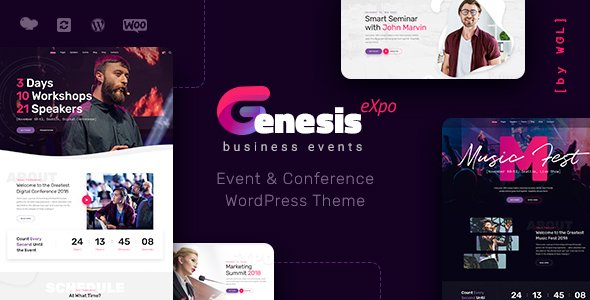
Stuck on your GenesisExpo WordPress theme? Let's fix it.
No endless back-and-forth. Just send us the details and we'll get it done.
No obligation · Replies within 1 hour · Quote within 1 day
Setup · Customization · Bug fixes · WooCommerce integration
About GenesisExpo WP Theme
GenesisExpo is a WordPress theme by WebGeniusLab built for exhibition, conference, and event-focused websites. It ships with a clean grid layout, speaker and schedule post types, and pre-built sections for agenda timelines, sponsor logos, and ticket CTAs. The design leans toward bold visuals with full-width hero sections, making it well-suited for single-event landing pages or recurring conference sites.
WebGeniusLab has packaged a demo importer so you can get a working site up quickly without building from scratch. The theme is compatible with Elementor, which means most layout decisions are handled through a visual editor rather than code. Countdown timers, pricing tables, and registration forms are included in the demo content. If you are running an event business or organizing a one-off conference, GenesisExpo gives you a solid structural starting point without needing a custom build.
Get matched with a GenesisExpo developer in under one day
Tell us about your GenesisExpo project. Small fixes, GenesisExpo theme customization, or a full website build, whatever you need, we've got it covered.
We'll connect you to the right GenesisExpo developers, define the scope, and get everything 100% clear.
You'll get one estimate, hire your preferred developer, and start collaborating.
GenesisExpo is straightforward to set up, but conference and event sites tend to get complex fast. Multi-track schedules, sponsor tiers, speaker bios tied to sessions, and ticket integrations are not trivial to build cleanly. A vetted WordPress developer on Codeable can handle the full build or fix what is already broken. You post your project, get matched within 24 hours, and receive a free estimate with no obligation to move forward. No generalist freelancers, only developers who have been screened specifically for WordPress work.
Pros
- Pre-built speaker, schedule, and sponsor sections save significant setup time for event sites
- Elementor compatibility means layout changes do not require touching PHP or template files
- One-click demo importer provides a working event site structure out of the box
- Countdown timer and ticket CTA sections are included without needing extra plugins
- Bold full-width hero sections work well for conference branding and keynote promotion
Cons
- Schedule post type is basic and struggles with multi-track or multi-day conference programs
- Speaker profile pages have limited layout options without custom Elementor template work
- No built-in ticketing or payment handling, WooCommerce integration requires additional setup
- Theme updates from WebGeniusLab can occasionally conflict with customized Elementor templates
- Mobile performance needs attention, demo content loads several large assets that slow page speed
Who is GenesisExpo for?
Tech Conferences
GenesisExpo handles the core needs of a tech conference site well. Speaker grids, session schedules, and sponsor tiers all fit into the existing layouts. A developer can extend the schedule post type to support track filtering, which is essential when you have parallel sessions running across multiple rooms or stages.
Trade Shows and Expos
Trade show and expo sites need exhibitor directories, floor maps, and registration forms alongside the standard event info. GenesisExpo provides the visual scaffolding and Elementor handles the custom exhibitor layouts. You will need plugin support for directory functionality and a developer to wire the registration flow to your CRM or email platform.
Music and Arts Festivals
The full-width hero and grid-heavy layout of GenesisExpo translates well to festival branding. Lineup sections, artist bios, and stage schedules sit naturally in the theme structure. A developer can adapt the speaker post type to serve as an artist or performer directory without building new functionality from scratch.
Corporate Training Events
Corporate training events need clean registration forms, session booking, and sometimes paywall-protected content for attendees. GenesisExpo provides the front-end structure. A developer integrates WooCommerce for paid access, sets up member-only schedule views, and connects the registration form to your internal systems or email automation tools.
Academic and Research Summits
Academic summits require abstract submission forms, committee bios, and structured program schedules. GenesisExpo covers the schedule and speaker presentation layers. Custom work typically includes a submission form connected to a review workflow, plus structured data markup so the event appears correctly in Google search results.

Customizing GenesisExpo
Out of the box, GenesisExpo covers the basics, but most real event sites need adjustments that go beyond what the theme options panel provides. Speaker profile layouts, session filtering by track, multi-day schedule views, and custom registration flows all require hands-on work. That is where a GenesisExpo expert saves you time.
Common customization requests include integrating WooCommerce for paid ticket sales, connecting the schedule to a booking plugin, adjusting the Elementor templates to match brand guidelines, and setting up custom post type relationships between speakers and sessions. A developer familiar with GenesisExpo and WebGeniusLab’s code structure can do this without breaking the theme’s update path. Work typically involves child theme setup, hook-based modifications, and targeted CSS alongside PHP edits that stay clean across upgrades.
Recommended plugins for GenesisExpo
GenesisExpo pairs well with several plugins depending on what your event site needs. The Events Calendar adds recurring event management. WooCommerce handles paid ticket sales. WPForms or Gravity Forms manage registration. For better site speed, a caching layer and image optimization are worth adding early, especially if you expect traffic spikes around event dates. Check out our WordPress performance service for help there.
If you plan to rank the event site in search, structured data for events is important. Schema markup for speakers, dates, and locations helps Google display rich results. Our WordPress SEO service covers that end-to-end.
Not sure which plugins to use? This WordPress plugins directory covers the most popular options with reviews and setup guides.
GenesisExpo common issues
GenesisExpo schedule section not showing correctly on mobile
Mobile display issues with the schedule section usually come from fixed column widths in the Elementor template that do not collapse properly on smaller screens. Open the affected section in Elementor, switch to mobile preview mode, and check the column settings. Setting columns to stack on mobile and adjusting padding values typically resolves the layout. If the problem persists, a custom CSS rule targeting the schedule wrapper at your breakpoint can force the correct stacking behavior without touching the template structure.
GenesisExpo Elementor templates broken after theme update
After a GenesisExpo update, Elementor templates can break if the theme has changed widget names, template IDs, or CSS class references. The safest fix is to regenerate Elementor CSS from the Elementor settings panel under Tools. If specific sections are still broken, compare the updated theme files with your child theme overrides to find conflicts. For sites without a child theme, this is a good time to set one up before making further changes. Our WordPress bug fixing service can handle this quickly.
GenesisExpo countdown timer not working
The GenesisExpo countdown timer stops working when the target date has passed or when a JavaScript conflict exists with another plugin. First, check that the target date in the Elementor widget settings is set to a future date. If the date is correct, deactivate plugins one at a time to identify a JavaScript conflict. Browser console errors will usually point to the conflicting script. Enqueue order issues between theme scripts and plugin scripts are the most common cause and can be fixed with a small snippet in your child theme’s functions.php file.
GenesisExpo speaker grid layout overlapping on some screen sizes
Speaker grid overlapping typically comes from inconsistent image aspect ratios across speaker profile photos. The grid assumes uniform image dimensions, so irregular uploads cause cards to shift. Standardize all speaker photos to the same aspect ratio before uploading, and set a fixed image size in the Elementor image widget. Adding align-items: start to the grid container via custom CSS also prevents cards from stretching to match their neighbors when content length varies between profiles.
GenesisExpo FAQ
Yes, GenesisExpo is designed with single-page event sites in mind. The demo includes anchor navigation that links sections like agenda, speakers, sponsors, and tickets in one scrolling layout. You can trim or reorder sections in Elementor to match your event scope. Most one-page conference sites launch using the demo as a starting point with minimal structural changes needed.
GenesisExpo does not include ticketing out of the box, but it works alongside WooCommerce without major conflicts. You create ticket products in WooCommerce and link them from the theme’s ticket CTA sections. Some styling work is needed to match the WooCommerce checkout pages to the rest of the GenesisExpo design. A developer can handle the integration and ensure a consistent look throughout the purchase flow.
GenesisExpo can support recurring conference sites, but it requires some structural planning. Each year typically gets its own set of speaker and schedule posts. Archiving past editions while keeping the current year prominent needs custom template work. If you want attendees to browse previous years, a developer can build that archive structure cleanly without cluttering the main event pages.
GenesisExpo does not include a native form builder. You add registration forms using a plugin like WPForms, Gravity Forms, or Fluent Forms, then embed the form shortcode into any page using an Elementor HTML or shortcode widget. For complex multi-step registration with payment, connecting a form plugin to WooCommerce or a dedicated event registration plugin is the more reliable path.
GenesisExpo works with the free version of Elementor for basic layout editing. However, some advanced features such as form widgets, custom popups for ticket prompts, and certain global template controls require Elementor Pro. WebGeniusLab’s demo content may also use Pro widgets, so importing the full demo and editing everything as shown typically requires an Elementor Pro license.
Hire a GenesisExpo Developer
Whether you need a full GenesisExpo build from the demo stage, custom Elementor templates, speaker or schedule functionality, or ticket integration, a specialist will get it done without the back-and-forth of a generalist hire. Get a free estimate and describe your project. You will hear back within 24 hours with a clear scope and price. No commitment required until you are satisfied with the plan.
You'll need a free Codeable account so developers can ask questions and send their quotes.