Blogar WordPress Theme
by Axilthemes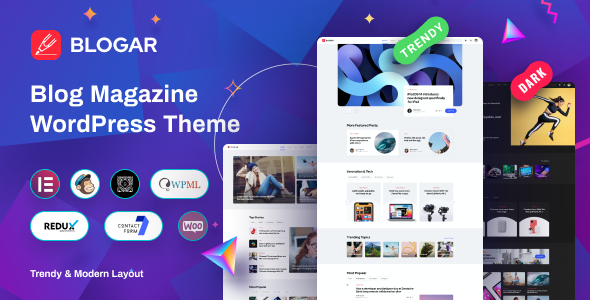
Stuck on your Blogar WordPress theme? Let's fix it.
No endless back-and-forth. Just send us the details and we'll get it done.
No obligation · Replies within 1 hour · Quote within 1 day
Setup · Customization · Bug fixes · WooCommerce integration
About Blogar WP Theme
Blogar is a WordPress blog theme built by Axilthemes, designed specifically for content-heavy sites that need a clean reading experience without sacrificing visual appeal. It ships with multiple homepage layouts, a drag-and-drop header builder, and pre-built demo content you can import in one click.
The theme targets bloggers, online magazines, and news sites. It supports Elementor and comes with custom widgets for post grids, featured sliders, and category filters. Performance is reasonable out of the box, with a lightweight codebase compared to many multipurpose themes in its category.
Axilthemes has a solid track record on ThemeForest, and Blogar reflects that experience. Typography controls, dark mode support, and ad placement zones make it genuinely practical for monetised blogs. It is a good starting point for anyone building a focused editorial site on WordPress.
Get matched with a Blogar developer in under one day
Tell us about your Blogar project. Small fixes, Blogar theme customization, or a full website build, whatever you need, we've got it covered.
We'll connect you to the right Blogar developers, define the scope, and get everything 100% clear.
You'll get one estimate, hire your preferred developer, and start collaborating.
Blogar is approachable for beginners, but production-ready editorial sites need more than demo content and default settings. Codeable connects you with vetted WordPress developers who have hands-on experience with Axilthemes products. Whether you need a custom post layout, a specific ad integration, or performance work on an existing Blogar site, a specialist delivers faster and cleaner than trial and error. Our team at FoxyConcept works through Codeable, so every project gets proper scoping, clear pricing, and no junior developers learning on your live site.
Pros
- Multiple pre-built homepage layouts that cover magazine, minimal blog, and grid styles
- Built-in dark mode toggle works without additional plugins
- Dedicated ad placement zones built into template structure, useful for monetised blogs
- One-click demo import makes initial setup fast and predictable
- Header builder with drag-and-drop controls gives layout flexibility without code
Cons
- Elementor dependency adds page weight if you are not already committed to that builder
- WooCommerce styling requires extra CSS work as the theme is not built with e-commerce in mind
- Limited block editor support, most advanced layouts rely on Elementor rather than native Gutenberg blocks
- Customer support response times from Axilthemes can be slow during peak periods
- Some demo sections are locked behind the Pro version with no clear feature comparison on the sales page
Who is Blogar for?
Personal Lifestyle Blog
Blogar’s minimal layout options and readable typography make it a strong fit for personal bloggers writing long-form content. The sidebar and featured post controls let you highlight popular articles without cluttering the reading experience. A personal blogger can get a professional-looking site running quickly using the one-click demo import.
Online News Magazine
The magazine-style homepage layouts in Blogar handle high post volumes well. Category filters and post grid widgets allow editors to surface content across multiple topics. The built-in ad zones are practical for news sites running display advertising. A developer can extend the setup with a custom breaking news ticker or sticky header.
Tech and Gadget Review Site
Review sites need structured data, comparison tables, and strong post formatting. Blogar’s post templates provide a solid base, and a developer can add custom review schema and star rating output. The theme’s dark mode is also popular with tech audiences who prefer lower-brightness interfaces during extended reading sessions.
Food and Recipe Blog
Food blogs rely heavily on visual presentation and recipe formatting. Blogar’s featured image handling and grid layouts display photography well. Adding a recipe card plugin like WP Recipe Maker integrates cleanly with the post structure. Category filtering helps readers navigate between recipe types without friction.
Travel Blog
Travel blogs need strong image presentation and location-based organisation. Blogar’s full-width featured images and flexible homepage grid handle photo-heavy content without performance collapse. With proper image optimisation and a caching setup, a travel blog built on Blogar loads quickly even on mobile connections.

Customizing Blogar
Blogar gives you a fair amount of control through the WordPress Customizer and its built-in options panel. You can change layouts, adjust sidebar positions, modify post meta display, and set up custom header styles without writing code. The Elementor integration extends this further for landing pages and custom sections.
That said, deeper customization, like restructuring post templates, adding custom post types, or integrating third-party plugins cleanly, often requires PHP and CSS knowledge. If you want the theme to behave exactly how your editorial workflow demands, working with a Blogar expert saves significant time and avoids breaking changes during updates.
A developer familiar with Axilthemes’ code structure can modify child theme files safely, hook into the theme’s filter system, and deliver a result that looks custom without the maintenance headache of editing core files.
Recommended plugins for Blogar
Blogar pairs well with several plugins that extend what it does natively. WooCommerce can be added for merch or digital product sales alongside your blog content. Rank Math or Yoast slot in cleanly for SEO optimisation. For speed, combining Blogar with a caching layer and image optimisation plugin keeps load times competitive. Full details on tuning a WordPress blog for speed are covered on our WordPress performance page.
Newsletter integrations like Mailchimp or ConvertKit work through standard shortcodes or Elementor widgets. Ad management plugins such as Advanced Ads fit naturally into the theme’s predefined ad zones.
Not sure which plugins to use? This WordPress plugins directory covers the most popular options with reviews and setup guides.
Blogar common issues
Blogar theme header not showing correctly after update
Header display issues after a Blogar update usually come from a conflict between the theme’s header builder and a cached version of your site. Start by clearing your caching plugin and any CDN cache. If the issue persists, check whether a customizer setting was reset during the update. Switching to a child theme before future updates prevents customizer settings from being wiped. If the problem is more complex, our WordPress bug fixing service can diagnose and resolve it quickly.
Blogar homepage layout broken with Elementor
Blogar homepage layouts breaking in Elementor are often caused by a version mismatch between the theme, Elementor, and Elementor Pro. Update all three together rather than individually. If a specific section breaks, try regenerating the CSS files inside Elementor’s tools panel. Importing a fresh demo section and rebuilding from that can also resolve persistent layout corruption faster than hunting individual element settings.
Blogar theme slow loading on mobile
Slow mobile load times on Blogar usually trace back to unoptimised images, Elementor loading full scripts on every page, or too many third-party ad scripts. Start with image compression using a plugin like ShortPixel. Then disable Elementor assets on pages not built with Elementor. If you are running ad networks, lazy load ad slots. For a full audit, our WordPress performance service covers these fixes in detail.
Blogar dark mode not working on all pages
Blogar’s dark mode relies on a cookie and JavaScript toggle. If it fails on specific pages, the most common cause is a caching plugin serving a cached light-mode version regardless of the visitor’s preference. Exclude the dark mode cookie from your caching rules. Also check whether a custom page template or Elementor canvas mode is stripping the theme’s body classes, which the dark mode script depends on to apply styles correctly.
Blogar FAQ
Blogar has a free version available on the WordPress theme directory. The Pro version unlocks additional homepage layouts, advanced header options, and extra widget styles. The free version is functional enough for a basic blog, but most publication-style setups will eventually need Pro features. Pricing is available directly through Axilthemes’ website.
Blogar works with Gutenberg for standard post and page editing, but its more advanced layout features, like the homepage grid sections and custom header builder, are tied to Elementor. If you want to avoid Elementor, the theme is usable but limited. Full Gutenberg block support across all template areas is not part of the current Blogar feature set.
Yes. Blogar supports WordPress’s native multi-author functionality. Author archive pages, bylines, and author bio boxes are included in the theme templates. For larger editorial teams needing role-based permissions or custom contributor workflows, you would add a plugin like PublishPress on top of what Blogar provides natively.
After activating Blogar, go to Appearance and look for the theme’s import panel, usually labeled as Demo Importer or Quick Setup. Select your preferred demo layout and import. The process installs pages, widgets, and Customizer settings. You need Elementor installed before importing most demos. The full import typically takes two to five minutes depending on your server.
Blogar is built with clean markup and supports standard SEO plugins like Rank Math and Yoast without conflicts. It outputs proper heading structures and includes schema-ready templates for blog posts. For serious SEO results, you still need a dedicated plugin and a content strategy. The theme alone does not replace proper WordPress SEO optimisation work.
Hire a Blogar Developer
If your Blogar site needs custom layouts, plugin integrations, speed improvements, or anything beyond what the theme panel offers, we can help. FoxyConcept delivers WordPress development through Codeable, meaning you get a free estimate before any work begins and zero obligation to proceed. Projects are handled by experienced developers who know the Axilthemes codebase. Get a free estimate and describe what you need. You will hear back within 24 hours.
You'll need a free Codeable account so developers can ask questions and send their quotes.