inVogue WordPress Theme
by heroplugins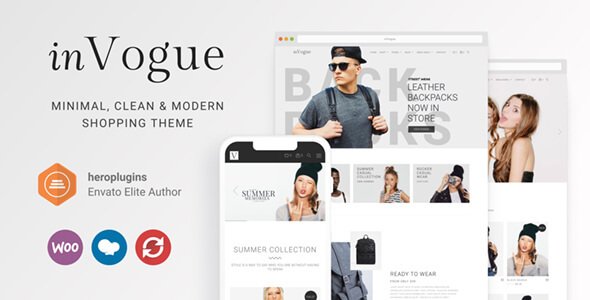
Stuck on your inVogue WordPress theme? Let's fix it.
No endless back-and-forth. Just send us the details and we'll get it done.
No obligation · Replies within 1 hour · Quote within 1 day
Setup · Customization · Bug fixes · WooCommerce integration
About inVogue WP Theme
inVogue is a WordPress theme developed by heroplugins, built for fashion brands, lifestyle blogs, and editorial-style online stores. It ships with a clean, magazine-inspired layout that puts visual content front and centre. Product grids, lookbook sections, and full-width hero banners are all part of the default design toolkit.
The theme is WooCommerce-compatible, making it a practical choice for boutique shops and fashion retailers who need both editorial presentation and a functional storefront. It supports Elementor for drag-and-drop editing, and the typography and colour controls give you enough flexibility to match most brand identities without touching code. If you want a polished fashion site without starting from scratch, inVogue covers the basics well out of the box.
Get matched with a inVogue developer in under one day
Tell us about your inVogue project. Small fixes, inVogue theme customization, or a full website build, whatever you need, we've got it covered.
We'll connect you to the right inVogue developers, define the scope, and get everything 100% clear.
You'll get one estimate, hire your preferred developer, and start collaborating.
inVogue is not a complex theme, but getting it to look and work exactly how you want still takes WordPress knowledge. A developer who has worked inside the theme before will move faster, avoid common pitfalls, and write code that holds up over time. Through Codeable, you get matched with vetted WordPress specialists, not generalists. Every developer on the platform has passed a technical screening, so you are not rolling the dice on quality. You get a free estimate before committing to anything.
Pros
- Clean editorial layout that works well for fashion and lifestyle brands without heavy customisation
- Full WooCommerce compatibility with styled product pages, cart, and checkout included
- Elementor support allows visual page building without writing any code
- Lookbook and gallery sections built into the theme reduce the need for additional plugins
- Responsive design that handles mobile product browsing and image-heavy content reliably
Cons
- Limited layout variation options compared to more flexible multipurpose themes
- Heavy reliance on Elementor means removing it later can break page layouts
- Advanced WooCommerce features like subscriptions or complex product types need extra plugin work
- Documentation from heroplugins is thin in places, which slows down troubleshooting
- Update cadence from heroplugins is slower than top-tier theme developers, which can create compatibility gaps
Who is inVogue for?
Fashion Boutique Store
inVogue suits small to mid-size fashion boutiques well. The WooCommerce integration handles product listings, sizing guides, and checkout without needing a separate shop theme. The grid layouts and full-width imagery give product pages the editorial feel that fashion shoppers expect, and the lookbook sections let you present seasonal collections cleanly.
Lifestyle and Personal Style Blog
The magazine-style homepage and category layouts make inVogue a strong fit for lifestyle bloggers. Post thumbnails, featured article banners, and clean typography all come pre-styled. A blogger covering personal style, travel, or wellness gets a professional-looking site without spending time on layout from scratch.
Beauty and Skincare Brand
Beauty brands need product photography to do the work, and inVogue gives it space. Full-width sections, clean white space, and WooCommerce product pages with large image galleries present skincare and cosmetics well. You can extend the default look with custom colour palettes to match branding without much effort.
Photography Portfolio with Shop
Photographers who also sell prints, presets, or sessions will find inVogue’s visual-first design useful. The gallery-style layouts show work at scale, while WooCommerce handles transactions. It is not a dedicated photography theme, but the combination of portfolio presentation and shop functionality covers both needs adequately.
Independent Fashion Designer
Independent designers launching a direct-to-consumer label can use inVogue to build both a brand presence and a functional store. Lookbook sections tell the story behind the collection, while product pages handle sales. With a developer’s help, the theme can be extended to match a designer’s specific visual identity closely.

Customizing inVogue
inVogue includes a Customizer panel where you can adjust fonts, colours, header layouts, and footer styles. Most changes are straightforward for anyone comfortable with WordPress. But the moment you want something specific, like a custom product filter, a bespoke lookbook layout, or a checkout flow that matches your brand, the built-in options will hit a ceiling.
That is where an inVogue expert makes the difference. A developer who knows the theme’s structure can extend its templates cleanly, add custom CSS without breaking future updates, and wire up third-party plugins without conflicts. Rather than hacking around limitations yourself, working with someone experienced in inVogue saves time and keeps your site maintainable long term.
Recommended plugins for inVogue
inVogue pairs well with several plugins that extend what the theme does by default. WooCommerce handles the shop side. YITH Wishlist and Quick View add useful product interactions. For filtering, FiboSearch or WooCommerce Product Filter slot in without much friction.
SEO plugins like Rank Math work cleanly with inVogue’s markup. For speed, pairing the theme with a good caching layer and optimised images makes a real difference. Check out our WordPress performance service and SEO optimisation service if you want those handled properly.
Not sure which plugins to use? This WordPress plugins directory covers the most popular options with reviews and setup guides.
inVogue common issues
inVogue theme not displaying correctly on mobile
Mobile display issues in inVogue usually come from custom CSS overriding the theme’s responsive breakpoints, or from Elementor sections with fixed pixel widths. Start by testing without any custom CSS active. Check Elementor column settings and switch fixed widths to percentages. If the issue appeared after a plugin update, deactivate plugins one by one to isolate the conflict. Persistent layout problems may need a developer to audit the template files directly. Our bug fixing service can help.
inVogue WooCommerce products not showing in grid layout
When WooCommerce products stop displaying in a grid, the most common cause is a plugin conflict affecting the shop template, or a Customizer setting that has been changed. Check WooCommerce display settings under Appearance > Customize > WooCommerce. If products show in list view only, the columns setting may have been reset. Also check whether a caching plugin is serving an outdated version of the shop page. Clear all caches and test again before going further.
inVogue header menu not working after update
Header menu breaks after updates are often caused by a conflict between the theme update and a cached version of the nav script. Start with a full cache clear, including any server-level or CDN cache. If the menu still fails, check for JavaScript errors in the browser console. A missing or conflicting script is usually the culprit. Reverting to the previous theme version temporarily can confirm if the update itself introduced the bug. Check our maintenance service for ongoing update management.
inVogue theme slow loading on product pages
Slow product pages in inVogue are typically caused by unoptimised images, too many HTTP requests from loaded scripts, or a lack of caching. Start by compressing all product images and enabling lazy loading. Check whether Elementor is loading its full asset stack on pages that do not use it. A performance audit will show you exactly where the load time is going. Our WordPress performance service covers full audits and fixes for themes like inVogue.
inVogue FAQ
Yes, inVogue is built with WooCommerce compatibility in mind. Product pages, shop archives, cart, and checkout all come styled out of the box. It works well for boutique fashion stores and smaller product catalogues. For larger shops with complex filtering or custom checkout logic, you will likely need a developer to extend the theme beyond its defaults.
Yes, inVogue supports Elementor. Most page layouts can be built or modified using the Elementor drag-and-drop editor without touching code. Keep in mind that building pages heavily inside Elementor creates a dependency on the plugin. If you ever switch themes or page builders, those pages will need to be rebuilt. It is worth planning for that before going too deep.
inVogue is developed by heroplugins, a theme developer that also produces several other WordPress themes. The theme is available through ThemeForest and the heroplugins website. Support is handled through their own channels, typically via ThemeForest comments or a dedicated support ticket system depending on where you purchased the theme.
inVogue’s design is clearly aimed at fashion, beauty, and lifestyle content. You can use it for other niches, but the default styling leans heavily toward that aesthetic. A food blog or tech site would need significant restyling to look right. For non-fashion use cases, a more neutral multipurpose theme is usually a better starting point than adapting inVogue.
Official support for inVogue comes through heroplugins via the ThemeForest support system if that is where you purchased the theme. Response times vary. For more complex issues or custom development work, an independent WordPress developer with inVogue experience will often resolve problems faster. Our bug fixing service is available for theme-specific issues that standard support cannot resolve.
Hire an inVogue WordPress Developer
Need help customising inVogue, fixing a layout issue, or building out your WooCommerce store? FoxyConcept connects you with experienced inVogue developers through Codeable’s vetted network. You describe the project, get a clear estimate, and only move forward if you are happy with it. No guesswork, no risk. Get a free estimate today and have a developer matched to your project within 24 hours.
You'll need a free Codeable account so developers can ask questions and send their quotes.