Organici WordPress Theme
by NooTheme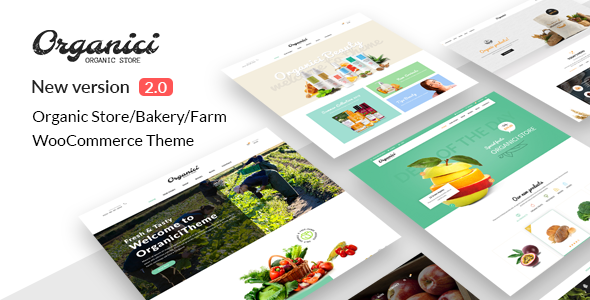
Stuck on your Organici WordPress theme? Let's fix it.
No endless back-and-forth. Just send us the details and we'll get it done.
No obligation · Replies within 1 hour · Quote within 1 day
Setup · Customization · Bug fixes · WooCommerce integration
About Organici WP Theme
Organici is a WordPress theme by NooTheme built specifically for organic food stores, farm shops, and health-focused eCommerce businesses. It ships with WooCommerce support built in, giving you a working online shop without extra configuration.
The theme includes multiple homepage layouts, a clean green-toned design system, and pre-built pages for products, blog, and contact. It uses Elementor as its page builder, so editing sections is visual and straightforward.
NooTheme has packaged several demo sites with Organici, covering scenarios like farm boxes, health food delivery, and organic grocery retail. One-click demo import gets you a working starting point fast. The theme is translation-ready and supports WPML for multilingual stores, which matters if you sell across regions.
Get matched with a Organici developer in under one day
Tell us about your Organici project. Small fixes, Organici theme customization, or a full website build, whatever you need, we've got it covered.
We'll connect you to the right Organici developers, define the scope, and get everything 100% clear.
You'll get one estimate, hire your preferred developer, and start collaborating.
Most Organici setup issues come from WooCommerce conflicts, Elementor widget errors, or demo content that doesn’t match a real product catalog. A developer who knows the theme fixes those in hours, not days.
Through FoxyConcept’s WordPress development services, work is delivered via Codeable — a network of vetted WordPress developers. You post your project, get matched with a specialist, and receive a free estimate before committing. No guesswork, no generalist freelancers who’ll figure it out as they go.
Pros
- Built specifically for organic food and farm shop eCommerce — design decisions match the niche
- Multiple pre-built demo sites allow fast store setup without starting from scratch
- Native WooCommerce integration with shop, cart, and product page templates included
- Elementor-based layout editing means non-developers can update content without touching code
- WPML compatible, which makes running multilingual organic food stores practical
Cons
- Elementor dependency increases page load time if not actively optimized
- Demo import can bring in a lot of dummy content that takes time to clean up
- NooTheme's support response times are inconsistent, especially for complex customization questions
- Design feels dated compared to newer food eCommerce themes without significant customization
- Limited documentation for advanced WooCommerce customizations specific to the theme
Who is Organici for?
Organic Grocery Delivery
Organici’s WooCommerce templates and clean product grid layouts suit an online grocery store well. You can display products by category, set up shipping zones by postcode, and present certifications like organic or fairtrade directly on product pages. A developer can add local delivery slot booking on top of the base theme.
Farm Box Subscriptions
The theme pairs well with WooCommerce Subscriptions for weekly or monthly farm box delivery. Product pages can be customized to show box contents, sourcing details, and swap options. An Organici developer can build a box customization flow that lets customers choose their preferences before checkout.
Health Food Retail Store
With multiple product categories, filter bars, and a WooCommerce-ready structure, Organici handles health food retail stores with a mid-size catalog. You can add supplement facts, ingredient lists, and dietary badges to product templates without disrupting the theme’s layout system.
Farm Shop with Workshop Bookings
Farm shops often sell products and run events. WooCommerce Bookings integrates with Organici to handle workshop or tour reservations. A developer can create separate booking flows for events while keeping the product shop intact, using Elementor to build a combined homepage that covers both offerings.
Recipe Blog with Shoppable Ingredients
Organici supports blog layouts alongside shop pages. A developer can link recipe posts to specific products, so a recipe for green smoothies shows a direct add-to-cart for the ingredients you stock. This increases average order value and gives the content side of your store a commercial purpose.

Customizing Organici
Out of the box, Organici covers the basics well. But most store owners hit a wall quickly. Product filters, custom checkout flows, subscription boxes, local delivery radius settings — none of that is handled by the theme alone.
An Organici expert can extend the theme without breaking its design. That means adding custom WooCommerce templates, integrating plugins like WooCommerce Subscriptions or Yith, and adjusting Elementor layouts to match your specific catalog structure.
NooTheme’s options panel gives you control over typography, colors, and header styles. A developer can go further — custom post types for farm suppliers, recipe content linked to products, loyalty programs, or age-gated product sections. If your store has specific workflows, a proper Organici developer will build around those rather than around the theme’s defaults.
Recommended plugins for Organici
Organici works cleanly with most major WooCommerce extensions. Popular additions include WooCommerce Subscriptions for weekly farm box delivery, WooCommerce Bookings for farm visits or workshops, and YITH plugins for wishlists and gift cards.
For performance, the theme’s Elementor dependency means page weight can grow fast. Pairing it with a caching layer and image optimization matters. See our WordPress performance service for that work.
If you’re targeting organic food search terms, structured data for products and recipes will help. Our WordPress SEO service covers schema markup and on-page optimization specific to WooCommerce stores built on themes like Organici.
Not sure which plugins to use? This WordPress plugins directory covers the most popular options with reviews and setup guides.
Organici common issues
Organici theme WooCommerce product page layout broken
Broken product page layouts in Organici usually come from a WooCommerce update that changed template file structures. The theme’s custom product templates can fall out of sync. A developer needs to compare the theme’s woocommerce template folder against the current WooCommerce template versions and update the overrides. Our WordPress bug fixing service handles this type of conflict directly.
Organici homepage not loading after demo import
Failed demo imports in Organici are most often caused by server memory limits or XML import timeouts. Check your php.ini for memory_limit and max_execution_time values — both need to be higher than default shared hosting settings. If the import runs but pages show blank, the Elementor template data likely didn’t attach correctly and needs to be re-imported or rebuilt manually.
Organici theme slow loading speed on mobile
Organici loads Elementor assets, custom fonts, and product images on every page. Without optimization, mobile scores suffer. Start with lazy loading images, switching to a lightweight font loading method, and enabling CSS/JS minification through a caching plugin. For deeper gains, consider critical CSS generation and removing unused Elementor widget scripts. Our WordPress performance service covers this in full.
Organici Elementor widgets not showing on frontend
When Organici Elementor widgets appear in the editor but not on the frontend, the issue is usually a JavaScript conflict or a missing widget registration caused by a plugin update. Deactivate plugins one by one to isolate the conflict. If the widgets registered by NooTheme’s companion plugin are missing, reinstall or update that plugin. Regenerating Elementor’s CSS cache often resolves display issues after plugin or theme updates.
Organici FAQ
Yes, Organici is built around WooCommerce. It includes custom templates for shop, product, cart, and checkout pages. It works well for small to mid-size organic food stores. For complex store requirements like subscriptions, custom checkout fields, or product configurators, you’ll need a developer to extend the theme beyond its defaults.
Yes. Organici uses Elementor as its primary page builder. All the pre-built demo pages are Elementor templates. NooTheme also ships a companion plugin that adds Organici-specific Elementor widgets for things like product grids and promotional banners. You need both the theme and the companion plugin active for the full widget set to work.
Organici doesn’t include subscription functionality on its own, but it works with WooCommerce Subscriptions. A developer can configure recurring billing, box contents display, and customer account management for subscriptions. The theme’s product page templates can be customized to show subscription options alongside one-time purchase pricing without major structural changes.
Organici’s demo import runs through the theme’s options panel or a bundled import plugin. Go to Appearance, then the theme settings, and look for the demo import section. Select your preferred demo, run the import, and wait for content, images, and settings to load. Server limits can cause timeouts — if the import fails, increase PHP memory and execution time limits first.
NooTheme has continued releasing updates for Organici, but the pace is slow compared to larger theme providers. Major WordPress and WooCommerce compatibility updates have been released. Check the ThemeForest changelog before purchasing to confirm the last update date. If ongoing maintenance is a concern, our WordPress maintenance service keeps the theme and its dependencies current.
Hire an Organici WordPress Developer
Need an Organici developer to set up your store, fix a broken layout, or build something the theme doesn’t support out of the box? Describe your project and get a free estimate through Codeable. You’ll be matched with a WordPress specialist within 24 hours. No obligation to hire, and the estimate costs nothing.
You'll need a free Codeable account so developers can ask questions and send their quotes.