ListingEasy WordPress Theme
by GT3themes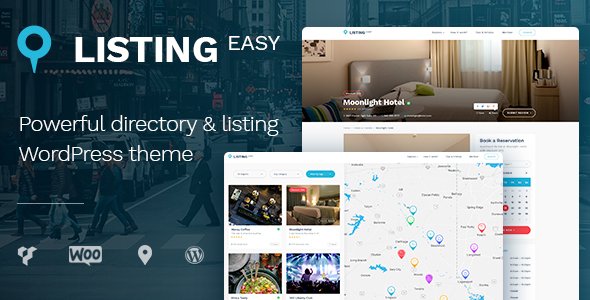
Stuck on your ListingEasy WordPress theme? Let's fix it.
No endless back-and-forth. Just send us the details and we'll get it done.
No obligation · Replies within 1 hour · Quote within 1 day
Setup · Customization · Bug fixes · WooCommerce integration
About ListingEasy WP Theme
ListingEasy is a directory and listing WordPress theme built by GT3themes. It targets classifieds, real estate, job boards, and local business directories. The theme ships with a drag-and-drop page builder, predefined listing types, and a front-end submission system so visitors can post their own listings without touching the WordPress admin.
GT3themes built it on a clean, modular codebase with WooCommerce integration for paid listing plans. It supports Google Maps, custom fields per listing category, and a filterable search that works without a page reload. The demo library covers several niche use cases, which cuts down setup time considerably. Overall it is a capable starting point for any directory-based project.
Get matched with a ListingEasy developer in under one day
Tell us about your ListingEasy project. Small fixes, ListingEasy theme customization, or a full website build, whatever you need, we've got it covered.
We'll connect you to the right ListingEasy developers, define the scope, and get everything 100% clear.
You'll get one estimate, hire your preferred developer, and start collaborating.
ListingEasy has enough moving parts that small misconfigurations cause real problems: broken submission forms, map API errors, or payment flows that silently fail. Getting expert help early is cheaper than fixing issues after launch.
FoxyConcept connects you with vetted ListingEasy developers through Codeable, a platform where every developer is tested and approved. You describe your project, get a clear estimate, and only proceed if it makes sense. No retainers, no lock-in.
Pros
- Front-end listing submission works without plugins, which keeps the setup lean for marketplace-style sites.
- Built-in support for paid listing plans through WooCommerce removes the need for a separate monetisation plugin.
- AJAX-powered search and filters let users refine results without full page reloads, which improves directory usability.
- Multiple demo imports cover real estate, jobs, cars, and local business, giving each niche a starting layout.
- Custom fields per listing category mean a car listing and a job listing can carry completely different data sets.
Cons
- The Customizer options are shallow. Anything beyond colours and fonts requires custom CSS or child theme work.
- Google Maps integration requires manual API key setup and can break silently when billing is not enabled on the Google Cloud project.
- WooCommerce paid listings setup is not straightforward for beginners and the documentation skips several configuration steps.
- Demo content import can conflict with existing pages and settings, especially if run on a site that already has content.
- Update frequency from GT3themes is inconsistent, which creates compatibility risks with newer versions of WordPress and WooCommerce.
Who is ListingEasy for?
Real Estate Directory
ListingEasy handles property listings well. Custom fields cover bedrooms, bathrooms, square footage, and price. The map view lets buyers browse by location. A developer can add mortgage calculators, agent profile pages, and inquiry forms tied to individual listings, turning a basic directory into a functional real estate portal.
Job Board
The front-end submission form works for employer-posted jobs. Custom fields capture job type, salary range, and location. With a paid plan added via WooCommerce, employers pay to post featured listings. A developer can restrict applications to registered users and pipe form submissions into an email workflow or a CRM.
Local Business Directory
Restaurants, services, and shops fit naturally into the ListingEasy listing structure. Categories, hours, ratings, and map pins work without extra plugins. Monetisation through featured placements or category sponsorships can be layered on with WooCommerce. A developer can also add a review system that integrates with the existing listing data.
Car Classifieds
Car classifieds need specific fields: make, model, year, mileage, fuel type, and transmission. ListingEasy supports this through custom field sets per category. A developer can add a comparison feature, a photo gallery template suited to vehicle listings, and price filtering that works within the AJAX search system.
Vacation Rental Listings
Rental listings require availability, pricing per night, and booking enquiry forms. ListingEasy provides the directory structure. A developer can integrate a booking plugin like MotoPress Hotel Booking or a custom enquiry flow. The map view lets visitors browse by area, which is essential for destination-based rental searches.

Customizing ListingEasy
Out of the box, ListingEasy gives you colour controls, font pickers, and layout switches inside the WordPress Customizer. That covers the basics. Deeper work, like custom listing fields, conditional search filters, or a multi-tier membership structure, requires code-level changes or plugin integration that goes well beyond the theme options panel.
A ListingEasy expert can wire up custom taxonomies, extend the front-end submission form, and connect payment gateways that match your business model. They can also restructure the homepage to reflect your specific directory niche instead of the generic demo. Working with someone who knows the GT3themes codebase saves significant time and avoids breaking the theme during updates.
Recommended plugins for ListingEasy
ListingEasy pairs well with several plugins. Paid Memberships Pro or WooCommerce Memberships handle subscription tiers for listing owners. Advanced Custom Fields extends the listing post type with fields specific to your niche. WPML adds multilingual support for international directories.
For site speed, image lazy loading and a caching layer are essential given how many assets a directory page loads. Want to go further? Our WordPress performance service can tune your stack. If organic search matters, a structured data setup for listings pairs well with our WordPress SEO service.
Not sure which plugins to use? This WordPress plugins directory covers the most popular options with reviews and setup guides.
ListingEasy common issues
ListingEasy Google Maps not showing on listing pages
This is almost always a Google Maps API key issue. The key needs to be entered in the theme settings and the Maps JavaScript API plus Geocoding API must both be enabled in your Google Cloud console. Billing must be active on the project even if you are within the free tier. If the key is correct but maps still fail, a JavaScript conflict with another plugin is usually the cause. Check the browser console for errors. Our WordPress bug fixing service can diagnose and resolve this quickly.
ListingEasy front-end submission form not working
Submission form failures usually trace back to one of three things: a permission setting that blocks non-logged-in users, a missing nonce caused by a caching plugin stripping dynamic values, or a JavaScript error from a plugin conflict. First, check whether the issue occurs when logged in versus logged out. Then temporarily disable caching and test again. If the form still fails, open the browser console and look for JavaScript errors. A developer familiar with the ListingEasy form hooks can fix this without breaking other functionality.
ListingEasy WooCommerce paid listings not processing payment
Paid listing payment failures usually mean the WooCommerce product tied to the listing plan is misconfigured, or the WooCommerce payment gateway has not been tested in live mode. Check that the listing product exists in WooCommerce and that the plan ID in the theme settings matches. Also confirm your gateway credentials are live, not sandbox. If payments go through but listings are not promoted afterward, the theme hook that upgrades listing status after purchase may need debugging. See our WordPress bug fixing service for targeted help.
ListingEasy search filters returning no results
Empty search results after applying filters usually point to a taxonomy mismatch or a rewrite rule problem. Go to Settings, Permalinks and save without changing anything. This flushes rewrite rules and fixes many search issues. If the problem persists, check whether the filter parameters are being passed correctly in the URL. A custom field filter that was added after the initial setup may not be registered properly with the theme query. A developer can audit the search query and fix the filter registration.
ListingEasy FAQ
GT3themes has not been consistent with update releases, so compatibility with the latest WordPress version is not guaranteed at any given time. Before updating WordPress on a live ListingEasy site, test on a staging environment first. If you are running an outdated version of the theme, a developer can audit compatibility and patch issues before you update. Keeping themes and plugins current is covered under a WordPress maintenance plan.
Yes. WooCommerce is only required if you want paid listing plans or e-commerce features. A directory built purely on the free submission model does not need WooCommerce at all. You can disable or simply not install it without affecting the core listing, search, or map functionality. Most of the theme’s primary features operate independently of WooCommerce.
ListingEasy has a built-in custom fields manager in the theme settings. You can create field groups and assign them to specific listing categories. For more control, Advanced Custom Fields Pro integrates cleanly with the listing post type and gives you conditional logic, repeater fields, and better display options. A developer can map ACF fields into the listing template and search filters without modifying core theme files.
ListingEasy is WPML-compatible, which is the most reliable way to run a multilingual directory on WordPress. You will need a WPML licence and some setup time to translate listing categories, custom fields, and theme strings. Polylang is a lighter alternative that works for basic multilingual setups. A full multilingual directory build is more complex and benefits from developer involvement, particularly around translated search and filtered results.
Migrating an existing directory to ListingEasy is possible but requires planning. Listing data needs to map to the theme’s post type and custom field structure. If your current site uses a different theme or plugin like GeoDirectory or Listify, the data models differ and a direct import rarely works cleanly. A developer can write a migration script to move listings, categories, and metadata accurately. Our WordPress migration service covers this type of structured data transfer.
Hire a ListingEasy Developer
Whether you need a full directory build, a custom listing type, or fixes to an existing ListingEasy site, FoxyConcept can match you with the right developer. Work is scoped clearly before anything starts. Get a free estimate and see what your project actually costs. No obligation, no risk. Most clients hear back within 24 hours.
You'll need a free Codeable account so developers can ask questions and send their quotes.