R.Cole WordPress Theme
by AncoraThemes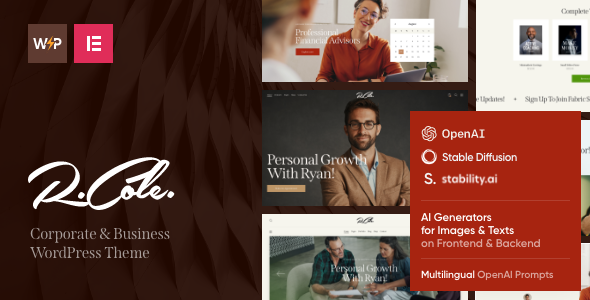
Stuck on your R.Cole WordPress theme? Let's fix it.
No endless back-and-forth. Just send us the details and we'll get it done.
No obligation · Replies within 1 hour · Quote within 1 day
Setup · Customization · Bug fixes · WooCommerce integration
About R.Cole WP Theme
R.Cole is a WordPress theme built by AncoraThemes, designed for creative professionals and portfolio-focused websites. It ships with a clean, minimal layout that puts visual content first — ideal for photographers, designers, and artists who want their work to speak without a cluttered interface getting in the way.
The theme is built on a solid foundation with Elementor compatibility, WooCommerce support, and a responsive grid that holds up across devices. AncoraThemes has a track record of well-coded, regularly updated themes, and R.Cole follows that pattern. It includes multiple demo layouts, a custom header builder, and typography controls that give you real flexibility without touching code. If you need a polished creative portfolio site without starting from scratch, R.Cole is a practical starting point.
Get matched with a R.Cole developer in under one day
Tell us about your R.Cole project. Small fixes, R.Cole theme customization, or a full website build, whatever you need, we've got it covered.
We'll connect you to the right R.Cole developers, define the scope, and get everything 100% clear.
You'll get one estimate, hire your preferred developer, and start collaborating.
Most R.Cole issues come down to customization going past what the theme’s built-in options cover. CSS conflicts, layout breaking on mobile, or WooCommerce styling that doesn’t match your design — these take time to fix properly if you’re not familiar with the theme’s code structure.
FoxyConcept connects you with vetted WordPress developers through Codeable who have hands-on experience with AncoraThemes products. You get an honest estimate before any work starts, no contracts, and a developer who knows what they’re doing.
Pros
- Clean minimal design that works well for image-heavy portfolios without visual clutter
- Full Elementor compatibility gives you drag-and-drop control over page layouts
- WooCommerce support built in, useful for selling prints or digital products
- Multiple pre-built demo layouts so you have a real starting point, not a blank canvas
- AncoraThemes provides regular updates and theme support, reducing long-term maintenance risk
Cons
- Demo content import can be slow and occasionally requires manual cleanup of placeholder images
- Deep customization beyond the Customizer options requires CSS or PHP knowledge
- Some layout options only work correctly when Elementor Pro is active, not just the free version
- WooCommerce shop and product pages need additional styling work to match the portfolio sections
- Limited built-in mega menu support — complex navigation structures need a plugin or custom code
Who is R.Cole for?
Photography Portfolios
R.Cole’s full-width image layouts and grid gallery options make it a natural fit for photographers. You can showcase client work, run a blog, and even sell prints through WooCommerce — all within one theme. The minimal chrome keeps attention on the images, which is exactly what a photography portfolio needs.
Graphic Design Studios
Design studios need a site that looks intentional without being overdone. R.Cole’s clean typographic defaults and flexible Elementor sections let you build a case study-style portfolio that feels professional. You can adapt the demo layouts quickly or build pages from scratch with consistent spacing and hierarchy.
Freelance Illustrators
Illustrators working across editorial, publishing, or licensing markets need a portfolio that’s easy to browse and update. R.Cole handles this well — categories, project pages, and image grids can be organised without plugin overload. Adding a contact form or client inquiry page takes minutes with the included layout options.
Creative Agencies
Small creative agencies can use R.Cole as a base for a multi-service site. With Elementor, you can build out separate sections for services, team profiles, and case studies while keeping a consistent visual identity. It’s not an agency-specific theme, but it’s flexible enough to work with proper setup.
Print and Digital Product Shops
The WooCommerce integration makes R.Cole usable for selling physical prints, digital downloads, or design assets directly from your portfolio. Product pages need some styling work to fully match the rest of the site, but the foundation is there. Combining it with a payment gateway and download manager covers most use cases.

Customizing R.Cole
R.Cole gives you a good set of customization options out of the box — color palettes, font controls, layout switching, and header configurations are all handled through the WordPress Customizer and Elementor. Most straightforward changes take minutes.
Where things get more involved is when you need to go beyond the demo: custom post layouts, conditional header logic, WooCommerce shop page redesigns, or integrations with third-party plugins. That’s where working with an R.Cole expert makes a real difference. An experienced developer knows the theme’s structure, avoids hacks that break on updates, and can extend the design in ways that stay maintainable long-term. FoxyConcept works with R.Cole regularly and can handle everything from minor tweaks to full custom builds on top of the theme.
Recommended plugins for R.Cole
R.Cole pairs well with several key tools. WooCommerce works out of the box for selling prints, digital downloads, or services. Elementor Pro unlocks advanced widget options and dynamic content. For lead generation, Contact Form 7 and WPForms integrate cleanly with the theme’s layouts.
If you want to go further, pairing R.Cole with proper performance optimisation — caching, image compression, and a CDN — keeps load times fast for image-heavy portfolios. Adding structured data and on-page work through a solid WordPress SEO setup helps your portfolio rank for the right searches.
Not sure which plugins to use? This WordPress plugins directory covers the most popular options with reviews and setup guides.
R.Cole common issues
R.Cole theme header not displaying correctly on mobile
Mobile header issues in R.Cole usually come from a conflict between the theme’s built-in header builder and a caching plugin serving a stale version of the layout. Start by clearing all caches — server, plugin, and CDN. If the issue persists, check whether a CSS media query override is being applied by a child theme or custom CSS block. In many cases the hamburger menu trigger is being blocked by a z-index conflict from a third-party plugin adding its own styles. Our WordPress bug fixing service can isolate and resolve this quickly.
R.Cole portfolio grid broken after plugin update
Portfolio grid breakage after a plugin update in R.Cole typically points to a JavaScript conflict — especially if you’re using Elementor or a gallery plugin alongside the theme’s native grid. Open your browser console and look for JS errors on the affected page. Deactivate recently updated plugins one at a time to identify the conflict. If the grid relies on Isotope or Masonry, check whether the script is being dequeued by another plugin. Restoring a backup and updating plugins one at a time prevents this pattern from repeating.
R.Cole WooCommerce product page not matching theme style
R.Cole’s WooCommerce styles don’t always carry over to product and shop pages automatically. The theme applies its global typography and color settings, but WooCommerce injects its own stylesheet which can override button styles, form inputs, and layout containers. The fix is usually a targeted CSS block in your child theme that overrides the WooCommerce defaults using the theme’s existing variables. Avoid editing the parent theme files directly — updates will wipe your changes. A developer can handle this cleanly in under an hour.
R.Cole custom fonts not loading after changing settings
Custom font loading failures in R.Cole are almost always one of three things: the font isn’t correctly enqueued after a theme update reset your settings, a Content Security Policy on your server is blocking the Google Fonts API request, or a performance plugin is deferring the font stylesheet in a way that causes a flash of unstyled text. Check the browser network tab to see whether the font request is returning a 200 or being blocked. If it’s a CSP issue, your hosting provider can update the header rules. Performance plugin font options can usually be excluded from deferral.
R.Cole FAQ
AncoraThemes updates R.Cole regularly to maintain compatibility with current WordPress releases. Before updating either WordPress core or the theme, always back up your site. If you’re running an older version of R.Cole, check the changelog on ThemeForest for breaking changes before applying the update. Running the latest version also ensures Elementor and WooCommerce compatibility is maintained.
R.Cole is designed with Elementor in mind, but the theme’s core layout and Customizer options work without it. You can use the WordPress block editor for page content. However, some of the demo layouts are built exclusively with Elementor, so replicating them without the plugin requires extra work. For anything complex, Elementor — at least the free version — is the practical choice.
Yes, R.Cole includes WooCommerce support. Shop pages, product listings, and cart and checkout pages all render within the theme’s layout. That said, product page styling often needs some manual CSS to fully match the portfolio sections of the site. Out of the box it’s functional, but not pixel-perfect without some additional work.
Demo content for R.Cole is installed through the theme’s built-in import tool, usually found under Appearance in the WordPress admin. You’ll need to have Elementor and any required plugins active before importing. The process can take several minutes depending on your server speed. Images from the demo are typically replaced with placeholders due to licensing restrictions, so you’ll need to swap those out manually after import.
Migrating an existing site to R.Cole is possible but involves more than just activating the theme. Your current content carries over, but layout, menus, widgets, and custom styling need to be rebuilt within R.Cole’s structure. If you’re moving from another host as well, a proper WordPress migration should be handled first before switching themes to avoid compounding issues.
Hire an R.Cole WordPress Developer
Whether you need help setting up R.Cole, customising a demo layout, fixing a display issue, or building something entirely custom on top of the theme, FoxyConcept can match you with the right developer. Work is scoped clearly, priced fairly, and delivered by someone who actually knows the theme.
Get a free estimate — no obligation, no upfront payment. Tell us what you need and we’ll come back to you within 24 hours.
You'll need a free Codeable account so developers can ask questions and send their quotes.