Mediz WordPress Theme
by GoodLayers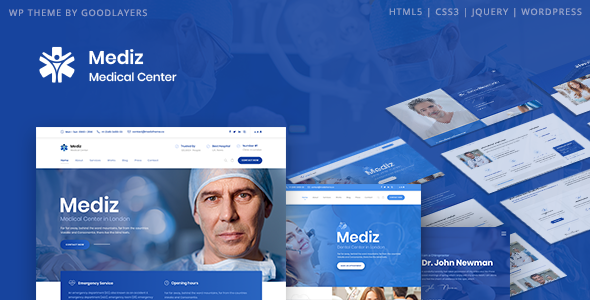
Stuck on your Mediz WordPress theme? Let's fix it.
No endless back-and-forth. Just send us the details and we'll get it done.
No obligation · Replies within 1 hour · Quote within 1 day
Setup · Customization · Bug fixes · WooCommerce integration
About Mediz WP Theme
Mediz is a medical WordPress theme built by GoodLayers, designed specifically for clinics, hospitals, doctors, and health-related businesses. It ships with the GoodLayers page builder (GDLR Core), giving you a drag-and-drop editing experience without needing Elementor or WPBakery.
The theme includes pre-built demo pages for appointment booking, doctor profiles, department listings, and service pages. It supports popular plugins like Appointment Hour Booking and WooCommerce, making it practical for clinics that sell products or take online bookings.
Mediz is built on a clean, responsive framework. Typography, color schemes, and header layouts can all be adjusted from the theme options panel. It is a solid starting point for any medical or wellness website that needs a professional look without custom development from scratch.
Get matched with a Mediz developer in under one day
Tell us about your Mediz project. Small fixes, Mediz theme customization, or a full website build, whatever you need, we've got it covered.
We'll connect you to the right Mediz developers, define the scope, and get everything 100% clear.
You'll get one estimate, hire your preferred developer, and start collaborating.
GoodLayers themes have their own ecosystem. GDLR Core, the custom page builder bundled with Mediz, behaves differently from standard builders. Not every WordPress developer knows its structure.
Through Codeable, you get matched with vetted developers who have worked with GoodLayers themes before. No guesswork, no offshore lottery. Post your project, get a free estimate within 24 hours, and only pay when you decide to move forward. It is a straightforward way to find someone who actually knows the theme.
Pros
- Includes pre-built medical demo pages for clinics, hospitals, and private practices that cut setup time significantly
- Doctor profile and department custom post types are built in, no extra plugin needed
- GDLR Core page builder is lightweight compared to Elementor and does not slow the site as much
- WooCommerce and major booking plugins integrate without conflicts on a clean install
- One-time purchase on ThemeForest with 6 months of GoodLayers support included
Cons
- GDLR Core page builder is proprietary, so switching themes later means rebuilding all page content
- Theme options panel can feel cluttered and takes time to learn for non-developers
- Support from GoodLayers slows down noticeably after the included support period expires
- Demo import does not always work cleanly on shared hosting with low PHP memory limits
- Some design elements look dated compared to modern medical site trends and need CSS overrides
Who is Mediz for?
Private Medical Clinics
Mediz is well suited for private GP clinics and specialist practices. The doctor profile system lets you list practitioners with qualifications, specialties, and contact details. Combined with a booking plugin, patients can request appointments directly from the site. A Mediz developer can connect this to your existing scheduling software.
Dental Practices
Dental practices benefit from Mediz’s service page structure and clean layout options. You can list treatments, display team profiles for each dentist, and embed a booking form. The theme handles before-and-after galleries well too, which is common in dental marketing. Light customization makes it feel specific to your practice.
Physiotherapy and Rehabilitation Centers
Physio and rehab centers need clear service listings and easy appointment access. Mediz provides both. The department structure maps well to treatment categories like sports injury, post-surgery rehab, or chronic pain management. A developer can extend the theme to include patient intake forms or telehealth booking links.
Health and Wellness Coaches
Health coaches and wellness practitioners get a professional foundation with Mediz. Blog layouts support content marketing. The homepage builder lets you highlight programs, testimonials, and a call to action without writing code. WooCommerce integration means you can sell courses or digital downloads from the same site.
Hospitals and Multi-Department Facilities
Larger facilities with multiple departments and dozens of doctors are where Mediz earns its keep. The department and doctor post types scale well. Navigation can be structured around departments, and each section can have its own contact details. Custom development is usually needed here, but Mediz provides a solid structural base.

Customizing Mediz
Out of the box, Mediz gives you enough theme options to change colors, fonts, header styles, and footer layouts. But most clinic and hospital websites have specific requirements: custom booking flows, branded patient portals, multilingual setups, or integrations with third-party calendar systems.
That is where a Mediz expert becomes necessary. A developer who knows GoodLayers themes can work inside the GDLR Core framework without breaking the update path. They can add custom post types, modify the doctor profile structure, build out department archive pages, or connect Mediz to external APIs.
If you need changes beyond the theme settings panel, working with a Mediz specialist saves time and avoids the common pitfalls of editing theme files directly.
Recommended plugins for Mediz
Mediz works well with several plugins that extend its core functionality. Appointment Hour Booking handles scheduling. WooCommerce adds an online shop for supplements or health products. WPML or Polylang make the site multilingual.
For performance, pairing Mediz with a caching plugin and optimized hosting makes a measurable difference. Learn more about WordPress performance tuning for medical sites with heavy traffic.
If you need search visibility, Yoast SEO or Rank Math integrate cleanly. For more advanced on-page work, see WordPress SEO services tailored to healthcare websites.
Not sure which plugins to use? This WordPress plugins directory covers the most popular options with reviews and setup guides.
Mediz common issues
Mediz theme demo import not working
Demo import failures on Mediz are almost always a hosting configuration issue. The import requires a PHP memory limit of at least 256MB and a maximum execution time of 300 seconds. On shared hosting, these are often set too low. Ask your host to raise both values, or temporarily switch to a staging environment with better resources. If the import still fails, a developer can import content manually using the WordPress XML importer and reconfigure the theme settings by hand. See our WordPress bug fixing service for fast help.
Mediz doctor profile page not displaying correctly
Doctor profile display issues usually come from one of two causes: a plugin conflict with GDLR Core, or a custom CSS override that is breaking the profile card layout. Start by deactivating plugins one at a time to isolate the conflict. If the layout is wrong on a fresh install with no extra plugins, the issue is likely a theme option setting under the Doctor post type settings panel. A Mediz developer can diagnose this quickly. Check our bug fixing service if you need it resolved fast.
Mediz theme slow loading after setup
Mediz can become slow if the GDLR Core scripts and styles load on every page regardless of need. Start by running a GTmetrix or PageSpeed Insights test to identify the heaviest assets. A caching plugin like WP Rocket and an image optimization plugin like ShortPixel handle most of the quick wins. For deeper performance work, a developer can conditionally load GDLR Core assets only on pages that use the builder. Visit our WordPress performance service for a full audit.
Mediz GDLR Core page builder not saving changes
When GDLR Core stops saving page builder changes, the most common cause is a JavaScript error conflicting with the builder’s autosave script. Open your browser console on the page editor and look for JS errors from other plugins. Security plugins that block REST API requests can also interfere. Try disabling your security plugin temporarily and testing the save again. If it works, whitelist the GDLR Core REST endpoints in your security plugin settings. Persistent issues may need a developer to trace the exact script conflict.
Mediz FAQ
Mediz is built around the GDLR Core page builder and is not designed to work with Elementor. You can technically install Elementor alongside it, but the two builders will conflict on the same page. If Elementor is a requirement, Mediz is not the right theme. Most Mediz users stick with GDLR Core for all page building and use Elementor only on separate standalone pages if absolutely needed.
Yes, Mediz is compatible with WPML. GoodLayers built the theme with translation in mind. You will need to translate the theme strings, page builder content, and custom post types like doctor profiles and departments separately inside WPML. A developer familiar with both Mediz and WPML can set this up cleanly and avoid the common issue of builder content not transferring between language versions.
Technically yes, but most of the pre-built layouts depend on GDLR Core shortcodes. If you disable or remove the plugin, those pages will show raw shortcode text instead of rendered content. You can use the standard WordPress block editor for simpler pages, but you will lose access to the doctor grids, department sliders, and other Mediz-specific elements that rely on the builder.
Mediz does not include booking functionality natively. The most common approach is to install Appointment Hour Booking or Bookly and embed the booking form on a dedicated page. Both plugins work without conflicts on a clean Mediz install. A developer can style the booking form to match your theme colors and integrate it into the header or sidebar for quicker patient access.
Yes, migrating an existing site to Mediz is possible. The process involves moving your content, setting up the Mediz template structure, and rebuilding page layouts using GDLR Core. If your current site has custom functionality, a developer will need to replicate that within the Mediz framework. Learn more about WordPress migration services and what the process involves before starting.
Hire a Mediz WordPress Developer
Need a developer who knows Mediz inside out? Whether you need a full site build, custom appointment booking integration, or specific design changes, the right developer makes the difference between a site that just looks medical and one that actually works for patients and staff.
Get a free estimate through Codeable. No obligation, no upfront payment. You describe the project, get a fixed quote, and decide from there. Developers are vetted and specialize in WordPress themes like Mediz.
You'll need a free Codeable account so developers can ask questions and send their quotes.