InHype WordPress Theme
by dedalx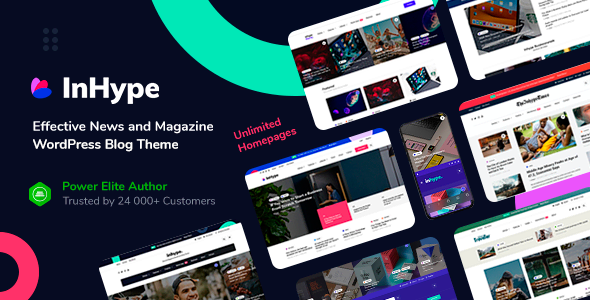
Stuck on your InHype WordPress theme? Let's fix it.
No endless back-and-forth. Just send us the details and we'll get it done.
No obligation · Replies within 1 hour · Quote within 1 day
Setup · Customization · Bug fixes · WooCommerce integration
About InHype WP Theme
InHype is a WordPress blog and magazine theme built by dedalx, designed for content-heavy sites that need clean typography and fast load times. It ships with multiple pre-built layouts suited to lifestyle, fashion, news, and personal blogging niches.
The theme is Gutenberg-compatible and works well with Elementor, giving editors a visual way to build post layouts without touching code. It includes custom widgets, a sticky header, dark mode support, and AJAX-powered pagination out of the box.
InHype follows a mobile-first approach, and the codebase is relatively lightweight compared to multipurpose themes. It is actively maintained by dedalx with regular updates that address compatibility with newer versions of WordPress and popular plugins.
Get matched with a InHype developer in under one day
Tell us about your InHype project. Small fixes, InHype theme customization, or a full website build, whatever you need, we've got it covered.
We'll connect you to the right InHype developers, define the scope, and get everything 100% clear.
You'll get one estimate, hire your preferred developer, and start collaborating.
InHype is straightforward to set up, but getting it to match a specific design or behave reliably under heavy traffic takes real WordPress knowledge. FoxyConcept connects you with vetted InHype developers through Codeable, a platform that screens every developer before they take on client work. You get a free estimate upfront, no commitment required. Whether you need a one-time customisation or ongoing support, the developer matched to your project will have direct experience with themes like InHype.
Pros
- Clean, lightweight codebase that loads faster than most multipurpose themes
- Dark mode included out of the box, no plugin needed
- AJAX pagination keeps readers on the page without full reloads
- Multiple pre-built demo layouts covering different blog and magazine styles
- Regular updates from dedalx with good WordPress version compatibility
Cons
- Limited layout flexibility without Elementor or custom CSS knowledge
- WooCommerce styling requires manual CSS adjustments to look polished
- Demo import can be slow and occasionally incomplete on some hosting environments
- No built-in mega menu — complex navigation needs a third-party plugin
- Support responses from dedalx can be slow during high-volume periods
Who is InHype for?
Lifestyle Blog
InHype suits personal lifestyle blogs well. Its clean grid layouts and readable typography keep the focus on written content and photography. The sticky header and category filters make it easy for readers to browse posts by topic without feeling overwhelmed by content density.
Online News Magazine
The theme handles high post volume without visual clutter. Category-based homepages, featured post sliders, and AJAX pagination work together to create a news site feel. Editors can update the front page through the Customizer without needing developer help for routine content changes.
Fashion and Beauty Site
InHype’s full-width image support and minimal design language translate well to fashion content. Large header images, lookbook-style post layouts, and dark mode all suit fashion and beauty brands that rely on strong visuals to drive engagement and return visits.
Food and Recipe Blog
Recipe blogs need clear structure and fast load times. InHype delivers both. Post templates support large featured images, and the sidebar widget areas work well for a recipe index or popular posts list. Adding a recipe card plugin alongside InHype takes very little configuration.
Personal Portfolio with Writing Samples
Writers and journalists can use InHype to present clips and long-form work in a professional format. The theme’s typographic defaults are strong, and a simple homepage layout with an about section and featured posts gives a clean first impression without requiring custom design work.

Customizing InHype
InHype gives you a solid starting point through the WordPress Customizer, where you can adjust typography, color schemes, header layouts, and sidebar positions without writing code. Most settings are straightforward and preview in real time.
Going beyond those defaults requires either comfort with CSS and PHP or the help of an InHype expert. Custom post templates, modified archive layouts, unique homepage sections, and third-party plugin integrations all fall outside what the Customizer can handle alone.
If you need the theme to behave in a specific way — custom ad placements, schema markup for articles, or a branded look that stands out from the default demo — working with a developer who knows InHype well will save you hours of trial and error.
Recommended plugins for InHype
InHype pairs well with plugins that extend standard blog and magazine functionality. WooCommerce can be added for a merch store or digital downloads. Rank Math or Yoast handles on-page SEO optimisation. For speed, combining InHype with a caching plugin and image optimisation tool keeps scores high — a dedicated WordPress performance setup makes a real difference on content-heavy sites.
Newsletter plugins like Mailchimp for WordPress integrate cleanly. Membership plugins such as MemberPress work if you want to gate content. Always test plugin combinations after InHype updates to catch any conflicts early.
Not sure which plugins to use? This WordPress plugins directory covers the most popular options with reviews and setup guides.
InHype common issues
InHype theme header not showing logo correctly
Logo display issues in InHype are usually caused by a size mismatch between the uploaded image and the header dimensions set in the Customizer. Go to Appearance > Customizer > Site Identity and check the logo crop settings. If the header is using a cached version, clear your site cache and any CDN cache. Using a retina-ready PNG at 2x the display size also prevents blurry rendering on high-density screens. If the issue persists after a theme update, check whether your child theme is overriding the header template.
InHype homepage layout broken after WordPress update
Broken layouts after a WordPress update in InHype usually point to a JavaScript conflict or a block editor compatibility issue. Start by deactivating plugins one at a time to identify the conflict. Check whether you are running the latest version of InHype — dedalx typically releases a patch within a few days of major WordPress updates. If you built your homepage with Elementor, regenerate the CSS via Elementor > Tools > Regenerate Files. For persistent issues, a WordPress bug fixing service can diagnose the root cause faster.
InHype dark mode not working on mobile
Dark mode toggle failures on mobile in InHype are often tied to browser caching or a JavaScript error triggered by a plugin. Open the browser console on mobile using remote debugging tools and look for JS errors on page load. Also check whether a caching plugin is serving a desktop-cached version to mobile visitors. If the toggle works on desktop but not mobile, the issue is likely a CSS media query conflict or the toggle script not loading correctly on smaller viewports. Disabling minification temporarily can confirm whether that is the cause.
InHype demo content not importing properly
InHype demo imports fail or come through incomplete most often due to server memory limits or execution timeouts. Increase max_execution_time and memory_limit in your php.ini or wp-config.php. If your host restricts this, import content in smaller batches using the WordPress importer separately from the theme options import. Some demo images may not import due to external URL restrictions — download them manually from the demo and re-upload to the media library. Always run the demo import on a staging environment first.
InHype FAQ
Yes, InHype works with Elementor. The theme does not bundle Elementor, so you install the plugin separately. Most of InHype’s own page builder features run through the Customizer and native Gutenberg blocks. Using Elementor on top of InHype gives you more layout control but adds page weight, so test performance after enabling it.
InHype does not officially advertise WooCommerce as a core feature, but the plugin installs and runs on it. Out of the box, WooCommerce pages inherit basic InHype styling, which looks functional but not polished. You will likely need custom CSS or a developer to align the shop pages with the rest of your site’s design.
Use a child theme before making any code changes to InHype. Settings saved through the WordPress Customizer survive updates, but modifications made directly to theme files will be overwritten. Export your Customizer settings as a backup before updating. If you have not been using a child theme, a developer can help migrate your changes safely before you apply the update.
InHype is built with clean HTML and supports schema markup through plugins like Rank Math. Its fast default load time helps with Core Web Vitals scores. It does not include built-in SEO tools, so pair it with a dedicated WordPress SEO plugin for full control over meta tags, structured data, and XML sitemaps.
InHype is designed around blog and magazine content. It can work for a simple business or portfolio site, but you would be working against its defaults rather than with them. If your site is not content-driven, a different theme will be easier to customise. If you want to stick with InHype for non-blog purposes, a developer can restructure the layout to suit your needs.
Hire an InHype WordPress Developer
Need changes made to your InHype site that go beyond the Customizer? FoxyConcept works through Codeable to match you with a developer who knows the theme well. From layout adjustments to full custom builds on top of InHype, you get a free estimate before any work begins. No obligation, no upfront payment. Post your project and hear back within 24 hours.
You'll need a free Codeable account so developers can ask questions and send their quotes.