WaveRide WordPress Theme
by Select-Themes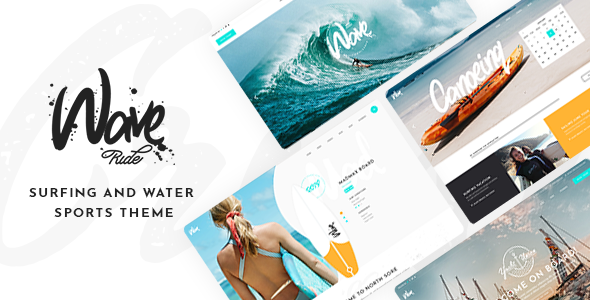
Stuck on your WaveRide WordPress theme? Let's fix it.
No endless back-and-forth. Just send us the details and we'll get it done.
No obligation · Replies within 1 hour · Quote within 1 day
Setup · Customization · Bug fixes · WooCommerce integration
About WaveRide WP Theme
WaveRide is a WordPress theme built by Select-Themes specifically for surf shops, skate brands, and action sports businesses. It ships with a visual style that matches the lifestyle market: bold typography, full-width imagery, and a layout that puts products and photography front and center.
The theme integrates cleanly with WooCommerce, making it a practical choice for shops selling boards, apparel, and gear. It includes multiple homepage layouts, a custom event section, and pre-built inner page templates that reduce setup time. Select-Themes built WaveRide with a responsive grid that holds up on mobile without extra configuration. If your business lives in the surf, skate, or outdoor action space, WaveRide gives you a head start with a design that already speaks to that audience.
Get matched with a WaveRide developer in under one day
Tell us about your WaveRide project. Small fixes, WaveRide theme customization, or a full website build, whatever you need, we've got it covered.
We'll connect you to the right WaveRide developers, define the scope, and get everything 100% clear.
You'll get one estimate, hire your preferred developer, and start collaborating.
WaveRide looks polished out of the box, but the demo and your finished site are rarely the same thing. Product pages need restructuring, custom sections need building, and plugin conflicts need sorting. FoxyConcept connects you with vetted WordPress developers through Codeable — a platform where every developer is screened before they take on client work. You get a fixed estimate before any work starts, and you only hire if the scope and price make sense for your project.
Pros
- Designed specifically for surf and action sports brands, so the visual direction fits the market without heavy design work
- WooCommerce integration is built in, making it straightforward to set up a product shop alongside editorial content
- Includes an events section out of the box, useful for surf contests, camps, and lesson schedules
- Multiple pre-built homepage layouts reduce initial setup time compared to building from a blank theme
- Responsive layout works on mobile without requiring separate mobile configuration
Cons
- Niche design makes it a poor fit for businesses outside surf, skate, or action sports
- Heavy use of large images can slow load times if performance optimization is not handled separately
- Customizer options cover the basics but deeper layout changes require CSS or PHP knowledge
- Select-Themes update cadence is slower than major theme frameworks, which can create compatibility gaps over time
- Limited third-party documentation and community resources compared to themes like Divi or Astra
Who is WaveRide for?
Surf Shop
WaveRide’s WooCommerce layout and product-forward design make it a natural fit for surf shops selling boards, wetsuits, and accessories. The shop pages are clean, the product images get space to breathe, and the overall aesthetic matches what a surf audience expects from a brand they want to buy from.
Skateboard Brand
Skate brands benefit from WaveRide’s bold typography and full-width visual sections. The theme handles product catalogues well, and the homepage layouts can showcase team riders, new decks, or brand story content without feeling cramped. A developer can push the aesthetic further with custom color schemes and type choices.
Surf School or Coaching
The built-in events section makes WaveRide practical for surf schools that run regular lessons, clinics, or surf camps. You can list upcoming sessions, take bookings through WooCommerce Bookings, and present instructor profiles — all within a design that reinforces the surf lifestyle your students are buying into.
Outdoor Gear Retailer
Outdoor gear retailers in adjacent markets — kitesurfing, paddleboarding, snowboarding — can use WaveRide’s shop and editorial layout to sell gear and publish content. The action sports visual style transfers well across these categories, and the WooCommerce foundation handles inventory and payments without extra configuration.
Action Sports Event Organizer
Surf contests, skate competitions, and beach events need a site that communicates energy and urgency. WaveRide’s event section, combined with large hero imagery and clear calls to action, gives organizers a practical starting point. Registration forms and ticketing can be added through compatible plugins.

Customizing WaveRide
WaveRide works with the WordPress Customizer, so most visual changes — colors, fonts, header layout, and logo — are handled without touching code. The theme includes multiple header styles and slider options you can switch between depending on the page type.
Beyond the basics, customization gets more technical. Adjusting the WooCommerce product grid, modifying the event section structure, or building a custom homepage that moves away from the demo layout typically requires CSS or PHP edits. A WaveRide expert can also wire up custom post types, add filtering to the shop, or rework the mobile navigation to better fit your brand. If you want the site to look original rather than like the demo, working with a WaveRide developer is the most direct path to that result.
Recommended plugins for WaveRide
WaveRide pairs naturally with WooCommerce for selling gear and apparel, and works alongside plugins like YITH WooCommerce Wishlist and WooCommerce Subscriptions if you run memberships or rental services. For bookings — surf lessons, guided tours, board rentals — WooCommerce Bookings fits cleanly into the theme’s layout.
On the performance side, WaveRide’s image-heavy design means caching and image optimization are essential. A developer can tune this properly. For search visibility, structured data and schema for products and events will help. See our WordPress performance services and SEO optimisation services for more detail.
Not sure which plugins to use? This WordPress plugins directory covers the most popular options with reviews and setup guides.
WaveRide common issues
WaveRide slider not working after WordPress update
Slider issues after a WordPress core update usually point to a JavaScript conflict or an outdated slider library bundled with the theme. Start by deactivating plugins one at a time to rule out a JS conflict. If the slider worked before the update, check whether Select-Themes has released a patch version of WaveRide that addresses the change. If you need the issue resolved quickly, our WordPress bug fixing service can diagnose and fix it without trial and error.
WaveRide WooCommerce shop page layout broken
A broken WooCommerce shop layout in WaveRide is often caused by a WooCommerce update that changed template structure. WaveRide ships with custom WooCommerce templates, and when WooCommerce updates those core templates, the theme’s overrides can fall out of sync. The fix is updating the theme’s WooCommerce templates to match the current version. A developer can do this without breaking your existing customizations. See our bug fixing service for help.
WaveRide homepage looks different from demo after install
When a WaveRide install doesn’t match the demo, the most common cause is missing demo content. WaveRide’s demo uses specific placeholder images, custom menus, and widget configurations that don’t import automatically. You need to run the theme’s demo importer, then set the correct homepage in Settings > Reading, and configure the menu locations. If the importer isn’t included or fails, a developer can replicate the layout manually using the theme’s built-in sections.
WaveRide site loading slowly on mobile
WaveRide uses large images throughout its layout — hero sliders, full-width sections, product photography. On mobile, these can cause significant load time problems if no optimization is in place. The fix involves compressing images, enabling lazy loading, using a caching plugin, and potentially serving smaller image sizes to mobile viewports. Our WordPress performance service covers all of this and can make a measurable difference to your mobile scores.
WaveRide FAQ
WaveRide is maintained by Select-Themes and has been updated for recent WordPress versions, but compatibility with the very latest release depends on when Select-Themes last pushed an update. Before updating WordPress on a live site running WaveRide, check the theme’s changelog and test on a staging environment first. If you’re running an outdated version of WaveRide, update the theme before updating WordPress core.
WaveRide has its own built-in page builder sections and is not specifically built for Elementor. It can technically be used alongside Elementor, but you may run into layout conflicts or lose access to WaveRide’s native sections. Gutenberg block support is partial. If you want full Elementor control inside WaveRide, a developer can set that up cleanly without breaking the theme’s existing structure.
Yes. WaveRide was built with WooCommerce compatibility as a core feature. The theme includes custom WooCommerce templates for shop, product, and cart pages that match its design. You can set up a functioning surf or skate shop without extra plugins. More advanced features — filtering, subscriptions, bookings — can be added through WooCommerce extensions.
WaveRide includes a one-click demo importer available from the theme options panel after activation. Running the importer pulls in placeholder content, widgets, and menu configurations. You’ll need to replace placeholder images with your own after import. If the importer fails or is unavailable in your version, the demo layout can be rebuilt manually using the theme’s page templates and sections.
Yes, you can migrate an existing site to WaveRide. The process involves moving your content into WaveRide’s page templates and restructuring your product or post data to fit the theme’s layout. It is not a one-click process — content migration and theme switching always require manual work. Our WordPress migration service can handle this without data loss or extended downtime.
Hire a WaveRide Developer
Whether you need a WaveRide site built from scratch, a customization that goes beyond the Customizer, or a bug tracked down and fixed, FoxyConcept can match you with a developer who knows the theme. Work is delivered through Codeable’s vetted network — you get a free estimate with no obligation to hire. Submit your project and get an estimate today.
You'll need a free Codeable account so developers can ask questions and send their quotes.