Bethlehem WordPress Theme
by MadrasThemes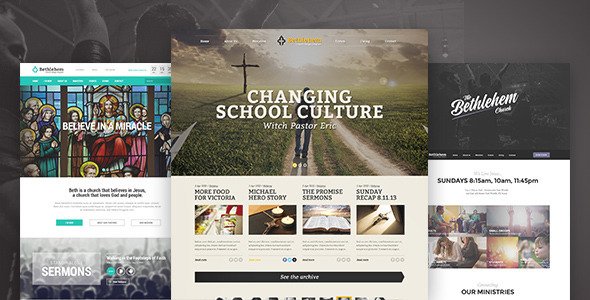
Stuck on your Bethlehem WordPress theme? Let's fix it.
No endless back-and-forth. Just send us the details and we'll get it done.
No obligation · Replies within 1 hour · Quote within 1 day
Setup · Customization · Bug fixes · WooCommerce integration
About Bethlehem WP Theme
Bethlehem is a WordPress theme built by MadrasThemes, designed specifically for churches, religious organizations, and faith-based communities. It comes with a clean layout, purpose-built sections for sermons, events, and ministries, and a visual design that fits the tone of a church or nonprofit website.
The theme works with Elementor, making it accessible to users who want to build pages without touching code. It includes multiple homepage demos, sermon archive templates, and a donation-ready layout out of the box. MadrasThemes has a solid track record building niche-focused WordPress themes, and Bethlehem reflects that with thoughtful defaults and a structure that suits congregation websites without requiring heavy customization from scratch.
Get matched with a Bethlehem developer in under one day
Tell us about your Bethlehem project. Small fixes, Bethlehem theme customization, or a full website build, whatever you need, we've got it covered.
We'll connect you to the right Bethlehem developers, define the scope, and get everything 100% clear.
You'll get one estimate, hire your preferred developer, and start collaborating.
Bethlehem is straightforward to use, but getting a church website right takes more than dragging blocks around in Elementor. Sermon archives need proper structure. Donation flows need testing. Mobile layout often needs manual fixes. Working with a vetted developer through Codeable means you get someone who has done this before, delivers clean work, and stands behind it. No guessing, no back-and-forth with a freelancer on the wrong platform.
Pros
- Purpose-built for church and ministry sites with sermon, events, and donation sections included
- Full Elementor compatibility makes page editing accessible without custom code
- Multiple prebuilt homepage demos reduce initial setup time significantly
- MadrasThemes provides regular updates and dedicated support for the theme
- Clean default typography and layout that fits religious and nonprofit branding
Cons
- Niche focus means it is not suitable for anything outside church or faith-based websites
- Heavy reliance on Elementor creates page builder lock-in over time
- Some demo content requires additional plugins to replicate exactly as shown
- Customization beyond the theme options panel requires Elementor or developer knowledge
- Documentation is limited compared to larger theme marketplaces like ThemeForest
Who is Bethlehem for?
Local Church Website
Bethlehem was built for exactly this. A local church can use the sermon archive to publish weekly messages, the events section to list service times and community gatherings, and the contact page to handle visitor inquiries. The homepage demos give a polished starting point that most local churches can launch from quickly.
Ministry or Outreach Organization
Outreach organizations need a site that communicates mission clearly and makes donating easy. Bethlehem’s layout supports both. Pair it with GiveWP for donation forms and The Events Calendar for outreach events. A developer can connect those tools and style the donation section to match your branding without rebuilding the entire site.
Christian Nonprofit
Nonprofits with a religious or community focus benefit from Bethlehem’s tone and structure. The theme handles content-heavy pages well, supports testimonials and impact sections, and integrates with WooCommerce if you sell books, merchandise, or event tickets. A child theme keeps customizations stable through updates.
Bible Study or Small Group Network
Small group networks need simple navigation, a clear schedule, and a way to sign people up. Bethlehem handles the visual side, and with the right plugin setup, it can also manage group registration and resource downloads. The events section works well for tracking recurring weekly meetings across multiple locations.
Religious Event or Conference
One-off religious events or annual conferences can use Bethlehem as a campaign landing site. The homepage can be restructured around a single event, speakers section, schedule, and registration. A developer can strip back the full church layout and focus the site around conversion and attendance for the event.

Customizing Bethlehem
Bethlehem gives you a decent starting point, but most church websites need adjustments before they go live. That means matching brand colors and fonts, reorganizing the homepage layout, connecting a donation plugin, setting up the sermon archive the way your team expects, and getting the events section to sync with an actual calendar tool.
If you want to skip the trial and error, a Bethlehem expert can handle those tasks cleanly and quickly. A developer familiar with MadrasThemes knows where the theme options live, which Elementor widgets play nicely with the existing structure, and how to avoid layout breakage when customizing. Custom post types, child themes, and conditional logic on the front page are all things a Bethlehem expert can sort out in hours, not days.
Recommended plugins for Bethlehem
Bethlehem pairs well with a focused set of plugins. For sermons, SermonManager is the go-to. For events, The Events Calendar integrates without much friction. WooCommerce or GiveWP handles donations depending on your preferred flow.
For performance, the theme is not particularly heavy but image optimization and caching are still worth setting up properly. Our WordPress performance service can handle that. If your church site needs to rank in local search, structured data and on-page work matters more than most people realize. Our WordPress SEO service covers that ground.
Not sure which plugins to use? This WordPress plugins directory covers the most popular options with reviews and setup guides.
Bethlehem common issues
Bethlehem theme homepage not loading demo content after import
This usually happens when required plugins are not activated before importing demo content. Bethlehem depends on Elementor and sometimes MadrasThemes’ own companion plugin. After importing, go to Appearance > Customize and confirm the static front page is set correctly. If images are missing, check that the import completed fully. Large demo imports sometimes time out on shared hosting. A developer can run the import via WP CLI to avoid that problem.
Bethlehem sermon archive page showing 404 or blank
A blank or 404 sermon archive usually means the permalink structure needs flushing. Go to Settings > Permalinks and click Save Changes without changing anything. If SermonManager is installed, also check that its archive slug does not conflict with a page slug. If the issue persists, the rewrite rules may need to be reset manually, which is a quick fix for any developer comfortable with WordPress internals. Our bug fixing service covers this.
Bethlehem Elementor sections not displaying correctly on mobile
Elementor sections in Bethlehem sometimes have fixed-width or padding values set at the desktop breakpoint that do not translate well to mobile. Open the affected section in Elementor, switch to mobile preview mode, and adjust column stacking, font sizes, and padding separately for mobile. Avoid using fixed pixel widths on columns. If the layout was built with a previous version of Elementor, the responsive controls may behave differently after an update.
Bethlehem theme update broke the site layout
Theme updates can overwrite customizations made directly to theme files. This is why child themes matter. If a recent Bethlehem update broke your layout, check whether you had custom CSS in the parent theme files. Restore from a backup, move customizations to a child theme, then update again. Going forward, always test updates on a staging site first. Our WordPress maintenance service includes staging and update management.
Bethlehem FAQ
Bethlehem is a premium WordPress theme sold by MadrasThemes. It is not available for free on WordPress.org. You purchase it directly from the MadrasThemes website. The license includes theme updates and support for a set period. Renewal is required to continue receiving updates after that period expires.
Yes. Bethlehem is built to work with Elementor and most of its demo layouts rely on Elementor page builder. You will need Elementor installed to edit pages the way they appear in the demo. Some sections may also require the MadrasThemes companion plugin to function correctly after demo import.
Technically yes, but practically it is a poor fit. The design language, default sections, and demo content are all oriented toward churches and religious organizations. Repurposing it for a business, portfolio, or unrelated nonprofit would require significant rework that would be faster to accomplish with a more general-purpose theme.
Bethlehem supports sermon archives when used alongside a sermon plugin like SermonManager. Install SermonManager, configure the archive slug, and then use the Bethlehem sermon page template to display it. The theme includes styling for sermon listings. You may need a developer to wire up the template and adjust the archive layout to match your content structure.
Yes, migrating to Bethlehem is possible. Your existing posts, pages, and media carry over through a standard WordPress migration. The design work is done fresh using Bethlehem’s templates and Elementor. If you need help with the migration itself, our WordPress migration service handles the technical move cleanly.
Hire a Bethlehem WordPress Developer
Whether you need a full site build with Bethlehem or fixes to an existing one, FoxyConcept connects you with a vetted WordPress developer who knows the theme. Projects are delivered through Codeable, so you get a real professional, not a random freelancer. Get a free estimate and hear back within 24 hours. No obligation, no risk.
You'll need a free Codeable account so developers can ask questions and send their quotes.