Eventim WordPress Theme
by BoldThemes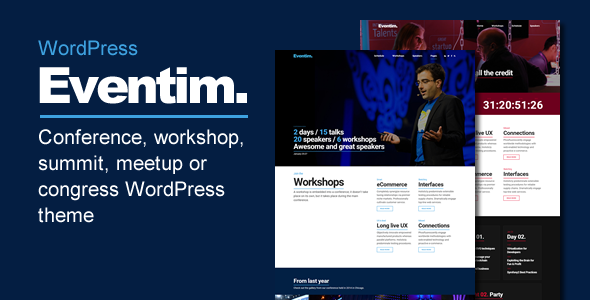
Stuck on your Eventim WordPress theme? Let's fix it.
No endless back-and-forth. Just send us the details and we'll get it done.
No obligation · Replies within 1 hour · Quote within 1 day
Setup · Customization · Bug fixes · WooCommerce integration
About Eventim WP Theme
Eventim is a WordPress theme built by BoldThemes, designed specifically for event organizers, concert promoters, and venue managers. It ships with The Events Calendar plugin integration out of the box, giving you a working event listing setup without much configuration.
The theme includes multiple homepage layouts, a ticket booking section, speaker and performer profiles, schedule displays, and countdown timers. It uses WPBakery Page Builder for layout control and supports WPML for multilingual sites.
BoldThemes has a track record of building niche-specific themes with solid documentation. Eventim follows that pattern. It looks polished on demo, handles event-heavy content structures well, and gives small to mid-sized event businesses a functional starting point without hiring a developer from scratch.
Get matched with a Eventim developer in under one day
Tell us about your Eventim project. Small fixes, Eventim theme customization, or a full website build, whatever you need, we've got it covered.
We'll connect you to the right Eventim developers, define the scope, and get everything 100% clear.
You'll get one estimate, hire your preferred developer, and start collaborating.
Most WordPress developers can install a theme. Fewer understand BoldThemes’ architecture, WPBakery’s shortcode structure, or how Eventim’s template hierarchy interacts with The Events Calendar plugin templates.
Through Codeable, you get matched with developers who have worked on event-specific WordPress projects and know where the edge cases are. No generalist guessing. Post your project and get a free estimate within 24 hours.
Pros
- Built-in integration with The Events Calendar plugin, reducing setup time significantly
- Multiple pre-built homepage and inner page layouts suited to different event types
- Includes speaker profiles, schedule grids, countdown timers, and ticket sections as theme-native elements
- WPML compatible for multilingual event sites targeting international audiences
- BoldThemes provides documentation and regular updates with each major WordPress release
Cons
- WPBakery Page Builder is bundled, which is heavier than block-based alternatives and slower to work with
- Ticket purchase flow depends on third-party plugins and requires extra configuration to work properly
- Demo content import can be unreliable and sometimes requires manual cleanup after installation
- Customizing The Events Calendar template files requires overriding them in a child theme, which is not beginner-friendly
- Limited native mobile menu options, often needing CSS adjustments for complex navigation structures
Who is Eventim for?
Music Festival Websites
Eventim handles multi-day festival structures well. You can list multiple stages, set up artist profile pages, display set times in a schedule grid, and add a ticket purchase CTA tied to an external provider. The countdown timer and sponsor logo sections are built in, which saves custom development time for festival-specific content.
Conference and Summit Sites
For conferences, the speaker grid and session schedule layouts are immediately useful. You can assign speakers to sessions, display tracks by time slot, and build out sponsor tiers on the homepage. Add The Events Calendar PRO and you get filtering by track or date without custom development.
Local Venue Listings
Venue operators can use Eventim to list upcoming shows, embed maps, display seating info, and link to ticketing platforms like Eventbrite or native WooCommerce checkout. The theme supports multiple event types on one site, which works well for venues that host varied programming across weeks.
Performing Arts Organizations
Theater companies, orchestras, and dance organizations get a clean structure for season programming. You can build out production pages with cast lists, schedule performances, and integrate a subscription or membership plugin for season ticket holders. The visual style suits arts organizations without needing heavy reskinning.
Corporate Event Management
Companies running recurring internal or client-facing events can use Eventim to manage registration pages, speaker lineups, and agenda displays. Pair it with a form plugin like Gravity Forms for custom registration logic. It also works for agencies managing multiple branded events under one WordPress install with separate page sets.

Customizing Eventim
Out of the box, Eventim covers the basics. But most event businesses need something more specific, whether that is a custom ticket flow, a members-only schedule area, or integration with a payment gateway beyond the defaults.
The theme’s options panel lets you adjust colors, fonts, and layout sections without touching code. WPBakery gives you drag-and-drop control over page structure. That said, deeper changes like custom post type modifications, conditional content by user role, or third-party API connections require actual development work.
An Eventim expert who knows the BoldThemes codebase can extend the theme without breaking core functionality on updates. They know which parts to modify via child theme, which hooks to use, and where WPBakery’s limitations require a different approach. That knowledge saves significant time compared to trial and error.
Recommended plugins for Eventim
Eventim works well with several plugins that add functionality the theme does not cover natively. The Events Calendar PRO adds recurring events, venue maps, and filtering. WooCommerce handles paid ticket sales when combined with the right ticketing add-ons. WPML makes multilingual event sites manageable.
For site speed, image optimization and caching configuration matter a lot on event sites with heavy media. See our WordPress performance service for specifics. If you are running SEO for event pages and trying to rank for local searches, our WordPress SEO service covers structured data and schema markup for events.
Not sure which plugins to use? This WordPress plugins directory covers the most popular options with reviews and setup guides.
Eventim common issues
Eventim theme events not showing on homepage
This usually comes down to a conflict between Eventim’s homepage template and The Events Calendar query settings. Check that your Events Calendar permalink settings match your WordPress permalink structure. Also verify that the theme’s event widget or homepage section is set to pull from the correct post type. If you recently updated either the theme or the plugin, a template override in your child theme may be outdated. Our WordPress bug fixing service can diagnose this quickly.
Eventim child theme not loading styles correctly
A common cause is incorrect child theme setup where the stylesheet is not properly enqueuing the parent theme’s CSS before the child styles. Open your child theme’s functions.php and confirm wp_enqueue_scripts is loading the parent stylesheet with get_template_directory_uri(). Also check that your child theme’s style.css has the correct Template: header pointing to the Eventim parent folder name exactly as it appears in wp-content/themes/.
WPBakery shortcodes showing as plain text after Eventim update
This happens when WPBakery is deactivated or its license is not validated after a theme or plugin update. Go to WPBakery settings and re-activate the plugin. If shortcodes still render as raw text, check for a plugin conflict by deactivating other plugins one at a time. Sometimes a caching plugin holds a stale version of the page. Clear all caches after re-activating WPBakery. If the issue persists across pages, the WPBakery database tables may need repair.
Eventim theme slow page load on event listing pages
Event listing pages with large numbers of events load slowly when images are not optimized and queries are not cached. Start by compressing event featured images and enabling lazy loading. Then check whether The Events Calendar is running unoptimized database queries on that page using a plugin like Query Monitor. A caching layer and proper database indexing usually cuts load time significantly. See our WordPress performance service for a full audit approach.
Eventim FAQ
BoldThemes updates Eventim to maintain compatibility with current WordPress releases. That said, you should always check the changelog before updating and test on a staging environment first. Conflicts sometimes appear between theme updates and third-party plugins like The Events Calendar or WPBakery, particularly when major WordPress versions introduce changes to how block rendering or REST API calls work.
Technically yes, but you lose a significant portion of what makes the theme functional. Eventim’s schedule, event listing, and archive templates are built around The Events Calendar’s post type structure. Without it, those sections either show nothing or break. You would need custom development to replace that functionality with another event management solution or a custom post type setup.
Yes, but it requires configuration. Eventim does not include native ticket checkout. You add WooCommerce and a compatible ticketing plugin like Ticket Tailor or TC Tickets. The theme does not conflict with WooCommerce out of the box, but the WooCommerce template styling needs adjustment to match Eventim’s design unless you use a child theme.
BoldThemes includes a one-click demo importer, but run it only on a fresh WordPress install or a staging site. It will overwrite your existing settings, menus, and widget configurations. Export your current data first. After import, you replace demo content with your own and rebuild from there. Importing onto a live site with existing content is risky and not recommended.
Yes, migration is possible. Your existing event data can be moved if you are already using The Events Calendar, since the post type structure stays the same. Design and layout migration is more involved because you need to rebuild pages in WPBakery. Our WordPress migration service handles this kind of theme switch while keeping your event data and SEO intact.
Hire an Eventim Developer
Whether you need a full Eventim setup, a custom feature added, or something broken fixed, working with a specialist is faster than figuring it out yourself. We match you with a vetted Eventim developer through Codeable. You describe the project, get a clear estimate, and only hire if it makes sense. No risk, no obligation. Get a free estimate here and hear back within 24 hours.
You'll need a free Codeable account so developers can ask questions and send their quotes.