Voyage WordPress Theme
by Mikado-Themes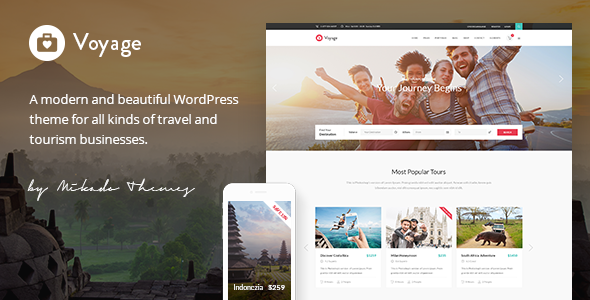
Stuck on your Voyage WordPress theme? Let's fix it.
No endless back-and-forth. Just send us the details and we'll get it done.
No obligation · Replies within 1 hour · Quote within 1 day
Setup · Customization · Bug fixes · WooCommerce integration
About Voyage WP Theme
Voyage is a WordPress theme by Mikado-Themes built for travel bloggers, photographers, and lifestyle content creators. It ships with a visual, full-width layout that puts imagery front and center. The theme is built on Mikado’s own framework and uses the WPBakery Page Builder for drag-and-drop layout control.
Out of the box, Voyage includes multiple homepage demos, a custom portfolio post type, a dedicated travel blog layout, and a header with a built-in search. It supports custom widgets, Instagram feed integration, and social sharing. The design leans heavily on large hero images and minimal typography, which works well for destinations and travel journals.
Voyage is sold exclusively on ThemeForest and comes with six months of author support. It is compatible with WooCommerce if you want to sell travel guides, prints, or merchandise alongside your content.
Get matched with a Voyage developer in under one day
Tell us about your Voyage project. Small fixes, Voyage theme customization, or a full website build, whatever you need, we've got it covered.
We'll connect you to the right Voyage developers, define the scope, and get everything 100% clear.
You'll get one estimate, hire your preferred developer, and start collaborating.
Mikado-Themes builds solid foundations, but their framework is proprietary. If something breaks or you need a feature the theme does not include, you need someone who already knows how Mikado themes are structured. Generic WordPress developers often spend hours just learning the codebase before writing a single line of useful code.
Through Codeable, FoxyConcept matches you with developers who have direct experience with Voyage and the Mikado framework. You get an accurate estimate fast, with no obligation to hire.
Pros
- Purpose-built for travel and lifestyle blogs with demo content that is actually useful
- Full-width hero images and portfolio layouts look polished without custom CSS
- WPBakery included in the theme price, no extra purchase needed
- Theme Options panel covers most common design changes without code
- WooCommerce compatible for selling guides, prints, or travel products
Cons
- Mikado's proprietary framework makes it harder for outside developers to work with
- WPBakery loads scripts and styles site-wide by default, hurting page speed scores
- Six months of included support from Mikado is short for long-term projects
- Mobile menu and header customization beyond the defaults requires CSS work
- No Gutenberg-native layout options; heavily tied to WPBakery for page structure
Who is Voyage for?
Travel Blog
Voyage was built with travel bloggers in mind. The dedicated blog layouts handle long-form posts, category archives, and social sharing cleanly. If you write destination guides, trip recaps, or travel tips, the theme’s typography and featured image treatment fits that content without much setup work.
Photography Portfolio
Photographers who travel and want to display their work alongside written content get a lot from Voyage’s portfolio post type. The grid layouts support full-width images and filter options by category. It works well for documentary-style photography or destination shoots where you want the image to carry the page.
Destination Guide
If you are building a city or country guide with structured content across multiple destinations, Voyage’s taxonomy support and custom post types can be extended to handle that. It takes some developer work to set up custom destination archives properly, but the visual framework is already suited for it.
Lifestyle Magazine
Voyage handles a multi-author lifestyle magazine setup with category filtering, featured post sections, and a clean sidebar layout. If your content mixes travel with food, fashion, or culture, the flexible homepage builder gives you enough layout control to separate those verticals visually.
Travel Product Shop
WooCommerce integration means you can sell travel photography prints, destination guides in PDF format, or branded merchandise directly from your Voyage site. The shop pages inherit the theme’s clean aesthetic without needing a lot of custom styling to match your blog design.

Customizing Voyage
Voyage gives you a Theme Options panel built with the Mikado framework. From there you can control fonts, colors, header styles, sidebar positions, and footer layout without touching code. WPBakery handles page structure, so most layout changes happen through a visual editor.
Beyond the defaults, customization gets more involved. Changing the portfolio grid spacing, tweaking the mobile menu behavior, or adding custom post types outside what Mikado provides usually requires CSS or PHP work. If you need specific functionality, like a custom destination taxonomy, a filterable trip archive, or a booking form integrated into your homepage, you will want a Voyage expert who knows the Mikado framework well enough to extend it cleanly without breaking theme updates.
Recommended plugins for Voyage
Voyage works with WooCommerce if you want to sell digital downloads or physical products alongside your travel content. It also supports popular plugins like Yoast SEO and Rank Math, though you may need minor CSS fixes for schema output to display cleanly in the blog layout.
For site speed, Voyage loads WPBakery assets globally by default, which adds weight to every page. Pairing it with a caching plugin and optimizing image delivery makes a noticeable difference. Learn more about WordPress performance optimization. If organic traffic matters to your travel site, structured WordPress SEO work on top of the theme is worth investing in.
Not sure which plugins to use? This WordPress plugins directory covers the most popular options with reviews and setup guides.
Voyage common issues
Voyage theme WPBakery slow page load
WPBakery loads its JavaScript and CSS on every page by default, including pages that do not use it. To fix this, disable the global script loading in WPBakery’s settings and only enqueue assets where needed. Pair that with a caching plugin and a CDN for static assets. If your Lighthouse score is still low, a WordPress performance audit will identify what else is slowing the site down.
Voyage WordPress theme header not showing on mobile
This is usually a conflict between a custom header style selected in Theme Options and a CSS rule added by a plugin or child theme. Check the Mikado Theme Options panel first and confirm the mobile header type is set correctly. If that looks right, open your browser inspector on mobile emulation and look for a z-index or display override hiding the header element. A targeted CSS fix usually resolves it quickly.
Voyage theme portfolio grid not displaying correctly
Portfolio grid issues in Voyage are often caused by a missing or mismatched portfolio category assignment, or a WPBakery element that did not save its settings correctly. First, check that each portfolio item has at least one category assigned. Then open the grid element in WPBakery and re-save it. If the issue persists after that, there may be a JavaScript conflict with another plugin. Try disabling plugins one at a time to isolate the cause.
Mikado Voyage theme update broke my layout
Mikado theme updates sometimes reset custom CSS added directly to the theme files rather than a child theme. If your layout broke after an update, check whether you are running a child theme. If not, your changes were likely overwritten. Going forward, all customizations should live in a child theme or in the WordPress Customizer’s Additional CSS field. If the damage is already done, a WordPress bug fixing service can help restore your layout.
Voyage FAQ
Voyage receives periodic updates on ThemeForest, though the pace has slowed compared to newer Mikado releases. It still works with current versions of WordPress, but some third-party plugin compatibility requires manual testing. If you rely on the theme for an active site, check the ThemeForest changelog before updating and test on a staging environment first.
Voyage is not built for Gutenberg. Its page layouts depend on WPBakery, and switching the editor to block-based would require rebuilding most pages. Mikado has not released a full Gutenberg integration for Voyage. If you want a Gutenberg-native setup, a theme migration to a block-based theme would be a better long-term move.
Technically yes, but it is not practical. The demo content and most homepage layouts are built inside WPBakery. Removing it means rebuilding those layouts in another editor or with custom code. For new pages you could use the Classic Editor or block editor, but the existing WPBakery shortcodes would render as broken text without the plugin active.
Create a folder in your wp-content/themes directory named voyage-child. Add a style.css file with the standard child theme header, including Template: voyage to link it to the parent. Then add a functions.php file to enqueue the parent stylesheet. Activate the child theme from the WordPress admin. All your custom CSS and PHP changes go into the child theme files.
Yes, but it takes planning. Voyage uses WPBakery shortcodes and Mikado’s custom post types, so your content does not transfer cleanly to a new theme on its own. Posts and pages with WPBakery layouts will show raw shortcode text after switching. A proper WordPress migration plan should include rebuilding key pages in the new theme before you switch live.
Hire a Voyage WordPress Expert
Whether you need a full Voyage setup, a specific customization, or a fix for something that stopped working, FoxyConcept can help. Work is handled through Codeable, so you are matched with a vetted developer who knows the Mikado framework. Get a free estimate with no commitment. Most projects get a response within 24 hours.
You'll need a free Codeable account so developers can ask questions and send their quotes.