Cirkle – Social Networking WordPress Theme WordPress Theme
by RadiusTheme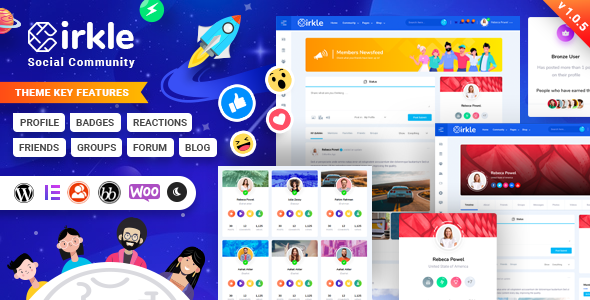
Stuck on your Cirkle – Social Networking WordPress Theme WordPress theme? Let's fix it.
No endless back-and-forth. Just send us the details and we'll get it done.
No obligation · Replies within 1 hour · Quote within 1 day
Setup · Customization · Bug fixes · WooCommerce integration
About Cirkle – Social Networking WordPress Theme WP Theme
Cirkle is a social networking WordPress theme built by RadiusTheme. It is designed specifically for community-driven websites where users can create profiles, post activity feeds, share media, and connect with each other in a Facebook-style layout.
The theme is built on top of BuddyPress, which handles the core social features. It also integrates with bbPress for forums, WooCommerce for monetisation, and PeepSo as an alternative social layer. The design is clean and modern, with a front-end that non-technical users will recognise instantly from mainstream social platforms.
Cirkle ships with multiple homepage layouts, a dark mode option, RTL language support, and a dedicated member directory. It is a practical starting point for anyone building a niche social network, alumni platform, or private online community without custom development from scratch.
Get matched with a Cirkle – Social Networking WordPress Theme developer in under one day
Tell us about your Cirkle – Social Networking WordPress Theme project. Small fixes, Cirkle – Social Networking WordPress Theme theme customization, or a full website build, whatever you need, we've got it covered.
We'll connect you to the right Cirkle – Social Networking WordPress Theme developers, define the scope, and get everything 100% clear.
You'll get one estimate, hire your preferred developer, and start collaborating.
Building a social network on WordPress is more technically demanding than a standard site. BuddyPress configuration, user role management, database load, and security all need careful attention. A developer who has worked specifically with Cirkle and BuddyPress-based builds will save you weeks of troubleshooting.
Through Codeable, you get matched with vetted WordPress specialists who have real experience with social networking themes. Post your project, get a free estimate, and only move forward if the fit is right. No cold hiring, no guesswork.
Pros
- Built specifically for BuddyPress, so social features integrate cleanly without heavy configuration
- Ships with multiple pre-built homepage layouts that reduce initial setup time
- Dark mode and RTL support included out of the box, useful for international communities
- WooCommerce compatibility makes paid memberships and digital product sales straightforward to add
- Active member directory with filtering by profile fields, location, and activity
Cons
- Heavily dependent on BuddyPress, so theme updates and BuddyPress updates need to be coordinated carefully
- Performance degrades noticeably on shared hosting once user activity and media uploads increase
- Customizer options are limited for deeper layout changes, requiring manual CSS or template overrides
- Some bundled plugins overlap in functionality, making it easy to end up with conflicting features
- Documentation covers basic setup well but gives little guidance on advanced BuddyPress component customisation
Who is Cirkle – Social Networking WordPress Theme for?
Niche Interest Communities
Cirkle works well for communities built around a shared interest, whether that is fitness, gaming, parenting, or local culture. Members can post updates, join groups, share media, and connect directly. The activity feed keeps engagement centralised, and group features let sub-communities form naturally within the larger network.
Alumni and School Networks
Schools and universities can use Cirkle to build alumni directories and reconnection platforms. Profile fields can capture graduation year, faculty, and current role. The member directory makes it easy to search and filter. BuddyPress groups can represent graduating classes or departments, keeping the network organised without custom development.
Paid Membership Platforms
Combined with WooCommerce and a membership plugin, Cirkle can gate content and community access behind a subscription. Paid tiers can unlock private groups, exclusive activity feeds, or direct messaging. This makes it a practical base for creators or educators who want to monetise a community without building a platform from scratch.
Professional Networking Sites
Cirkle’s profile system supports extended fields, making it adaptable for professional directories where skills, location, and industry matter. Members can connect, message, and post updates in a familiar social layout. It suits industry associations, freelancer networks, or local business communities that need more than a static directory.
Fan and Creator Communities
Content creators building audiences around music, sports, entertainment, or personal brands can use Cirkle to move followers off third-party platforms. Members get profiles, groups, and direct messaging. The creator controls the data and the experience. Monetisation through WooCommerce can support merchandise, tickets, or exclusive content access.

Customizing Cirkle – Social Networking WordPress Theme
Out of the box, Cirkle gives you layout controls through the WordPress Customizer, but most serious builds will need changes that go beyond what the panel offers. Header layout, profile page structure, activity feed styling, and notification behaviour often require custom CSS or template overrides to match a specific brand.
A Cirkle Social Networking WordPress Theme expert can restructure the member directory, add custom profile fields, adjust BuddyPress component visibility, and integrate third-party plugins without breaking core functionality. They can also set up access restriction rules, paid membership gates via WooCommerce, and custom group features.
If you want Cirkle to behave like a purpose-built social product rather than a generic theme installation, professional customisation is the faster and more reliable route.
Recommended plugins for Cirkle – Social Networking WordPress Theme
Cirkle works with a stack of plugins that extend its social features. BuddyPress is the foundation. PeepSo, bbPress, WooCommerce, and BuddyBoss Platform (as a migration target) are all compatible. For notifications, BadgeOS or GamiPress can add gamification layers.
On the technical side, pairing Cirkle with a caching solution and a CDN matters because social feeds are database-heavy. Image uploads from users also add up fast. Proper hosting and a WordPress performance setup are worth addressing early. If your community relies on search, investing in WordPress SEO optimisation for member profiles and group pages can drive organic growth.
Not sure which plugins to use? This WordPress plugins directory covers the most popular options with reviews and setup guides.
Cirkle – Social Networking WordPress Theme common issues
Cirkle theme BuddyPress activity feed not loading
This usually points to a JavaScript conflict between Cirkle and another plugin, or a BuddyPress version mismatch. Start by disabling other plugins one at a time to isolate the conflict. Check your browser console for JS errors. Also confirm that the BuddyPress Activity component is enabled under Settings. If the feed loads when Cirkle’s child theme or custom CSS is removed, the issue is likely a script conflict. A WordPress bug fixing service can diagnose and resolve this quickly.
Cirkle WordPress theme slow after adding members
Social feeds are database-intensive. Each activity item, notification, and connection query hits the database directly. On shared hosting, this causes visible slowdowns once your member count grows. The fix involves adding object caching (Redis or Memcached), optimising BuddyPress database tables, setting up a CDN for media, and reviewing your hosting plan. See our WordPress performance service for a full audit and implementation tailored to BuddyPress-based sites.
Cirkle theme profile page layout broken after update
Profile layout breaks after updates are usually caused by template override files in a child theme that no longer match the updated parent template structure. Check your child theme’s BuddyPress template folder for outdated files. Compare them against the updated templates in the parent theme. Updating or removing the overrides often restores the layout. If you are not using a child theme, a theme update may have overwritten customisations. Always use a child theme for any layout modifications.
Cirkle social theme notifications not working
Notification failures in Cirkle typically trace back to BuddyPress email settings, a caching plugin blocking AJAX calls, or a conflict with a third-party notification plugin. First, check that BuddyPress email is configured under Settings and that your server can send mail. Then test with caching disabled. If push or real-time notifications are expected, those require additional setup beyond what BuddyPress provides by default and may need a dedicated plugin or custom integration.
Cirkle – Social Networking WordPress Theme FAQ
Cirkle is one of the more purpose-built options for WordPress-based social networks. It handles profiles, activity feeds, groups, and member directories without heavy custom development. That said, performance and scalability still depend on your hosting environment and how well BuddyPress is configured. For small to medium communities, it is a solid choice. Larger platforms may need additional infrastructure work.
No. Cirkle is built around BuddyPress. Without it, most of the social features including activity feeds, member profiles, groups, and friend connections will not function. BuddyPress must be installed and its components enabled for Cirkle to work as intended. Some visual elements will display without it, but the theme has no meaningful purpose outside a BuddyPress setup.
Yes. Cirkle includes WooCommerce compatibility, and with a membership plugin such as Paid Memberships Pro or MemberPress, you can restrict community access behind a paid subscription. You can gate groups, profile features, or content sections. This setup does require configuration and testing to make sure the membership rules and BuddyPress permissions interact correctly.
Basic profile customisation is available through BuddyPress profile field settings and the WordPress Customizer. For layout changes, you need to modify or override BuddyPress member templates in a child theme. Custom profile sections, reordered components, or design changes beyond the Customizer options require CSS edits or PHP template work. A developer familiar with Cirkle can handle this cleanly.
RadiusTheme updates Cirkle periodically, but compatibility depends on your specific WordPress and BuddyPress versions. Always check the theme’s changelog and the Themeforest comments before updating. Running the latest WordPress version with an outdated theme or outdated BuddyPress version is a common source of breakage. Use a staging site to test updates before applying them to a live community. If you need help with updates, consider a WordPress maintenance plan.
Hire a Cirkle Social Networking WordPress Theme Developer
Whether you need a full Cirkle setup, custom profile features, BuddyPress integration, or ongoing fixes, working with an experienced developer makes the difference. Our specialists have hands-on experience with social WordPress builds and can scope your project accurately from day one.
Get a free estimate with no obligation. Describe what you need, get matched within 24 hours, and hire only when you are confident. 100% risk-free.
You'll need a free Codeable account so developers can ask questions and send their quotes.