Droow WordPress Theme
by design_grid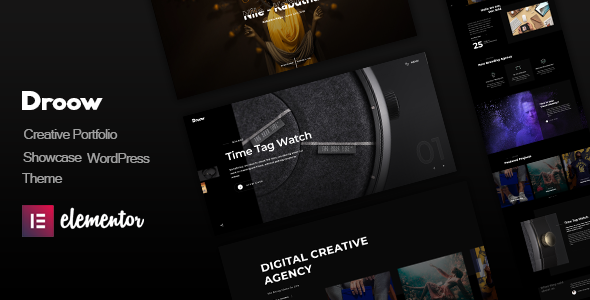
Stuck on your Droow WordPress theme? Let's fix it.
No endless back-and-forth. Just send us the details and we'll get it done.
No obligation · Replies within 1 hour · Quote within 1 day
Setup · Customization · Bug fixes · WooCommerce integration
About Droow WP Theme
Droow is a creative portfolio WordPress theme built by design_grid. It targets agencies, freelancers, and studios that need a visually strong online presence without sacrificing load speed. The theme ships with smooth page transitions, a fullscreen project slider, and a dark/light mode toggle out of the box.
Built on the Elementor page builder, Droow gives you drag-and-drop control over layouts without touching code. It supports custom cursors, animated headings, and a filterable portfolio grid. The demo content covers creative agencies, photographers, and design studios, so getting started takes minutes rather than days. It is a solid choice if visual storytelling is the primary goal of the site.
Get matched with a Droow developer in under one day
Tell us about your Droow project. Small fixes, Droow theme customization, or a full website build, whatever you need, we've got it covered.
We'll connect you to the right Droow developers, define the scope, and get everything 100% clear.
You'll get one estimate, hire your preferred developer, and start collaborating.
Droow looks impressive in demos, but the gap between demo and a finished client site is real. AJAX transitions break with certain plugins. The custom cursor conflicts with accessibility tools. Elementor widget caching needs configuring. Getting all of it working together takes experience, not just enthusiasm.
FoxyConcept connects you with vetted Droow developers through Codeable, the professional WordPress freelance network. Every developer is pre-screened. You get a transparent estimate before any work begins, and you only pay when you are satisfied with the result.
Pros
- AJAX page transitions create a fluid, app-like browsing experience without custom development
- Built-in dark and light mode toggle with no extra plugin required
- Fullscreen portfolio slider and filterable grid work well for visual-heavy industries
- Multiple demo styles cover agencies, photographers, and studios so setup is fast
- Custom cursor support adds a distinctive touch that differentiates creative sites
Cons
- AJAX loading frequently conflicts with third-party plugins, requiring manual fixes
- Heavy JavaScript payload means out-of-box performance scores are poor without optimisation
- Limited e-commerce styling means WooCommerce pages look generic without extra CSS
- Documentation is sparse on advanced Elementor integration and hook locations
- Custom cursor and scroll animations can hurt accessibility compliance if not carefully configured
Who is Droow for?
Creative Agency
Droow’s fullscreen transitions and bold typography make it a natural fit for agencies that win clients on first impressions. The filterable portfolio lets visitors browse work by service type, and the dark mode option gives the site a polished, premium feel that reflects agency-level positioning.
Freelance Photographer
Photographers benefit from Droow’s fullscreen image sliders and minimal UI that keeps attention on the work. Gallery layouts load quickly when images are properly optimised, and the AJAX transitions between portfolio items give the browsing experience a gallery-like quality without needing a dedicated photography plugin.
Graphic Design Studio
Design studios need a site that demonstrates design thinking, not just lists services. Droow’s animated headings, asymmetric grid options, and custom hover effects let a studio communicate visual intelligence before a visitor reads a single word. The filterable portfolio handles multiple service categories cleanly.
Motion Designer or Videographer
Droow supports embedded video backgrounds and autoplay video sections, making it practical for motion designers and videographers. Portfolio items can link to external reels or embed Vimeo and YouTube directly. The dark theme variant is particularly effective for showcasing video work without visual distraction.
Architecture or Interior Design Firm
Architecture firms rely on large, high-quality imagery to communicate spatial quality. Droow’s fullscreen layouts and smooth transitions support that without requiring a bespoke theme build. Project case studies can be structured as single portfolio pages with detailed image galleries and written descriptions side by side.

Customizing Droow
Droow ships with a handful of pre-built demos, but most clients need something that reflects their specific brand. Adjusting typography pairs, color schemes, and section spacing is straightforward inside Elementor. The trickier work involves the theme’s JavaScript-driven transitions, custom cursor behaviour, and AJAX page loading, which require careful tuning so they do not conflict with plugins or slow the site down.
A Droow expert can rebuild demo sections to match your brand, configure the portfolio filter categories, set up contact forms, and make sure animated elements actually enhance the user experience rather than distract from it. FoxyConcept works with experienced Droow developers who know exactly where design_grid’s theme quirks appear and how to resolve them cleanly.
Recommended plugins for Droow
Droow relies on Elementor Pro for advanced widgets like forms, popups, and dynamic content. WooCommerce can be added if you sell products or services, though you may need custom CSS to align the shop pages with the theme’s aesthetic.
For better search visibility, pairing Droow with Yoast SEO or Rank Math is recommended. Check our WordPress SEO service for details. Because the theme uses AJAX loading and heavy animations, performance tuning is critical. Our WordPress performance service covers caching, script deferral, and image optimisation specifically for animation-heavy themes like Droow.
Not sure which plugins to use? This WordPress plugins directory covers the most popular options with reviews and setup guides.
Droow common issues
Droow AJAX page transitions not working after plugin update
AJAX transitions in Droow depend on specific JavaScript hooks that third-party plugins sometimes override. The most common triggers are caching plugins that serve static HTML, or scripts that fire on DOMContentLoaded rather than the theme’s custom transition events. Disable caching for logged-in users first, then isolate the conflicting plugin by deactivating one at a time. If you need a faster fix, our WordPress bug fixing service can diagnose and resolve the conflict directly.
Droow portfolio filter not filtering correctly on mobile
Droow’s portfolio filter uses Isotope.js, which can miscalculate item positions on touch devices or when images load asynchronously. The fix usually involves triggering a layout refresh after all images have loaded using imagesLoaded.js, which Droow includes but does not always bind correctly on mobile breakpoints. Checking the theme’s portfolio.js file for the initialisation order and adding a resize trigger resolves this in most cases. Our bug fixing team handles this kind of issue regularly.
Droow Elementor page not saving or layout breaking on publish
Elementor save failures in Droow are usually caused by a PHP memory limit that is too low, a JavaScript conflict loading in the editor, or a corrupted Elementor data entry in the database. Start by increasing memory_limit to 256MB in wp-config.php. Then check the browser console for JS errors while inside the Elementor editor. If the layout breaks on publish specifically, the theme’s custom Elementor widgets may need updating to match your current Elementor version. Our maintenance service keeps these dependencies aligned.
Droow custom cursor not showing in Chrome or Firefox
Droow’s custom cursor is controlled by a CSS class applied to the body element and a JavaScript listener for mousemove. It will not appear if a browser extension is blocking pointer events, if the theme’s main JS file failed to load, or if a caching plugin is serving an old version of the script. Open DevTools, check the Network tab to confirm main.js loaded correctly, and verify the body class is present. Clearing all caches including server-side cache resolves this in most cases.
Droow FAQ
Yes, Droow is built specifically for Elementor and works with both the free and Pro versions. Elementor Pro unlocks additional widgets like forms, dynamic content, and popups, which pair well with Droow’s design. Some of the more advanced demo sections require Pro to replicate accurately, so it is worth having both installed before building.
Droow is manageable without code for basic customisation. Elementor handles most layout changes visually. However, adjusting AJAX transitions, fixing plugin conflicts, or modifying the custom cursor behaviour will require PHP or JavaScript knowledge. If you hit a wall, working with a Droow developer saves time and avoids breaking things that are already working.
Droow includes basic WooCommerce compatibility, but the shop, cart, and checkout pages do not inherit the theme’s design language automatically. You will need custom CSS to bring those pages in line with the rest of the site. It is functional out of the box but will look mismatched without styling work from someone familiar with both Droow and WooCommerce.
Always use a child theme for any customisations made in theme files. If you have only used Elementor to customise, updates are generally safe because Elementor stores data in the database rather than theme files. Back up the site before every update. Our WordPress maintenance service handles updates, backups, and compatibility checks automatically.
Migrating content to Droow is possible but involves more than a theme switch. Existing pages will lose their formatting and need rebuilding in Elementor. Portfolio items need to be recreated using Droow’s custom post type. If your current site is on a different host, our WordPress migration service can handle the technical move before the rebuild begins.
Hire a Droow Expert Developer
Whether you need a Droow site built from scratch, an existing site customised, or a specific bug fixed, FoxyConcept can match you with a vetted developer who knows the theme inside out. Work is handled through Codeable, so the process is transparent and fully risk-free.
Post your project and get a free estimate within 24 hours. No obligation, no upfront payment. Get your free estimate now and describe what you need in plain language.
You'll need a free Codeable account so developers can ask questions and send their quotes.