Steam WordPress Theme
by IndustrialThemes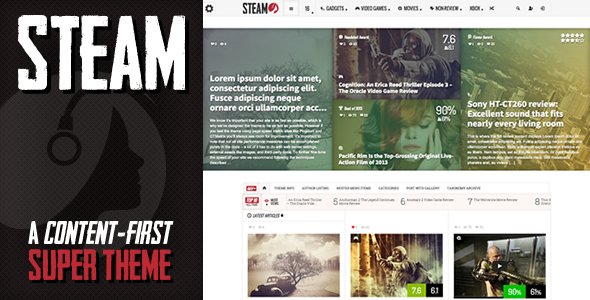
Stuck on your Steam WordPress theme? Let's fix it.
No endless back-and-forth. Just send us the details and we'll get it done.
No obligation · Replies within 1 hour · Quote within 1 day
Setup · Customization · Bug fixes · WooCommerce integration
About Steam WP Theme
Steam is a WordPress theme built by IndustrialThemes, designed for businesses and portfolios that want a raw, industrial aesthetic. Think exposed grids, dark tones, bold typography, and layouts built around showcasing work rather than decorating it.
It ships with a page builder-compatible structure, multiple homepage layouts, and a post format system that handles standard blog content alongside portfolio entries. The theme targets creative studios, manufacturers, architects, and fabricators who want something that looks like it was built in a workshop, not a design agency.
IndustrialThemes has focused Steam on performance and layout flexibility without overloading it with shortcodes and bloat that slow down most multi-purpose themes. If your brand leans heavy, dark, and industrial, Steam gives you a solid starting point.
Get matched with a Steam developer in under one day
Tell us about your Steam project. Small fixes, Steam theme customization, or a full website build, whatever you need, we've got it covered.
We'll connect you to the right Steam developers, define the scope, and get everything 100% clear.
You'll get one estimate, hire your preferred developer, and start collaborating.
Steam is not a difficult theme, but getting it to look like your business and not like the demo takes real development work. FoxyConcept delivers that work through Codeable, a vetted network where every developer is screened before they touch a client project. No bidding wars, no unknown freelancers, no wasted time on back-and-forth that goes nowhere. You describe what you need, get a clear estimate, and work with someone who has done this before.
Pros
- Strong industrial visual style that stands out from generic multi-purpose themes
- Multiple homepage layouts included, reducing the need for heavy page builder dependency
- Portfolio post type built in, useful for creative and manufacturing businesses
- Clean codebase compared to bloated all-in-one themes, better baseline performance
- Dark and light color scheme options give reasonable flexibility without full redesign
Cons
- Customizer options are limited, advanced changes require custom CSS or child theme work
- WooCommerce styling is not polished out of the box and needs developer attention
- Limited third-party documentation and community support compared to mainstream themes
- Typography options are narrow and do not cover all branding needs without extra configuration
- IndustrialThemes update cadence is slower than major theme shops, which can create compatibility lag
Who is Steam for?
Metal Fabrication and Manufacturing
Steam’s grid layouts and dark aesthetic suit fabrication and manufacturing businesses that want to showcase workshop capabilities and finished products. The portfolio system handles project galleries cleanly. A developer can integrate enquiry forms, custom product spec sheets, and WooCommerce for parts or equipment sales without breaking the visual theme.
Architecture and Interior Design Studios
Architecture studios benefit from Steam’s focus on large imagery and structured portfolio layouts. Projects can be categorized by type, scale, or location. Custom post templates let firms present case studies with technical details, photography, and client context in a format that reads professionally without being over-designed.
Creative Agencies and Design Portfolios
Creative agencies using Steam get a dark, confident aesthetic that communicates craft over decoration. The theme supports multiple post formats and portfolio categories, making it easy to separate brand work, web projects, and print. With ACF and a child theme, agencies can build detailed case study pages that go beyond what the default templates offer.
Industrial Product Ecommerce
Industrial product sellers can use Steam as a WooCommerce base with custom styling. The raw aesthetic fits tools, hardware, safety equipment, and technical gear better than a polished ecommerce theme would. Developer work is needed to align WooCommerce templates with Steam’s visual language, but the end result reads as intentional rather than generic.
Construction and Contracting Companies
Construction and contracting companies need sites that project reliability and show completed work. Steam handles project portfolios, service pages, and contact forms without the visual noise of corporate themes. Adding Google Maps integration, testimonials, and a quote request system turns Steam into a practical lead generation site for trade businesses.

Customizing Steam
Steam comes with a Customizer panel that covers basic settings: logo, colors, fonts, and layout toggles. That gets you maybe 40% of the way to a polished site. The real work starts when you need custom page templates, modified header structures, or layouts that break from what IndustrialThemes shipped.
A Steam expert can handle child theme development, custom post type integration for portfolios or products, Advanced Custom Fields setups, and WooCommerce styling that actually fits the industrial look without clashing. Most clients come in needing the theme bent into something more specific than the demo showed.
Working with someone who knows Steam means fewer workarounds and cleaner code. You get modifications that survive updates rather than hacks that break every few months.
Recommended plugins for Steam
Steam pairs well with a focused plugin stack. WooCommerce works for product or merch stores, though you will need custom styling to keep it on-brand. Elementor or Beaver Builder can extend layout options beyond the default templates. Yoast or Rank Math handles on-page SEO structure.
For performance, combining Steam with proper caching, image optimization, and a CDN makes a measurable difference. See our WordPress performance service for specifics. If organic search matters to your business, our WordPress SEO service covers technical and content optimization built around your setup.
Not sure which plugins to use? This WordPress plugins directory covers the most popular options with reviews and setup guides.
Steam common issues
Steam theme header not displaying correctly on mobile
Mobile header issues in Steam usually come from CSS conflicts between the theme’s navigation script and a plugin adding its own styles. Start by disabling plugins one at a time to isolate the conflict. If the issue persists, inspect the header markup in browser dev tools and check whether the mobile menu toggle class is being overridden. A child theme with targeted CSS fixes is the cleanest long-term solution. Our bug fixing service can diagnose and resolve this quickly.
Steam WordPress theme portfolio not showing all posts
Portfolio display problems in Steam are often caused by pagination settings, post type query arguments, or a caching plugin serving stale data. Check the portfolio widget or shortcode settings for post count limits. If you are using a custom query, confirm the post type slug matches exactly. Clear all caches after any change. If posts were imported or the permalink structure changed recently, a permalink flush under Settings > Permalinks usually resolves missing content.
Steam theme WooCommerce pages look unstyled
Steam does not include deep WooCommerce styling by default. Unstyled shop, cart, and checkout pages are expected without additional work. The fix involves adding WooCommerce-specific CSS to a child theme stylesheet or using a plugin like WooCommerce Custom CSS. Button colors, product grid spacing, and form styling all need manual targeting. This is a development task, not a settings change. Our WordPress bug fixing service handles this as a standard project.
Steam theme breaking after WordPress update
Theme breakage after a WordPress core update usually points to a PHP compatibility issue or a deprecated function in Steam’s code. Check the site error log first. Common culprits are functions removed in newer PHP versions or changes to WordPress template hierarchy. Running Steam as a parent with a child theme reduces breakage risk significantly. If you are on the base theme without a child, that needs to be addressed before applying future updates. Our maintenance service covers update management.
Steam FAQ
IndustrialThemes maintains Steam but updates are infrequent compared to larger theme shops. The theme works with current WordPress versions, but you should monitor compatibility after major WordPress or PHP releases. If you are running a critical site on Steam, having a developer on retainer for post-update checks is worth the investment. Our maintenance plans cover exactly that scenario.
Steam is compatible with page builders, but integration varies. Elementor works reasonably well for page-level layouts. WPBakery functions but can produce styling conflicts with Steam’s own CSS. For best results, use a child theme and test builder output carefully before publishing. Complex page builder layouts sometimes override Steam’s grid system in ways that need manual CSS correction to resolve cleanly.
Steam supports WooCommerce but does not include polished shop templates. Basic WooCommerce functionality works, but the visual output on product, cart, and checkout pages will look unstyled without additional CSS work. Budget for developer time to align WooCommerce with Steam’s aesthetic. This is a one-time task that makes a significant difference to the final result.
Custom fonts in Steam require either editing the child theme’s functions.php to enqueue a Google Font or using a plugin like Custom Fonts or Use Any Font for uploaded typefaces. The Customizer typography settings are limited. Once the font is loaded, you target the relevant CSS selectors in the child theme stylesheet. Avoid editing the parent theme files directly or updates will overwrite your changes.
Steam migrates cleanly as long as the database, files, and URLs are handled correctly. Layout issues after migration usually come from incorrect site URL settings or serialized data not being updated properly. Use a migration plugin like Migrate Guru or All-in-One WP Migration for straightforward moves. Our migration service handles the full process with post-migration checks included.
Hire a Steam WordPress Expert
Whether you need a full Steam site built from scratch, a customization that the theme options panel cannot handle, or ongoing development support, FoxyConcept can help. Projects are scoped clearly and delivered through Codeable’s trusted developer network. Get a free estimate and know exactly what you are getting before any work begins. No obligation, no risk.
You'll need a free Codeable account so developers can ask questions and send their quotes.