Notumn WordPress Theme
by DecaX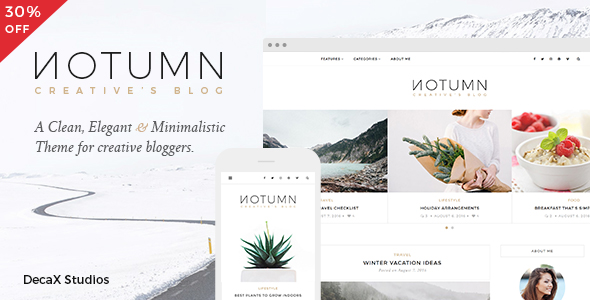
Stuck on your Notumn WordPress theme? Let's fix it.
No endless back-and-forth. Just send us the details and we'll get it done.
No obligation · Replies within 1 hour · Quote within 1 day
Setup · Customization · Bug fixes · WooCommerce integration
About Notumn WP Theme
Notumn is a WordPress theme developed by DecaX. It is built for portfolio and agency websites that need a clean, minimal layout without bloat. The theme ships with block-based sections, smooth scroll behaviour, and a typography-first design approach that works well across devices.
DecaX built Notumn to be lightweight out of the box. Page load times stay low because the theme avoids loading unnecessary scripts or stylesheets. It supports the WordPress block editor natively, so you can build pages without a third-party page builder if you prefer to keep things simple.
Notumn suits freelancers, creative studios, and small agencies that want a professional-looking site without spending weeks on configuration. The default styles are polished enough to go live with minor tweaks, which saves time early in a project.
Get matched with a Notumn developer in under one day
Tell us about your Notumn project. Small fixes, Notumn theme customization, or a full website build, whatever you need, we've got it covered.
We'll connect you to the right Notumn developers, define the scope, and get everything 100% clear.
You'll get one estimate, hire your preferred developer, and start collaborating.
Notumn is straightforward to set up, but custom work takes real theme knowledge. Modifying template parts incorrectly, adding code outside child theme files, or misconfiguring theme.json can cause visual regressions that surface only after an update.
FoxyConcept connects you with vetted Notumn developers through Codeable. Every developer on the platform is screened and rated. You describe your project, get an estimate, and decide whether to proceed. No upfront payment until you are ready to hire.
Pros
- Lightweight codebase with no unnecessary scripts loaded by default
- Full compatibility with the WordPress block editor and theme.json global styles
- Clean typography-focused design that requires minimal styling work out of the box
- Low configuration overhead makes it fast to go from install to live site
- Responsive layout holds up well on mobile without extra CSS adjustments
Cons
- Limited built-in block patterns compared to larger commercial themes
- WooCommerce product page styling is minimal and needs manual CSS for a polished shop
- No dedicated options panel, so some users find customization less visual than expected
- Smaller community and documentation pool than mainstream themes like Astra or Kadence
- Dark mode support requires custom code rather than a built-in toggle setting
Who is Notumn for?
Freelance Portfolio
Notumn’s minimal layout keeps the focus on work samples. Freelancers can set up a clean portfolio in a short time using the default block patterns. The typography-first design makes written case studies and project descriptions easy to read without distraction.
Creative Agency
Small creative agencies get a professional-looking site without a heavy theme framework. Notumn’s structured layout handles service pages, team sections, and contact forms cleanly. Agencies can add their brand colours and fonts through the Customizer without writing CSS.
Photography Studio
Photography studios benefit from Notumn’s image-forward layout options. Full-width sections and clean grid spacing let photos breathe. The theme avoids decorative UI elements that would compete with visual content, keeping the site focused on the images themselves.
Web Design Consultancy
Web design consultancies often want a site that demonstrates technical taste. Notumn’s clean code and block editor support signal good practice to developer-savvy clients. The theme avoids the page builder dependency that some clients specifically ask to avoid.
Software or SaaS Landing Page
Notumn works well as a base for SaaS landing pages. Its fast load time and semantic HTML structure give a solid starting point. A developer can extend it with custom sections for pricing tables, feature lists, and call-to-action rows using block patterns or custom PHP templates.

Customizing Notumn
Notumn gives you customization options through the native WordPress Customizer and block editor settings. You can adjust colours, fonts, spacing, and layout widths without touching code. The theme also supports theme.json, so developers can define global styles at the configuration level rather than writing custom CSS for every element.
If you want to go further, working with a Notumn expert saves time. A developer who knows the theme’s structure can add custom post types, modify block patterns, hook into DecaX’s built-in filters, and extend the layout without breaking core functionality on future updates.
Custom header designs, dark mode toggles, and animation adjustments are all achievable but require working knowledge of how Notumn structures its template parts. Getting this wrong can cause layout issues that are harder to fix later.
Recommended plugins for Notumn
Notumn works with most popular WordPress plugins without conflicts. WooCommerce integration is possible for small shops, though the theme’s minimal styling means product pages may need additional CSS. Contact form plugins, cookie consent tools, and analytics scripts all load cleanly.
For performance, pairing Notumn with a caching plugin and a CDN keeps load times fast. See our WordPress performance service for further optimisation. If search visibility matters, Notumn’s clean HTML structure works well with SEO plugins. Our WordPress SEO service covers technical and on-page optimisation built on top of your theme.
Not sure which plugins to use? This WordPress plugins directory covers the most popular options with reviews and setup guides.
Notumn common issues
Notumn theme header not showing correctly after update
Header display issues after a Notumn update usually point to a child theme override that conflicts with a changed template part. Check whether your child theme includes a custom header.php or block template that no longer matches the parent theme structure. Clear any caching plugins and test with the child theme disabled. If the header returns, the conflict is in your customizations. Our WordPress bug fixing service can trace and resolve this quickly.
Notumn custom CSS not applying to block editor styles
Notumn uses theme.json for global styles, which can override custom CSS added through the Additional CSS field in the Customizer. Styles targeting block elements specifically may need to be written using block editor CSS selectors like .wp-block-* classes. Alternatively, add your styles directly to theme.json under the styles object in a child theme copy. This ensures your rules load with the correct specificity.
Notumn theme WooCommerce pages missing styles
Notumn does not ship with full WooCommerce template files, so shop and product pages fall back to WooCommerce defaults. This often causes layout inconsistencies. The fix is to copy the relevant WooCommerce templates into your child theme under a woocommerce/ folder and apply Notumn’s spacing and colour variables. Our WordPress bug fixing service handles WooCommerce styling conflicts across themes.
Notumn footer widgets not displaying on mobile
Footer widget display issues on mobile in Notumn are often caused by a column layout that stacks incorrectly on smaller screens. Check the footer template part for fixed pixel widths or float-based layouts. Replacing these with flexbox or CSS grid rules in your child theme stylesheet usually resolves the problem. Also check whether a caching plugin is serving a desktop-only cached version to mobile visitors.
Notumn FAQ
Notumn is developed by DecaX. Check the theme’s official listing on the WordPress theme repository or the DecaX website for current pricing. Some DecaX themes offer a free base version with premium features available as an upgrade. Confirm the exact licensing before building a client project on it.
Notumn is compatible with WooCommerce but does not include dedicated shop templates. Basic shop functionality works, but product pages and cart layouts will use WooCommerce default styles. Additional CSS or copied WooCommerce template files in a child theme are needed for a fully styled store experience.
Notumn is designed around the native WordPress block editor. It can technically run alongside page builders, but mixing block editor templates with Elementor sections often causes layout conflicts. For best results, pick one approach and stick with it. Using the block editor as intended keeps the site lightweight and consistent.
Create a folder in wp-content/themes/ named something like notumn-child. Add a style.css file with the correct header including Template: notumn and a functions.php that enqueues the parent stylesheet. Activate the child theme from the WordPress dashboard before making any customizations.
Yes, migrating an existing site to Notumn is possible but requires rebuilding page layouts to match the theme’s block structure. Content migrates easily, but design elements from your old theme will not carry over automatically. Our WordPress migration service can handle the transition and rebuild your pages cleanly inside Notumn.
Hire a Notumn Developer
Need help setting up Notumn, customising its layout, or fixing a specific issue? FoxyConcept matches you with experienced Notumn developers through Codeable. You get a free estimate within 24 hours and no obligation to hire. Projects are fully managed and backed by Codeable’s money-back guarantee. Get your free estimate now and tell us what you need built.
You'll need a free Codeable account so developers can ask questions and send their quotes.