Calmes WordPress Theme
by like-themes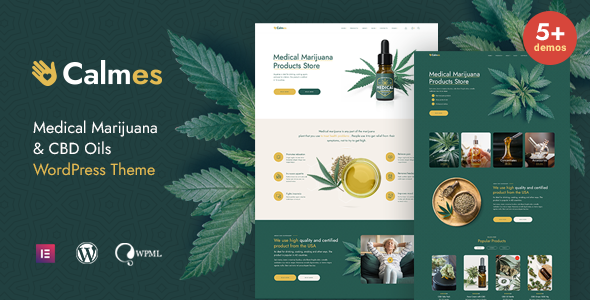
Stuck on your Calmes WordPress theme? Let's fix it.
No endless back-and-forth. Just send us the details and we'll get it done.
No obligation · Replies within 1 hour · Quote within 1 day
Setup · Customization · Bug fixes · WooCommerce integration
About Calmes WP Theme
Calmes is a minimalist WordPress theme built by like-themes, designed for creatives who want clean layouts without the bloat. It focuses on typography, whitespace, and a calm visual rhythm that keeps attention on content rather than decoration.
The theme is suited to portfolios, personal blogs, and small creative agencies. It ships with a handful of well-structured page templates, Gutenberg compatibility, and a straightforward options panel. There are no page builders bundled in, which keeps load times low and markup clean.
Like-themes built Calmes with restraint in mind. The result is a theme that is easy to understand, fast to set up, and unlikely to fight you when you need to customise it. If you need something simple that still looks considered, Calmes is a solid starting point.
Get matched with a Calmes developer in under one day
Tell us about your Calmes project. Small fixes, Calmes theme customization, or a full website build, whatever you need, we've got it covered.
We'll connect you to the right Calmes developers, define the scope, and get everything 100% clear.
You'll get one estimate, hire your preferred developer, and start collaborating.
Most Calmes issues come down to the same things: child theme conflicts, Customizer limitations, or trying to add functionality the theme was not built for. A developer who has worked with Calmes before knows where those edges are.
Through Codeable, you get matched with vetted WordPress developers within 24 hours. No guesswork on who is handling your project. Every developer on the platform has been screened, so the quality floor is higher than hiring through a generic freelance marketplace.
Pros
- Minimal, distraction-free layout that loads quickly without unnecessary scripts
- Clean semantic HTML output that works well with SEO plugins from the start
- No bundled page builder keeps the codebase simple and easy to override in a child theme
- Gutenberg-compatible with block editor styling that matches the theme's typography
- Straightforward Customizer options that cover fonts, colours, and header settings without a learning curve
Cons
- Limited built-in layout variety means custom page structures require manual PHP template work
- WooCommerce styles are not polished out of the box and need additional CSS to match the theme
- No demo importer or starter content, so building out a full site takes longer initially
- Documentation from like-themes is sparse, which makes troubleshooting harder without developer experience
- Not suited for complex membership sites or directory builds without significant custom development
Who is Calmes for?
Freelance Creative Portfolio
Calmes suits freelance designers, illustrators, and writers who want a portfolio that lets the work speak. The minimal layout avoids competing with project images or case studies. Adding a custom projects post type and ACF fields gives you a structured portfolio without heavy plugin dependencies.
Personal or Niche Blog
For bloggers focused on long-form writing, Calmes delivers good reading typography and a clean single post layout. Setting up categories, custom author bios, and a simple newsletter opt-in works without conflict. The theme stays out of the way and keeps readers focused on the content.
Small Creative Agency
A small creative agency with a focused service offering can use Calmes as the base for a clean five to eight page site. Services, team, and contact pages all work within the existing template system. A developer can add subtle animation and custom sections without breaking the theme’s visual logic.
Photographer Showcase Site
Photographers benefit from Calmes because image quality is not diluted by busy surrounding UI. Full-width gallery support and a clean lightbox integration work well here. Adding a client proofing plugin or password-protected galleries is straightforward with basic customisation work.
Independent Author Website
Authors need a site that highlights books, events, and a blog without looking overbuilt. Calmes handles this naturally. A custom books post type, event listing integration, and an email list sign-up fit cleanly into the theme’s structure without requiring a page builder or complex setup.

Customizing Calmes
Out of the box, Calmes gives you control over fonts, colours, header layout, and basic typography scale through the WordPress Customizer. That covers most surface-level changes without touching any code.
Beyond that, customisation gets more technical. Adjusting column behaviour, adding custom post type support, or modifying the template hierarchy requires PHP and CSS knowledge. If you want a layout that differs from what like-themes shipped, you will need to either create a child theme or work with a Calmes expert who knows the theme’s structure well.
A developer familiar with Calmes can also wire it up to custom fields, ACF layouts, or CPT UI without breaking the existing design logic. Small changes compound quickly, and having the right person handle them saves a lot of back-and-forth.
Recommended plugins for Calmes
Calmes works cleanly with WooCommerce for simple shop setups, though the default styles need tweaking to match the theme’s aesthetic. WPForms and Gravity Forms both integrate without conflicts.
For SEO, Calmes outputs clean semantic HTML which gives plugins like Yoast or Rank Math a solid base to work with. If you want to push further, a WordPress SEO service can handle structured data and on-page optimisation.
Performance is already reasonable out of the box, but image optimisation, caching, and a CDN setup will make a noticeable difference. A WordPress performance service can handle that in full.
Not sure which plugins to use? This WordPress plugins directory covers the most popular options with reviews and setup guides.
Calmes common issues
Calmes theme header not showing logo correctly
This usually comes down to image dimensions or the SVG format not being accepted by the Customizer. First, check the logo dimensions against what the theme expects in its add_theme_support( 'custom-logo' ) declaration. If you are uploading an SVG, WordPress blocks those by default and you need a plugin or a filter to allow it. Retina display issues often appear here too. If the logo looks blurry, upload at 2x the expected size.
Calmes custom fonts not loading after update
Font issues after a theme update are almost always caused by enqueue conflicts or a caching layer serving the old stylesheet. Clear your server cache and CDN cache first. If you are using a child theme to load fonts, check that the parent theme update has not changed the handle names the child theme depends on. Check the browser console for 404 errors on font files. If you use a third-party font plugin, deactivate it temporarily to isolate the source. Our bug fixing service can diagnose this quickly.
Calmes theme layout broken on mobile
Mobile layout breaks in Calmes usually come from custom CSS added without media query wrappers, or a plugin injecting styles that override the theme’s responsive rules. Open browser DevTools, switch to mobile view, and inspect which CSS rule is overriding the layout. If you have added custom column widths or padding values, make sure they are wrapped in appropriate breakpoints. A conflicting page builder stylesheet from a different plugin is another common cause worth checking.
Calmes child theme not inheriting styles properly
A child theme that does not inherit Calmes styles is almost always a functions.php enqueue issue. The child theme stylesheet must be enqueued with the parent stylesheet as a dependency using wp_enqueue_style. Using @import in the child stylesheet works but is slower. Also confirm the child theme’s Template: header in style.css matches the parent theme’s folder name exactly, including capitalisation. If styles still do not apply, check whether a caching plugin is serving an old compiled CSS file.
Calmes FAQ
Yes, Calmes is compatible with the Gutenberg block editor. The theme’s block styles align with its overall typography and spacing. Some blocks may need minor CSS adjustments to match perfectly, but there are no known conflicts. Full Site Editing is not supported, so block-based templates are not available. The classic template structure remains in place.
Calmes works with WooCommerce in the sense that there are no plugin conflicts, but the default WooCommerce templates will not match the Calmes aesthetic without additional CSS work. Product pages, cart, and checkout will render correctly but will look generic. A developer can write targeted styles to bring WooCommerce in line with the rest of the site’s design.
Custom fonts can be added to Calmes through a plugin like Google Fonts for WordPress, or by enqueuing them manually in a child theme’s functions.php. The Customizer may offer limited font options depending on the theme version. For full control over font pairing and loading performance, manual enqueuing in a child theme is the more reliable approach.
Create a new folder in your themes directory, add a style.css with the correct header including Template: calmes, and add a functions.php that enqueues the parent stylesheet as a dependency. Upload via FTP or the theme upload tool, then activate. Never modify the parent theme files directly. If you need help with moving the site to a new environment before doing this, that can be handled separately.
Calmes outputs clean, semantic HTML which gives it a good technical foundation for SEO. Heading hierarchy, fast default load times, and minimal render-blocking resources all contribute positively. It does not include built-in schema markup or breadcrumbs, so you will need an SEO plugin to cover those. Pairing Calmes with a solid WordPress SEO setup gives you full coverage.
Hire a Calmes WordPress Developer
Whether you need a small CSS fix or a full custom build on top of Calmes, working with a developer who knows the theme saves time. Our WordPress development services are delivered through Codeable, where every developer is vetted before they touch a project.
Post your project today and get a free estimate with no obligation to hire. Get your free estimate here and hear back within 24 hours.
You'll need a free Codeable account so developers can ask questions and send their quotes.