Construction WordPress Theme
by SK-Themes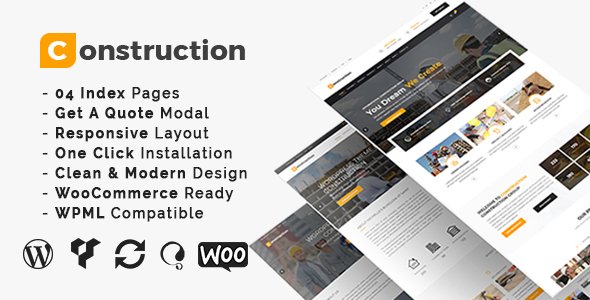
Stuck on your Construction WordPress theme? Let's fix it.
No endless back-and-forth. Just send us the details and we'll get it done.
No obligation · Replies within 1 hour · Quote within 1 day
Setup · Customization · Bug fixes · WooCommerce integration
About Construction WP Theme
Construction is a WordPress theme built by SK-Themes for contractors, builders, and construction companies. It ships with a clean layout focused on showcasing services, completed projects, and team credentials without unnecessary clutter.
The theme includes a drag-and-drop page builder, pre-built demo content, and sections designed specifically for construction-related businesses: project portfolios, service grids, testimonial blocks, and contact forms. Installation is straightforward and the demo can be imported in a few clicks.
Construction runs on Elementor, which means you get full visual control without touching code. It is translation-ready, mobile-responsive, and compatible with WooCommerce if you need to sell products or materials directly from your site. SK-Themes maintains the theme with regular updates and provides documentation to help you get started quickly.
Get matched with a Construction developer in under one day
Tell us about your Construction project. Small fixes, Construction theme customization, or a full website build, whatever you need, we've got it covered.
We'll connect you to the right Construction developers, define the scope, and get everything 100% clear.
You'll get one estimate, hire your preferred developer, and start collaborating.
Construction is a capable theme, but most contractor websites need more than a template swap. Custom quote forms, service area pages, project galleries with filtering, and local SEO structure all require hands-on work.
Through Codeable, FoxyConcept connects you with vetted WordPress developers who have built sites exactly like yours. You get a free estimate, no commitment required, and a developer matched to your project within 24 hours. No generalist freelancers, no guesswork.
Pros
- Elementor-based page builder gives full visual editing control without code
- Pre-built demo content covers the core pages most contractor sites need
- Project portfolio section supports category filtering out of the box
- WooCommerce compatible for selling materials or service packages
- Translation-ready with WPML and Polylang support for multilingual sites
Cons
- Heavy reliance on Elementor widgets makes switching page builders difficult later
- Demo import can pull in large image files that slow the site if not cleaned up
- Limited built-in options for service area targeting or local SEO structure
- No native cost estimator or quote calculator, requires a third-party plugin
- Support response times from SK-Themes can be slow for complex issues
Who is Construction for?
General Contractors
General contractors need a site that lists services clearly, shows past projects, and makes it easy to request a quote. Construction handles this with its service grid, project portfolio, and contact sections. A developer can wire up a quote form that routes inquiries by project type or location, saving time on intake.
Roofing Companies
Roofing businesses depend heavily on local search traffic. The Construction theme provides the right structural foundation, but a developer can add location-specific service pages, a before-and-after gallery, and schema markup to help the site appear in local search results for roofing queries in specific areas.
Interior Fit-Out Firms
Interior fit-out companies need a portfolio-first layout that lets the work do the talking. Construction supports full-width project galleries and filterable case studies. A developer can add custom project detail pages showing scope, materials used, and timeline, giving potential clients the detail they need to make a hiring decision.
Civil Engineering Consultancies
Civil engineering firms often need to present credentials, team profiles, and technical project summaries. Construction provides the layout framework. A developer can build out custom post types for projects with fields like location, value, and scope, plus a team section with certifications and professional memberships displayed cleanly.
Home Renovation Specialists
Home renovation specialists benefit from a site that captures leads from homeowners searching for specific work. The Construction theme supports testimonial sections, before-and-after imagery, and service breakdowns. A developer can integrate a project estimator form or a Calendly-style booking flow to convert more visitors into consultations.

Customizing Construction
Out of the box, Construction gives you enough flexibility for most contractor websites. You can swap colors, fonts, logos, and header layouts through the WordPress Customizer. The Elementor integration lets you rearrange sections, add new blocks, and edit content visually on any page.
Where it gets more involved is custom work: modifying project filter logic, adding quote request workflows, integrating booking tools, or building out multi-location service pages. A Construction expert can handle all of that without breaking the existing design.
If you need something the theme does not support natively, like a cost estimator form, a project timeline display, or custom post types for materials and certifications, a developer can extend the theme cleanly using child themes and custom plugins rather than hacking core files.
Recommended plugins for Construction
Construction pairs well with several plugins that add real functionality to a contractor site. Gravity Forms or WPForms handles quote requests and contact routing. WooCommerce works if you sell materials or service packages. WPML or Polylang covers multilingual needs for firms operating across regions.
For visibility, pairing the theme with a solid WordPress SEO setup will help service pages rank locally. If the site starts feeling slow after adding plugins, a proper WordPress performance audit can bring load times back in line without stripping out features.
Not sure which plugins to use? This WordPress plugins directory covers the most popular options with reviews and setup guides.
Construction common issues
Construction theme project portfolio not filtering correctly
Portfolio filter issues in the Construction theme usually come down to a JavaScript conflict with another plugin or a missing category assignment on project posts. First, check that each project post has at least one portfolio category assigned. Then test with all other plugins disabled to isolate a JS conflict. If the issue persists after a plugin check, a developer can inspect the filter script and patch it without affecting the rest of the theme. See our WordPress bug fixing service for fast turnaround.
Construction theme contact form not sending emails
When contact forms on the Construction theme stop sending emails, the problem is almost always server-side mail configuration rather than the theme itself. WordPress uses PHP mail by default, which many hosts block. The fix is to install an SMTP plugin like WP Mail SMTP and connect it to a transactional email service. If you have already done that and emails are still missing, check spam folders and verify the sender address matches your domain. A developer can diagnose and fix this quickly through our WordPress bug fixing service.
Construction WordPress theme looks broken after update
A broken layout after updating the Construction theme is often caused by a conflict between the updated theme files and cached Elementor CSS. Start by clearing all caches, then go to Elementor and regenerate CSS files from the Tools panel. If you modified theme files directly rather than using a child theme, those changes will have been overwritten by the update. A developer can restore your customizations properly inside a child theme so future updates do not break the site again.
Construction theme slow loading on mobile
The Construction theme can load slowly on mobile when demo images are not compressed, Elementor loads unused assets, or third-party scripts block rendering. Start with an image compression plugin like ShortPixel. Then check if Elementor’s asset loading can be restricted to pages that actually use it. A full WordPress performance review will identify the specific bottlenecks and apply fixes that bring mobile scores up to a level that supports both user experience and search rankings.
Construction FAQ
Yes, Construction by SK-Themes is a practical choice for contractor websites. It covers the key sections most builders and contractors need: services, project portfolios, team profiles, and contact forms. It is not the most flexible theme on the market, but for a straightforward contractor site it delivers a clean result without a lot of setup time. Custom requirements will need developer input.
The Construction theme is built around Elementor, so removing it entirely breaks the pre-built layouts. You can technically use the classic WordPress editor for basic content pages, but the homepage and service templates will not display correctly without Elementor active. If you want to move away from Elementor later, a developer would need to rebuild the affected templates in a different editor.
The Construction theme does not include a built-in quote form. The most common approach is to install WPForms, Gravity Forms, or Contact Form 7 and embed the form on a dedicated quote page or in a popup. For more advanced workflows, like routing requests by service type or location, a developer can build a custom form setup that connects to your email or CRM. Check our WordPress development services for help.
Yes, the Construction theme is translation-ready and compatible with WPML and Polylang. You will need a valid WPML license to translate pages, posts, and theme strings. String translation for custom Elementor widgets may need extra configuration. If you are setting up a multilingual contractor site across multiple regions, a developer can handle the full WPML setup including language switcher placement and hreflang tags.
Migrating an existing contractor site to the Construction theme involves exporting your content, importing the new theme demo, then moving your pages and media into the new layout. It is not a simple one-click process, especially if your current site has custom post types, SEO settings, or form configurations. A WordPress migration service ensures nothing gets lost and your URLs and redirects are handled correctly throughout the move.
Hire a Construction WordPress Developer
Whether you need the Construction theme set up from scratch, customized to match your brand, or extended with new features, a specialist can get it done properly. From project portfolio layouts to quote request forms and local SEO structure, the work is scoped clearly and delivered on time.
Get a free estimate with no obligation. A vetted WordPress developer will review your project and come back with a clear plan, usually within 24 hours.
You'll need a free Codeable account so developers can ask questions and send their quotes.