Rumble WordPress Theme
by AncoraThemes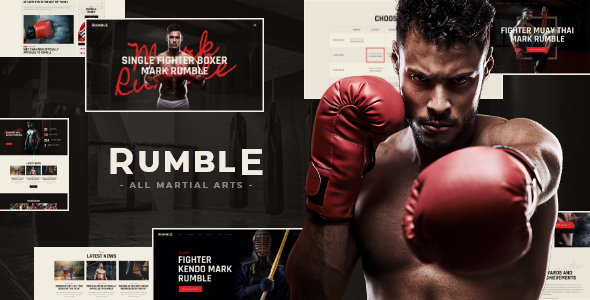
Stuck on your Rumble WordPress theme? Let's fix it.
No endless back-and-forth. Just send us the details and we'll get it done.
No obligation · Replies within 1 hour · Quote within 1 day
Setup · Customization · Bug fixes · WooCommerce integration
About Rumble WP Theme
Rumble is a WordPress theme built by AncoraThemes, aimed at music artists, bands, DJs, and event promoters. It ships with a dark, high-impact design that puts visuals and audio front and center. The theme includes built-in support for tour dates, discography layouts, video galleries, and artist profiles, so music-focused sites don’t need a pile of extra plugins to cover the basics.
AncoraThemes built Rumble on a clean codebase with WPBakery Page Builder included, giving users drag-and-drop control over page layouts. It’s compatible with WooCommerce for selling merch or tickets directly from the site. If you want a music site that looks serious without building everything from scratch, Rumble covers most of the ground you’d need.
Get matched with a Rumble developer in under one day
Tell us about your Rumble project. Small fixes, Rumble theme customization, or a full website build, whatever you need, we've got it covered.
We'll connect you to the right Rumble developers, define the scope, and get everything 100% clear.
You'll get one estimate, hire your preferred developer, and start collaborating.
AncoraThemes built Rumble with a specific audience in mind, and that specificity means the theme has quirks a general WordPress developer might not anticipate. A developer who has worked with Rumble before knows where the template hierarchy sits, how WPBakery elements are wired into the theme, and which customizations are safe to make without touching core files. Through Codeable, you get matched with vetted WordPress specialists who have hands-on experience with themes like Rumble, so you’re not paying someone to figure it out as they go.
Pros
- Ships with music-specific layouts including discography, tour dates, and artist profiles out of the box
- One-click demo import gets a working site up quickly without manual configuration
- WooCommerce compatible for selling merchandise or event tickets directly from the site
- Dark, high-contrast visual design works well for music and entertainment brands without heavy customization
- WPBakery Page Builder included, giving non-developers drag-and-drop layout control
Cons
- WPBakery locks you into a page builder that makes switching themes later more difficult
- Updates from AncoraThemes have been infrequent, which can create compatibility concerns with newer WordPress versions
- Limited font and color control without editing CSS or using a child theme
- Documentation is thin in areas, especially for less common use cases like custom post types or API integrations
- Mobile performance can lag on pages with heavy video backgrounds or audio embeds without additional optimization
Who is Rumble for?
Independent Music Artists
Solo artists can use Rumble to build a professional press presence with a discography section, embedded audio, and bio pages. The dark aesthetic suits most genres from indie to metal. WooCommerce lets artists sell digital downloads or physical merch without a third-party storefront.
Bands and Group Acts
Bands with multiple members benefit from Rumble’s multi-artist profile layouts. Tour dates display cleanly in a dedicated section, and the video gallery handles live footage or music videos well. It’s a workable all-in-one setup for bands who want to avoid managing multiple platforms.
DJs and Electronic Music Producers
Rumble’s bold visuals and audio-friendly sections suit DJs who need a high-energy online presence. SoundCloud and Mixcloud embeds slot into WPBakery layouts without much effort. A booking inquiry form can be added to handle event requests directly from the site.
Music Event Promoters
Event promoters can use Rumble’s tour date listings as an event calendar and pair it with WooCommerce or a ticketing plugin for sales. The theme’s layout flexibility means you can build individual event pages without relying on a separate events plugin for the basics.
Record Labels and Music Agencies
Small labels or music management agencies can adapt Rumble to showcase their roster using the artist profile layouts. A customized homepage with multiple artist sections and a news or blog area covers most of what a label site needs at a reasonable build cost.

Customizing Rumble
Rumble comes with a set of pre-built demo pages you can import in one click, but most sites will need customization beyond that. The WordPress Customizer handles colors, fonts, header styles, and logo placement. WPBakery gives you layout control, though it has a learning curve if you haven’t used it before.
For anything more involved, like custom tour date integrations, unique homepage sections, or syncing with a music distribution platform, you’ll want a Rumble expert who knows how AncoraThemes structured the theme. A developer familiar with Rumble can modify templates, adjust the child theme, and extend functionality without breaking the base design or creating update conflicts.
Recommended plugins for Rumble
Rumble works well with WooCommerce for ticket and merch sales. Adding a booking plugin like Amelia can handle event registrations. For audio, plugins like MP3-jPlayer or HTML5 Audio Player drop into page layouts cleanly. You can connect Rumble to SEO plugins like Yoast or Rank Math without conflicts. If site speed is a concern, pairing Rumble with proper caching and image optimization makes a noticeable difference. See our WordPress performance service and WordPress SEO service for those areas.
Not sure which plugins to use? This WordPress plugins directory covers the most popular options with reviews and setup guides.
Rumble common issues
Rumble theme not displaying tour dates correctly after WordPress update
Tour date display issues after a WordPress update usually point to a template conflict between the theme and the updated core files. First, check whether AncoraThemes has released a corresponding Rumble update. If the theme version is outdated, a developer will need to manually reconcile the template files. Avoid editing theme files directly without a child theme in place, as any fix will get overwritten on the next update. Our WordPress bug fixing service handles exactly this type of issue.
WPBakery layout broken on Rumble theme mobile view
Broken mobile layouts in WPBakery are often caused by column settings that weren’t configured for smaller screens, or by custom CSS that targets fixed widths. Open the affected row or column in WPBakery and check the responsive settings tab. For more stubborn layout issues, the problem may be in the theme’s own mobile CSS rather than WPBakery itself. A developer can audit the stylesheet and add targeted media query fixes without disrupting the desktop layout.
Rumble theme demo import not working or incomplete
Failed or incomplete demo imports in Rumble usually happen due to server memory limits, a PHP timeout, or a missing required plugin. Start by confirming all required plugins listed by AncoraThemes are installed and activated before importing. Increase the PHP memory limit in wp-config.php if it’s below 256MB. If the import still stalls, import the XML file manually through WordPress’s built-in importer rather than relying on the theme’s one-click tool.
Rumble theme WooCommerce shop page layout looks wrong
WooCommerce layout issues in Rumble typically occur because the theme’s shop template doesn’t account for WooCommerce’s default markup. Check whether Rumble includes a WooCommerce-specific stylesheet or template folder. If not, a developer can create a woocommerce folder in the child theme and override only the templates that are causing display problems. This keeps the fix isolated and won’t break with future WooCommerce updates.
Rumble FAQ
AncoraThemes releases updates for Rumble, but the frequency is lower than some major theme providers. Before purchasing or building on Rumble, check the changelog on ThemeForest to see when the last update was released. If you’re already running the theme, keeping it on a maintenance plan ensures you’re not caught off guard by compatibility issues with newer WordPress or WooCommerce versions. See our WordPress maintenance service for ongoing support options.
Technically yes, but it’s not straightforward. Rumble’s demo layouts and many of its pre-built sections are built using WPBakery shortcodes. Removing WPBakery will leave those pages showing raw shortcode text instead of the intended layout. You’d need to rebuild affected pages in another editor or plain blocks. If you want to move away from WPBakery, a developer can handle that transition cleanly rather than leaving broken content behind.
Rumble is not officially built for Elementor. The theme is designed around WPBakery, and swapping to Elementor would require rebuilding all WPBakery-based layouts from scratch. Elementor can technically be installed alongside Rumble, but you’d lose the pre-built demo content advantages. If Elementor is important to your workflow, a different AncoraThemes release or an Elementor-native music theme would be a better starting point.
The most reliable approach is to use a dedicated audio player plugin such as MP3-jPlayer, HTML5 Audio Player, or Compact WP Audio Player. These output a shortcode or block you can drop into any WPBakery text element or standard content area. For a sticky footer player that persists across pages, you’ll need a plugin that supports that feature specifically, or a custom implementation added to the theme’s footer template via a child theme.
Yes, migrating an existing site to Rumble is doable, but it involves rebuilding your pages in WPBakery to match the new layouts. Your posts, media, and WooCommerce products transfer cleanly, but page content usually needs manual reconstruction. If your current site has a lot of pages or custom functionality, factor in that rebuild time. Our WordPress migration service can handle the technical side of the move safely.
Hire a Rumble WordPress Developer
Whether you need a custom homepage layout, WooCommerce integration for merch sales, or a fix that’s been sitting on your to-do list, a dedicated Rumble developer can get it done properly. FoxyConcept works through Codeable, matching you with vetted WordPress developers who know their way around AncoraThemes builds. Post your project, get an estimate within 24 hours, and only move forward if it makes sense. Get a free estimate with no obligation.
You'll need a free Codeable account so developers can ask questions and send their quotes.