Resideo WordPress Theme
by pixel_prime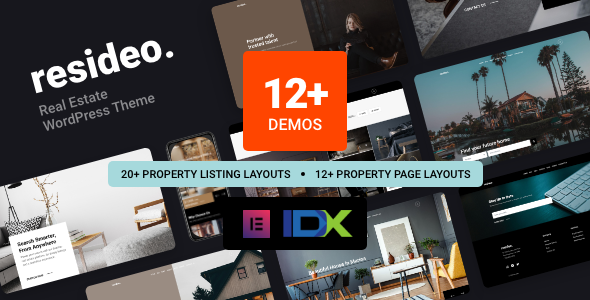
Stuck on your Resideo WordPress theme? Let's fix it.
No endless back-and-forth. Just send us the details and we'll get it done.
No obligation · Replies within 1 hour · Quote within 1 day
Setup · Customization · Bug fixes · WooCommerce integration
About Resideo WP Theme
Resideo is a WordPress theme built by pixel_prime, designed specifically for real estate agencies, property listings, and housing-related businesses. It ships with a dedicated property listing system, advanced search filters, and a clean layout that puts property details front and centre.
The theme integrates with popular real estate plugins and supports both rental and for-sale listings out of the box. Map integration, mortgage calculators, and agent profile pages are all included without needing additional plugins. Page speed is reasonably well-optimised at the template level, and the mobile experience holds up across standard property browsing use cases.
If you run a property agency or build sites for real estate clients, Resideo gives you a solid starting point without having to stitch together multiple plugins from scratch.
Get matched with a Resideo developer in under one day
Tell us about your Resideo project. Small fixes, Resideo theme customization, or a full website build, whatever you need, we've got it covered.
We'll connect you to the right Resideo developers, define the scope, and get everything 100% clear.
You'll get one estimate, hire your preferred developer, and start collaborating.
Resideo is not a theme you configure once and forget. Property sites require ongoing attention: new listing types, map API changes, plugin conflicts, and search filter adjustments come up regularly. Working with a developer who knows pixel_prime themes through Codeable means you get someone already familiar with how the theme is structured, rather than spending the first few hours reverse-engineering it. Faster turnaround, fewer back-and-forth cycles.
Pros
- Includes a dedicated property listing system without needing a separate plugin
- Advanced search filters with price range, property type, and location out of the box
- Google Maps integration built into listing templates
- Agent profile pages with contact forms and property association included
- Clean, property-focused design that works well for both agencies and individual agents
Cons
- Heavily tied to pixel_prime's own plugin, which can make switching themes difficult later
- Limited layout flexibility compared to page-builder-based real estate themes
- IDX and MLS integration requires additional plugins or custom development
- Customising the search filter logic requires PHP knowledge
- Documentation is functional but sparse on advanced use cases
Who is Resideo for?
Real Estate Agencies
Resideo is built for agencies managing multiple listings across different property types. The multi-agent support, searchable listing archive, and enquiry routing make it a practical fit for teams. Agencies with larger portfolios will benefit from pairing it with WP All Import for managing listings at scale.
Property Rental Businesses
Rental businesses need filtering by availability, price, and location. Resideo handles these out of the box. Adding a booking or enquiry workflow on top is straightforward with the right plugin. It works well for short-term and long-term rental models without significant restructuring of the theme.
Real Estate Agents
Solo agents get a lot of value from Resideo’s agent profile system and individual listing pages. The theme presents property details clearly without needing much customisation. It’s a credible, professional starting point for an independent agent who wants to own their own web presence rather than rely on portal listings.
Property Development Companies
Development companies launching new residential or commercial projects can use Resideo to showcase floor plans, pricing tiers, and availability. The listing structure maps well to development projects. A developer can add custom fields for unit types and stage availability without rebuilding the template from scratch.
Commercial Property Listings
Commercial property differs from residential in the data it needs to show: square footage, zoning, lease terms, and fit-out details. Resideo’s custom field system supports this, though some configuration is required. It works best when a developer has set up the custom fields and search filters to match commercial use cases specifically.

Customizing Resideo
Resideo works with the WordPress Customizer and includes its own options panel for controlling colours, typography, header styles, and listing layout variations. Most surface-level changes are manageable without touching code.
Beyond that, customisation gets more involved. Adjusting the property search logic, adding custom listing fields, or modifying the map display requires PHP and familiarity with how pixel_prime has structured the theme templates. A Resideo expert can save you significant time here, especially if you need custom post type adjustments or want to integrate a third-party CRM or IDX feed.
Child theme setup is recommended before making any template edits to protect your changes from being overwritten on updates.
Recommended plugins for Resideo
Resideo pairs well with plugins like WP All Import for bulk property uploads, Contact Form 7 or WPForms for enquiry forms, and WPML for multilingual listing sites. For performance, image optimisation and caching plugins make a measurable difference given the media-heavy nature of property pages. See our WordPress performance service if load times are an issue.
If SEO is a priority, structured data for property listings needs careful setup. Our WordPress SEO service covers schema markup and technical optimisation specific to listing-based sites.
Not sure which plugins to use? This WordPress plugins directory covers the most popular options with reviews and setup guides.
Resideo common issues
Resideo theme property search not working
Search issues in Resideo are usually caused by a plugin conflict, a missing rewrite rule after permalink changes, or a corrupted query parameter. Start by going to Settings > Permalinks and saving without changing anything to flush rewrite rules. If the issue persists, deactivate plugins one at a time to isolate the conflict. If you’ve added custom fields, verify they are registered correctly with the theme’s search configuration. For persistent issues, our WordPress bug fixing service can diagnose and resolve it quickly.
Resideo Google Maps not showing on listing pages
Map display failures in Resideo are almost always tied to the Google Maps API key. Since July 2018, Google requires a billing-enabled account for Maps to load. Check your API key is entered correctly in the theme settings, that the Maps JavaScript API and Geocoding API are both enabled in the Google Cloud Console, and that there are no domain restrictions blocking your site. Browser console errors will usually point to which specific Maps API call is failing.
Resideo theme update broke my listings
If a Resideo update has broken your listings, the most common cause is a template override in a child theme that no longer matches the updated parent template. Compare your child theme templates against the updated parent versions and merge any changes manually. If you were not using a child theme, some direct edits may have been overwritten. Going forward, always use a child theme and test updates on a staging environment before applying to production. Our WordPress maintenance service includes update management.
Resideo theme slow to load on property pages
Property pages in Resideo are image-heavy by nature, which hits performance hard without the right setup. Start with image optimisation using a plugin like ShortPixel or Imagify. Enable lazy loading for listing images. Add a caching layer with WP Rocket or similar. If the theme is loading scripts on every page rather than only on listing pages, a developer can conditionally dequeue unnecessary assets. See our WordPress performance service for a full audit.
Resideo FAQ
Resideo is not built around Elementor and does not officially support it as a page builder. Some pages can be edited with Elementor, but the core listing templates and property archive pages are custom theme templates. Trying to rebuild listing pages in Elementor typically causes conflicts with the theme’s query logic. Most Resideo customisation is better done through the theme’s own options or with direct template editing.
WPML works with Resideo for multilingual sites, but the setup requires some manual configuration. Listing post types and custom fields need to be registered as translatable in WPML’s settings. String translations for search labels and filter text need to be handled through WPML’s String Translation module. A developer familiar with both Resideo and WPML can get this set up cleanly without breaking the search functionality.
Migrating an existing property site to Resideo depends on where your current listing data lives. If listings are in a compatible plugin or structured as custom post types, WP All Import can handle the data transfer. Design migration is a separate task. Our WordPress migration service can assess your current setup and map out the safest approach before any work starts.
Resideo does not include native IDX or MLS integration. These require a third-party IDX plugin such as iHomeFinder, Showcase IDX, or DSIDXpress, which then feed listing data into the site. The integration complexity varies depending on which IDX provider you use and how closely you want the listings to match Resideo’s native listing template style.
Resideo developer costs vary based on what you need. Small fixes or configuration tasks typically run a few hundred dollars. A full site build with custom listing fields, search filters, and design adjustments will cost more. The best way to get an accurate number is to describe your project and request a free estimate. You’ll get a clear scope before committing to anything.
Hire a Resideo Expert Developer
Whether you need a full Resideo site built from scratch, custom listing fields added, or a persistent bug fixed, our vetted WordPress developers can help. Work is scoped before anything starts, so you know exactly what you’re getting. Get a free estimate with no obligation to hire. Projects are matched within 24 hours through Codeable’s developer network.
You'll need a free Codeable account so developers can ask questions and send their quotes.