Limme WordPress Theme
by like-themes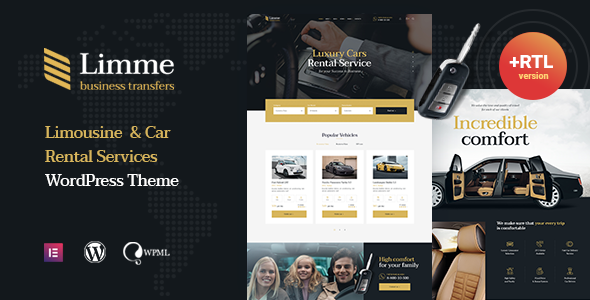
Stuck on your Limme WordPress theme? Let's fix it.
No endless back-and-forth. Just send us the details and we'll get it done.
No obligation · Replies within 1 hour · Quote within 1 day
Setup · Customization · Bug fixes · WooCommerce integration
About Limme WP Theme
Limme is a clean, minimal WordPress theme built by like-themes. It targets creative professionals, freelancers, and small agencies who want a polished portfolio or business site without heavy page-builder dependencies. The design leans on whitespace, sharp typography, and a grid-based layout system that keeps content front and centre.
Like-themes built Limme with a focus on speed and simplicity. The theme ships with a handful of pre-built demos, Elementor compatibility, and WooCommerce support. It registers custom post types for portfolio work and testimonials, which keeps your content structured and reusable. The options panel is straightforward — header styles, colour controls, and font pickers — without burying you in settings you will never touch.
If you want a lightweight, visually refined starting point for a creative or professional site, Limme is worth a close look.
Get matched with a Limme developer in under one day
Tell us about your Limme project. Small fixes, Limme theme customization, or a full website build, whatever you need, we've got it covered.
We'll connect you to the right Limme developers, define the scope, and get everything 100% clear.
You'll get one estimate, hire your preferred developer, and start collaborating.
Limme looks straightforward until you need it to do something specific. Custom layouts, portfolio logic, WooCommerce styling, and plugin conflicts all require someone who knows WordPress at a code level. The developers at FoxyConcept work through Codeable, a vetted platform where every developer is screened before taking client work. You get a qualified WordPress specialist, not a generalist. Work is scoped clearly, estimates are free, and you are never locked in before you agree to anything.
Pros
- Minimal, well-structured codebase that loads fast on shared hosting
- Built-in portfolio custom post type with filterable grid out of the box
- Elementor compatible without requiring a page builder to function
- WooCommerce support included with basic shop styling already handled
- Clean demo designs that are quick to import and start working from
Cons
- Limited built-in header layout options compared to more feature-heavy themes
- Customisation depth requires CSS or PHP knowledge beyond the options panel
- Like-themes support response times can be slow depending on your licence tier
- Demo content imports can overwrite existing settings if not handled carefully
- Fewer third-party tutorials or community resources than larger theme brands
Who is Limme for?
Freelance Photographer Portfolio
Limme’s full-width image support and clean grid layout make it a practical choice for photographers. The portfolio post type handles gallery organisation without extra plugins. A developer can extend it with lightbox integration, client-specific password-protected galleries, or a booking form tied to your availability calendar.
Creative Agency Website
Agencies need a site that looks sharp and loads quickly. Limme’s whitespace-driven design keeps the focus on work samples. Custom service pages, team member profiles, and case study templates can be built on top of the existing theme structure without rebuilding from scratch.
Graphic Designer Portfolio
For a graphic designer, the portfolio grid and typography controls in Limme give you a clean canvas. Work types can be separated using Limme’s built-in category filtering. A developer can add project detail pages with custom field layouts showing deliverables, tools used, and client testimonials.
Small Product Shop
Limme’s WooCommerce compatibility makes it usable for small shops selling prints, digital downloads, or physical products. The base styling is clean but may need adjustment for product pages and checkout. A developer can align the shop design with the rest of the site and handle any payment gateway integration.
Consultant or Coach Website
Consultants and coaches need clear service pages, a strong about section, and a contact or booking flow. Limme’s layout handles all of this with modest setup. Adding a booking plugin, testimonial display, or lead magnet landing page on top of the theme is straightforward with a developer’s help.

Customizing Limme
Out of the box, Limme covers the basics well. Where you might need extra help is when the defaults stop fitting your exact requirements. Custom header layouts, non-standard portfolio filtering, WooCommerce styling tweaks, and third-party plugin integration all take time to get right inside Limme’s structure.
A Limme expert can work directly with the theme’s template hierarchy, child theme setup, and custom CSS without breaking updates or creating technical debt. Common customization requests include building additional page templates, adjusting the portfolio grid behaviour, modifying the demo import content to match real branding, and extending the built-in options with custom fields or ACF integration.
Getting this done properly from the start saves hours of troubleshooting later. A developer familiar with like-themes products will move faster and produce cleaner results than trial-and-error DIY edits.
Recommended plugins for Limme
Limme works well with Elementor for drag-and-drop layout control, WooCommerce for selling products or services, and WPForms or Gravity Forms for lead capture. If you need stronger filtering on your portfolio, FacetWP or JetSmartFilters pair cleanly with Limme’s post type structure.
For site speed, combining Limme with a caching plugin and optimised hosting makes a noticeable difference. You can review dedicated WordPress performance optimisation options if load time is a priority. If organic traffic matters, pairing the theme with Yoast or Rank Math and a proper WordPress SEO strategy will get you further than design alone.
Not sure which plugins to use? This WordPress plugins directory covers the most popular options with reviews and setup guides.
Limme common issues
Limme theme portfolio grid not filtering correctly
Portfolio filtering issues in Limme usually come from a missing or incorrectly enqueued JavaScript file, a category taxonomy mismatch, or a caching plugin serving stale output. Check the browser console for JS errors first. If the filter buttons appear but nothing changes on click, the issue is almost always a script conflict with another plugin. Deactivate plugins one by one to isolate it. If you need a reliable fix without the debugging process, the WordPress bug fixing service can resolve it cleanly.
Limme theme header not showing on mobile
Mobile header problems in Limme are typically caused by a custom CSS conflict, a child theme override that did not account for responsive breakpoints, or a third-party header plugin interfering with Limme’s built-in menu output. Open browser developer tools, switch to a mobile viewport, and inspect the header element for overriding styles. If you recently updated the theme or a plugin and this broke, a rollback or targeted CSS fix is usually enough to restore it.
Limme demo import not working or incomplete
Failed or incomplete demo imports in Limme are common when server memory limits or execution time limits are too low. The demo import process for most like-themes products tries to pull images and content in a single request. Raise max_execution_time and memory_limit in your php.ini or wp-config.php. If you are on managed hosting, contact your host to increase these temporarily. Running the import again after adjusting these values usually resolves the issue completely.
Limme WooCommerce product page layout broken
WooCommerce layout breaks in Limme often happen after a WooCommerce major version update changes template file structures that the theme has not caught up with. Check if Limme’s WooCommerce template files are outdated in WooCommerce > Status > Tools > Template Overrides. Outdated templates need updating manually in a child theme. If you are not comfortable editing template files, a WordPress bug fix from a developer will sort this without risk to your live site.
Limme FAQ
Yes, Limme is compatible with Elementor. You can use Elementor’s drag-and-drop editor to build pages while the theme handles global styles, the portfolio post type, and the overall site structure. Some users run the theme with Elementor only for specific pages and use standard WordPress blocks elsewhere. Both approaches work without conflicts in most setups.
Limme includes WooCommerce support with basic shop, product, and cart page styling. It is suitable for small product catalogues. For larger shops with complex product types, subscriptions, or custom checkout flows, you may need additional development work to get the design and functionality to match your requirements fully.
Create a new folder in wp-content/themes/ named limme-child. Inside it, add a style.css with the correct Template: limme header comment, and a functions.php that enqueues the parent stylesheet. Activate the child theme from the WordPress admin. All your custom CSS and template overrides go in the child theme, keeping them safe from theme updates.
Yes. A site migration moves all files and the database, which includes your Limme settings, customiser choices, and content. Your theme customisations are stored in the database, so they travel with the migration. Make sure the migration process exports and imports correctly. For a clean, risk-free move, the WordPress migration service handles this without downtime or data loss.
Like-themes continues to release updates for Limme, though the update frequency is moderate compared to larger theme marketplaces. Check the theme’s changelog on ThemeForest or the like-themes website for the latest version. Keeping the theme updated matters for WordPress compatibility and security. If you are not sure when you last updated, check Appearance > Themes in your WordPress admin.
Hire a Limme Developer
If your Limme site needs custom development, accurate scoping matters before any work starts. Post your project through FoxyConcept and get matched with a developer who has hands-on WordPress and like-themes experience. No guesswork, no commitment until you approve the estimate. Get a free estimate today and know exactly what the work will cost before it begins.
You'll need a free Codeable account so developers can ask questions and send their quotes.