Howes WordPress Theme
by thememount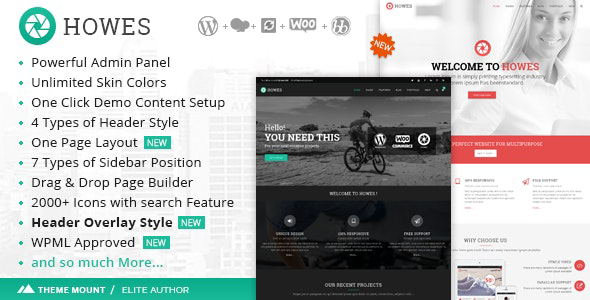
Stuck on your Howes WordPress theme? Let's fix it.
No endless back-and-forth. Just send us the details and we'll get it done.
No obligation · Replies within 1 hour · Quote within 1 day
Setup · Customization · Bug fixes · WooCommerce integration
About Howes WP Theme
Howes is a WordPress theme built by ThemeMount, designed for creative agencies, freelancers, and portfolio-focused businesses. It ships with a clean, minimal aesthetic and a flexible page builder-compatible structure that makes it easy to build polished sites without touching code.
The theme includes multiple demo layouts, a header builder, custom widget areas, and WooCommerce support out of the box. Typography controls are detailed enough for brand-conscious clients who care about presentation. Performance is reasonable on a clean install, and the codebase follows standard WordPress conventions, making it straightforward for developers to extend.
ThemeMount maintains Howes with regular updates, keeping it compatible with current versions of WordPress and popular plugins. It suits small business owners and creatives who want a professional-looking site without a large development budget, but still need room to grow.
Get matched with a Howes developer in under one day
Tell us about your Howes project. Small fixes, Howes theme customization, or a full website build, whatever you need, we've got it covered.
We'll connect you to the right Howes developers, define the scope, and get everything 100% clear.
You'll get one estimate, hire your preferred developer, and start collaborating.
Howes is approachable, but getting it production-ready takes more than clicking through the Customizer. Whether you need a custom layout, plugin conflict resolved, or a full build from a demo, working with a vetted developer saves time and avoids mistakes that compound later.
FoxyConcept connects you with experienced Howes developers through Codeable, a platform of pre-screened WordPress professionals. You get a free estimate before any work begins and no obligation to proceed. Every project is backed by a satisfaction guarantee.
Pros
- Clean minimal design that works well for portfolio and agency sites without heavy customization
- Built-in WooCommerce support means adding a shop does not require a separate starter theme
- Header builder gives layout flexibility without needing a separate plugin
- Multiple demo layouts included so you can import a starting point close to your target design
- ThemeMount provides regular updates keeping the theme compatible with current WordPress versions
Cons
- Advanced layout changes require CSS or child theme work, the Customizer has limits
- Demo content import can be slow and occasionally leaves placeholder images that need manual replacement
- Portfolio functionality is basic compared to dedicated portfolio plugins
- Limited documentation for developers wanting to extend the theme programmatically
- Some bundled plugins are premium and require separate licenses to unlock full features
Who is Howes for?
Creative Agency
Howes suits agency sites that need a polished, minimal look and room to showcase client work. The portfolio grid and header builder give agencies enough flexibility to present services and case studies without a custom build. A developer can extend the default setup with custom project types and filtered gallery views.
Freelance Designer Portfolio
Freelancers need a site that loads fast, looks sharp, and puts work front and center. Howes delivers that on a clean install. Add a contact form, a testimonials section, and a custom color scheme and you have a complete freelance presence without overbuilding. A Howes developer can set this up quickly from a demo layout.
Photography Studio
Photography studios need large images to load without dragging page speed down. Howes handles full-width imagery well and supports lazy loading when paired with the right performance plugins. A developer can configure gallery templates and lightbox behavior to match how the studio wants clients to browse work.
Small Business Brochure Site
Small businesses that need a clean, credible online presence without e-commerce complexity are a natural fit for Howes. Services pages, a contact form, and a homepage with clear calls to action can be built quickly from the demo. A developer can ensure the site is accessible and loads well on mobile.
Digital Product Shop
Howes includes WooCommerce support, making it viable for shops selling digital products like templates, presets, or guides. Product pages render cleanly within the theme’s aesthetic. A developer can customize checkout flow, add license key delivery plugins, and configure download restrictions without switching themes.

Customizing Howes
Howes gives you a solid starting point, but most clients need more than default settings. Customizing the header layout, adjusting the portfolio grid, or wiring up custom post types to match a specific workflow takes real WordPress knowledge.
A Howes expert can help you move beyond the demo content and build something that actually fits your brand. That means custom CSS that does not break on updates, child theme setup so your changes survive core upgrades, and proper integration of third-party plugins like contact form builders or booking systems.
If the built-in Customizer options are not enough, a developer can extend Howes with custom template files, hook-based modifications, or a lightweight ACF setup to give editors more control over content without touching code.
Recommended plugins for Howes
Howes works cleanly with most major WordPress plugins. WooCommerce integration is built in, so adding a shop requires minimal configuration. Elementor and WPBakery are compatible for clients who want visual page editing beyond the default layout options.
For sites that need better load times, pairing Howes with a caching plugin and image optimization tool makes a measurable difference. A developer can also help with WordPress performance tuning specific to the theme’s asset structure. If organic traffic matters, combining Howes with a proper WordPress SEO setup ensures the theme’s output is structured correctly for search engines.
Not sure which plugins to use? This WordPress plugins directory covers the most popular options with reviews and setup guides.
Howes common issues
Howes theme header not displaying correctly on mobile
Mobile header issues in Howes are usually caused by a CSS conflict with a plugin or a custom header layout that was not tested at smaller breakpoints. Start by disabling recently added plugins to isolate the conflict. If the issue persists, check the header builder settings and confirm the mobile menu toggle is assigned correctly. A developer can audit the theme’s header output and apply targeted CSS fixes through a child theme to avoid the problem recurring after updates.
Howes demo content import failing or incomplete
Demo import failures in Howes typically happen due to server timeout limits, insufficient PHP memory, or missing required plugins. Increase the PHP memory limit in your hosting settings and ensure all required plugins are installed before importing. If the import completes but content is missing, try importing XML and widgets separately. Persistent issues are worth handing to a developer who can run the import via WP CLI and troubleshoot server-level constraints directly.
Howes portfolio grid not showing all posts
When the Howes portfolio grid skips posts, the usual causes are incorrect post type assignment, a category filter misconfiguration, or a pagination setting limiting the number of displayed items. Check the portfolio widget or shortcode settings for any category restrictions. Also verify that the posts are published and assigned to the right portfolio category. If the grid layout itself is broken, a CSS or JavaScript conflict with another plugin is likely the cause. Our WordPress bug fixing service can resolve this quickly.
Howes theme slow loading after plugin install
Speed drops after a plugin install with Howes are most often caused by unoptimized scripts loading on every page or plugin assets conflicting with the theme’s own JavaScript. Use a tool like Query Monitor to identify which plugin is adding slow queries or blocking scripts. A caching plugin configured correctly for Howes will help, but a developer may need to conditionally load plugin scripts only on relevant pages. See our WordPress performance service for a structured approach.
Howes FAQ
Yes, Howes is compatible with Elementor. The theme’s page templates work alongside Elementor’s canvas and full-width layouts. Some styling conflicts can appear between Elementor sections and Howes’s own layout classes, particularly around spacing and typography. A developer can resolve these with targeted CSS in a child theme so both systems work cleanly together without overriding each other.
Howes includes built-in WooCommerce support. Shop pages, product templates, and cart and checkout pages inherit the theme’s styling with minimal setup. Default WooCommerce styles are present, though most clients want custom adjustments to product grids and checkout design. A developer can tailor these to match the rest of the site without touching core theme files.
Creating a child theme for Howes follows the standard WordPress process. Create a new folder in your themes directory, add a style.css file with the correct template header pointing to Howes as the parent, and enqueue the parent stylesheet via functions.php. Any customizations go into the child theme so they survive Howes updates. If you are not comfortable with this setup, a developer can handle it in under an hour.
Migrating an existing site to Howes involves exporting your content, importing it into the new theme environment, and then rebuilding your layouts to match Howes templates. Content migrates cleanly but design elements tied to a previous theme or page builder may need rebuilding. Our WordPress migration service covers this end to end, including redirects and post-migration checks.
ThemeMount has maintained Howes with updates to keep pace with WordPress core releases. As of recent checks, the theme receives periodic updates. Before committing to Howes for a new project, verify the last update date on ThemeForest and check the support forum activity. Active support threads and recent changelogs are good indicators that the theme is still being maintained properly.
Hire a Howes WordPress Expert
Need help with your Howes site? Whether it is a custom layout, a functionality problem, or a full build from scratch, a vetted developer can handle it. FoxyConcept works through Codeable, so you only work with professionals who have passed a rigorous vetting process.
Post your project, get matched within 24 hours, and receive a free estimate with no pressure to hire. Get your free estimate today and see what a Howes expert can do for your site.
You'll need a free Codeable account so developers can ask questions and send their quotes.