Journo WordPress Theme
by Edge-Themes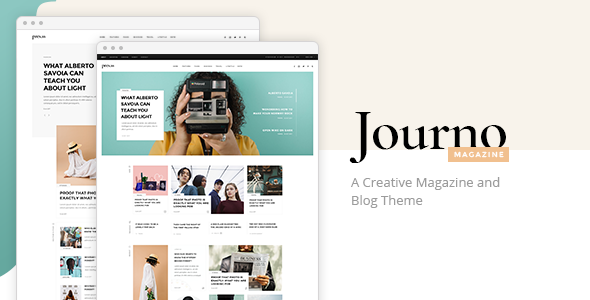
Stuck on your Journo WordPress theme? Let's fix it.
No endless back-and-forth. Just send us the details and we'll get it done.
No obligation · Replies within 1 hour · Quote within 1 day
Setup · Customization · Bug fixes · WooCommerce integration
About Journo WP Theme
Journo is a WordPress theme built by Edge-Themes, designed specifically for online magazines, news portals, and editorial publications. It ships with a large collection of pre-built homepage layouts, giving editors and publishers a strong visual starting point without touching code.
The theme uses Edge-Themes’ own page builder alongside Elementor compatibility, making layout construction reasonably accessible. It includes post formats for video, audio, gallery, and standard articles, which suits multi-format editorial teams.
Typography options are plentiful, and the built-in ad placement zones make it practical for monetised publications. Journo is built on a well-tested codebase that Edge-Themes has refined across multiple themes, so it carries a level of structural reliability. That said, the sheer number of options can make initial setup time-consuming without guidance.
Get matched with a Journo developer in under one day
Tell us about your Journo project. Small fixes, Journo theme customization, or a full website build, whatever you need, we've got it covered.
We'll connect you to the right Journo developers, define the scope, and get everything 100% clear.
You'll get one estimate, hire your preferred developer, and start collaborating.
Journo is feature-rich but not quick to configure correctly. The Edge-Themes options panel, combined with post format settings, ad zones, and layout variations, takes time to get right. A developer who knows the theme well will avoid common misconfigurations from the start.
Through Codeable, you get access to vetted WordPress developers with hands-on experience in editorial and magazine themes like Journo. You post your project, get a clear estimate within 24 hours, and only proceed if you want to. No obligation, no risk.
Pros
- Ships with 20+ pre-built homepage demos covering different editorial styles
- Built-in ad placement zones make monetisation setup straightforward
- Supports multiple post formats including video, audio, gallery, and standard articles
- Category colour coding and mega menus help organise large content archives
- Edge-Themes has a consistent update history and active support forum
Cons
- The options panel is large and can overwhelm first-time users of Edge-Themes products
- Demo import does not always reproduce exactly what you see in the preview
- Out-of-the-box page speed scores are not strong without performance tuning
- Heavy reliance on Edge-Themes' own shortcodes creates some theme lock-in
- Support response times can be slow during high-volume periods
Who is Journo for?
Online News Portals
Journo handles high article volumes well. Its category-based homepage sections, breaking news ticker, and multiple listing layouts make it a practical choice for news portals publishing multiple stories per day. The built-in ad zones also suit publications that rely on display advertising for revenue.
Lifestyle and Culture Magazines
The full-width featured layouts, large typography options, and clean grid structures work well for lifestyle and culture titles where visual presentation matters as much as the content itself. Gallery and video post formats add variety to content-rich sections like fashion, food, or travel.
Sports Publications
Sports sites benefit from Journo’s ability to separate content by category with distinct colours and layouts. Live score widgets and match report formats can be added through third-party plugins. The theme handles high-traffic traffic spikes reasonably well when performance is properly configured.
Tech and Gaming Blogs
Tech and gaming publications need flexible layouts for reviews, news, and opinion pieces. Journo supports star rating displays and comparison-style content well. The sidebar and widget areas give room for affiliate links and product placements without disrupting the editorial flow.
Independent Political Journalism
For independent journalists and political media outlets, Journo provides a credible, editorial feel without requiring a large budget. Author pages, opinion columns, and newsletter integration all work within the theme’s existing feature set, helping smaller teams build professional-looking publications.

Customizing Journo
Journo gives you a lot of control over layout, typography, colour schemes, and widget areas. But the volume of settings inside the Edge-Themes options panel can slow things down if you are not already familiar with how the framework works.
Custom post templates, category colour coding, sticky sidebars, and header styles all need careful configuration to get right. A Journo expert can cut through that setup time significantly, building a publication layout that matches your editorial structure from day one.
Beyond initial setup, customising things like breaking news tickers, category mega menus, or custom ad zones often requires child theme work or targeted CSS. Hiring a Journo expert means those adjustments are done cleanly and won’t break on the next theme update.
Recommended plugins for Journo
Journo works well with WooCommerce if you want to add a subscription or merchandise store to your publication. WPBakery and Elementor both integrate with the theme, though stacking multiple page builders can create bloat worth managing carefully.
For performance, caching plugins and image optimisation tools are important given how image-heavy magazine layouts tend to get. See our WordPress performance service for help there.
On the SEO side, Journo pairs well with Yoast or Rank Math, but structured data for articles and authors often needs manual setup. Our WordPress SEO service covers that in detail.
Not sure which plugins to use? This WordPress plugins directory covers the most popular options with reviews and setup guides.
Journo common issues
Journo theme demo import not working correctly
Demo import failures in Journo are often caused by server timeout limits or memory restrictions. The XML file and required plugins need to import in a specific order. Increase your PHP memory limit to at least 256MB and max execution time to 300 seconds before attempting the import. If issues persist, importing content in stages or manually recreating the homepage using the saved layout files usually resolves it. A developer can also do this cleanly using WP CLI.
Journo WordPress theme slow page load speed
Journo loads a significant number of scripts and styles by default. Start by enabling CSS and JS minification through a caching plugin like WP Rocket or LiteSpeed Cache. Defer non-critical scripts, lazy load images, and consider a CDN for static assets. Edge-Themes’ custom fonts and slider scripts are common culprits. Disabling unused post format scripts through the theme options panel also helps. See our WordPress performance service for a full audit.
Journo theme layout breaking on mobile
Mobile layout issues in Journo usually come from custom CSS overriding the theme’s responsive rules, or from fixed-width elements set inside the page builder. Check for hardcoded pixel widths in your custom CSS and replace them with percentages or max-width values. Also verify that your viewport meta tag is present and correct. If you are using WPBakery or Elementor alongside the Edge-Themes builder, conflicting responsive settings between tools can cause display problems on smaller screens.
Journo theme not compatible with plugin after update
Plugin compatibility issues after a Journo update are usually linked to JavaScript conflicts or deprecated shortcode functions. Disable plugins one by one to isolate the conflict. Check the Edge-Themes changelog for notes on removed or changed functions. If the issue is with a contact form, SEO plugin, or WooCommerce, there is often a settings reset needed on the plugin side after major theme updates. Our WordPress bug fixing service can diagnose and resolve this quickly.
Journo FAQ
Journo produces clean HTML output and works with SEO plugins like Yoast and Rank Math. However, article schema markup, author structured data, and breadcrumb configuration usually need manual setup. Out of the box, it is not fully optimised. Pairing it with an SEO plugin and doing a basic technical audit will get you to a solid foundation for editorial rankings.
Yes, Journo is compatible with Elementor. Edge-Themes also has its own page builder built into the theme. Running both simultaneously is possible but can increase page weight and create occasional layout conflicts. Most developers recommend choosing one builder and sticking to it for consistency and performance. Elementor is the more flexible long-term choice for most projects.
You can configure Journo without writing code, but the options panel is extensive and some settings are not clearly labelled. Building a clean publication layout from scratch takes patience. Using a pre-built demo as a starting point helps considerably. For anything beyond basic customisation, working with a developer will save significant time and avoid configuration mistakes that are difficult to undo later.
The breaking news ticker in Journo is configured through the Edge-Themes options panel under the header settings section. You can assign a specific category or tag to pull posts into the ticker automatically. Adjust scroll speed, label text, and visibility per device from the same settings area. If the ticker does not appear after enabling it, clearing your caching plugin’s cache usually resolves it immediately.
Yes, switching your existing site to Journo is possible. Your content, users, and settings remain in WordPress throughout the process. The main work involves rebuilding your homepage layout and page templates using Journo’s tools. Widgets and menus will need reconfiguring. Our WordPress migration service includes theme transition support if you want that handled professionally.
Hire a Journo WordPress Developer
Whether you need a full Journo setup, layout customisation, or ongoing editorial site support, we can match you with the right developer. Work is delivered through Codeable, so you get a vetted professional, a transparent estimate, and no pressure to commit until you are ready.
Get a free estimate and describe your project. You will hear back within 24 hours with a clear plan and price.
You'll need a free Codeable account so developers can ask questions and send their quotes.